goed alternatief voor gewone muis
"Ivm klachten aan schouder/arm opnieuw moustrapper aangeschaft waardoor klachten verminderen en de schouder en arm een stuk minder worden belast dan bij een gewone muis."



Measure your hand as shown in the image and choose your size using the table below:
| Size | Width | Length |
|---|---|---|
| Any hand size | suitable | suitable |
It's a bit like explaining Brexit on the children's news. Making fairly complicated material accessible and understandable. The Advance does a bit of that too. Quite an advanced device, but you'll get the hang of it straight away.
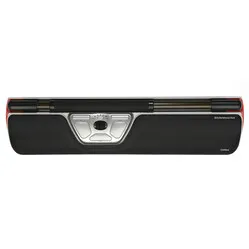
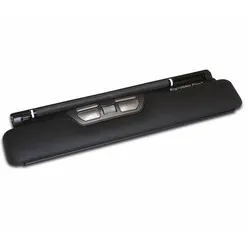
The centric Advance is perhaps Mousetrapper's most popular model. It works comfortably, has many extra (programmable) buttons and an extensive touchpad which I will come back to. Because it sits directly in front of you, between you and your keyboard, you maintain a compact working posture. Your arms operate the mouse and keyboard within shoulder width, which benefits relaxation, especially in the shoulders.
The difference between the 2.0 and the 2.0+ lies in the wrist rests. With the 2.0, these are made of polyester, which can only be somewhat cleaned with a damp cloth. The 2.0+ features leather wrist rests. These are easy to clean with disinfectants.
You control your cursor with the 'mat' on the trackpad. The mat is about 8 x 5 cm and can be operated with 1 to 3 fingers simultaneously. This gives you a lot of control and precision. It can be rolled vertically and slid horizontally. You have no limitations in doing so; the device will still move the cursor even if you are at the far left or far right of the mat.
With 2000 DPI (dots per inch), your cursor flies across your screen at lightning speed. The sensitivity can also be lowered, should you wish to 'train' quietly towards that light speed. You can gradually increase the speed.
The mouse has 6 buttons. In addition to the usual left and right mouse buttons, there are also buttons for double-clicking, copying, pasting, scrolling up and down. Scrolling can also be done with the mat, on the right side.
Using the Mousetrapper driver, MTkeys, you can change button functions or turn scrolling with the mat on and off. Even browsing forwards and backwards in folders and within browsers is possible.
The Advance is only truly optimally used when you put both hands to work simultaneously. I myself (Tim) often have to work precisely. In the back office of our webshop, but also with Photoshop. The left-click function in the Mousetrapper's mat is somewhat less precise because pressing it can accidentally move the cursor.
With the Mousetrapper driver, I have replaced the double-click with a left-click, allowing me to mouse with my right hand and click with my left. If that gets tiresome, I could also place my beloved click on the right, so I mouse with my left hand and click with my right. As you can see, the strain on your shoulders can be nicely distributed, and you can choose which arm you give the
| Item number | ERGO-MTADVP |
| Manufacturer's item number | MT122 |
| Brand | Mousetrapper® |
| Warranty | 2 years |
| Type of guarantee | Ergowerken free warranty return service |
| Colour | Black with white accents |
| Ergonomic design | |
| Management | Trackpad |
| Left- or right-handed | This mouse can be operated with either hand. |
| Hand length | Suitable for any arm length |
| Hand width | Suitable for any hand size |
| Operation | Trackpad and buttons |
| Included receiver | not applicable |
| Bluetooth | not applicable |
| USB port | |
| USB version | 2.0/3.0 |
| Number of buttons | 6 programmable buttons |
| On/off button | not applicable |
| Adjustable buttons | Yes, using the free MTkeys® software, which can be downloaded. |
| Scroll wheel | |
| Trackball | |
| Adjustable sensitivity | |
| Sensitivity | 2000 dots per inch |
| Type of power supply | Wire |
| Battery type | not applicable |
| Rechargeable | not applicable |
| Minimum system requirements | Mac OS X or Windows XP and higher |
| Plug and play | |
| Dimensions length x width x height | 110 x 480 x 20 millimetres |
| Product weight | 670 grams |
Customers who write a review enter a prize draw for a voucher. We pick one winner and publish all reviews, including critical ones.