Stel hier je vraag over dit product
Optapad wired touchpad


Product description of Optapad wired touchpad
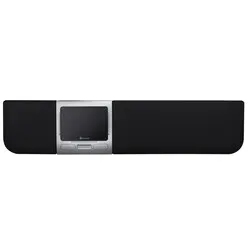
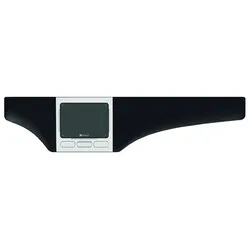
Optapad Wired Touchpad
Which size fits your hand?
Measure your hand as shown in the image and choose your size using the table below:
| Size | Width | Length |
|---|---|---|
| Any hand size | suitable | suitable |

Description
Optapad gives you wings
“Hey, that's funny. Is that one of those, uh, laptop mice, but with wrist rests?” Yes, almost. A Dacia and a Ferrari are both just 'cars', aren't they? This one, like a Ferrari, is at the top of its game.
Why the Optapad?
The Optapad is a versatile trackpad. Developed in Sweden, this product sits directly in front of you, between you and your keyboard. Its central position promotes a relaxed working posture, as your most important tools (keyboard and mouse) are kept within shoulder width. Your shoulders, in particular, will thank you.
This touchpad is the thinnest on the market (Front 9.7 mm, back 17.2 mm) and weighs only 565 grams. This makes it ergonomic, but also a very strong appearance from a design perspective. It contributes to a modern and stylish look for your workspace and is definitely worth seeing.
You can use the Optapad in many ways. This makes it suitable for both administrative and graphic work. The possibilities offered by the trackpad can make any type of work easier and faster. From cutting and pasting to even entering custom button combinations as hotkeys, it provides convenience for users at every level.
The Optapad prefers not to be compared to a laptop trackpad. It offers you so much more. For example, the touchpad is entirely made of glass. Glass feels very comfortable and allows fingers to glide much more smoothly over the surface.
The wrist rests on the left and right offer extra support while typing and reduce the height difference between your desk and your keyboard. They are also replaceable, which makes the product much more durable.
The Optapad works with ‘zForce optical multisensing’ technology. This means it detects shadows and reflections created by your hands. This makes the Optapad very accurate. Styluses and other objects at least 7 mm thick can also be used thanks to this technology.
As soon as you touch the Optapad, its LEDs in the edges light up. A nice gimmick that can also be dimmed or turned off. What is very handy are the LEDs next to the touch keys. There is such a so-called touch key in each corner of the trackpad. You can assign all sorts of functions to these keys, including cut and paste. As soon as you hit the key, the LED lights up. If you don't always hit the key correctly - resulting in no illuminated LED - there is still the option to enlarge the key's surface.
The Optapad can also scroll horizontally and vertically with 1 finger. This special function is integrated into the side and bottom of the touchpad. Below the touchpad are 4 physical buttons. By default, these are the left mouse button, right mouse button, and scroll up and down. The touchpad also supports multi-finger touch. You can scroll, zoom, swipe, and call up the right-click function with 2 fingers.
This is what makes an ergonomic mouse so good
A major advantage of a central mouse like the Optapad is its ease of use. Your hands will find it quickly. Additionally, it can be operated with both hands simultaneously, allowing you to distribute the workload effectively. Click with the left, drag with the right. Or vice versa. You are completely free to choose. Thus, a trackpad is not only good for relaxing your shoulders, but also for your arms and hands.
Get the most out of it
As mentioned, the touch keys, the physical buttons below them, and the surface are customisable. These changes can be made in Optapad's clear proprietary software, which you can find on this page under 'downloads'. The software is available for both Mac OS and Windows. Optapad allows you to save your preferences in a profile. This ensures that you can always set up the Optapad exactly as you prefer with just one click.
We absolutely recommend using the Optapad driver. So much is possible that it's hard to imagine not wanting to use it. The touch and physical keys, in particular, are an asset for every task. You can program a predefined function into them, such as 'forward' or 'calculator', but even pre-programmed text snippets and key combinations are possible. For Photoshop on Windows, think of CTRL+T to select an object.
This product is good for
arm - shoulder
The Optapad touchpad provides relaxation for the arm and shoulder muscles. Because the touchpad is centrally located in front of you, you no longer need to reach for the mouse.
Pros and Cons
- Centrally placed
- Touchpad supports multi-touch
- Usable with both hands
- Programmable buttons
- Less easy to carry
Brief specifications
| Warranty | 2 years |
| Ergonomic design | |
| Usage | Left and right-handed |
| Number of buttons | 8 programmable buttons |
| Plug & Play | |
| view all specifications |
Product features
- Prevents RSI complaints
- Usable with both hands
- Touchpad with multi-touch technology
- Can be placed centrally in front of the body
- 8 programmable buttons
- Thin and modern design
- Environmentally friendly, made from recycled materials
- Wrist rest made of soft coated textile
- Easy to keep clean
- Promotes natural posture
- Plug & Play, works with Windows and Mac
- Free software to program buttons
- Cable length 150 cm
What's in the box?
- 1 x Optapad wired touchpad
- 1 x manual
Standard functions
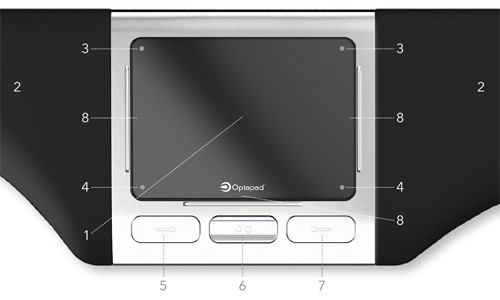
- Touchpad
- Wrist rest
- Left: Slow mode, Right: double-click
- Left: Copy, Right: Paste
- Left mouse button
- Scroll button
- Right mouse button
- Horizontal/vertical scrolling
Frequently asked questions
Specifications
| Item number | ERGO-OPTA |
| Manufacturer's item number | 161 102 |
| Brand | Optapad |
| Warranty | 2 years |
| Type of guarantee | Ergowerken free warranty return service |
| Colour | Silver grey with black wrist rests |
| Ergonomic design | |
| Management | Touchpad |
| Left- or right-handed | Can be used by both left- and right-handed people, and both at the same time |
| Hand length | Suitable for all hand sizes |
| Hand width | Suitable for all hand sizes |
| Operation | Buttons and touchpad |
| Included receiver | not applicable |
| Bluetooth | not applicable |
| USB port | |
| USB version | 2.0/3.0 |
| Number of buttons | 8 buttons |
| On/off button | not applicable |
| Adjustable buttons | Yes, using the free software provided |
| Scroll wheel | Scroll button instead of scroll wheel |
| Trackball | |
| Adjustable sensitivity | |
| Sensitivity | The speed at which you can move your finger |
| Type of power supply | Wire |
| Battery type | not applicable |
| Rechargeable | not applicable |
| Minimum system requirements | Mac OS X and Windows XP or higher |
| Plug and play | |
| Dimensions length x width x height | 480 x 110 x 17 millimetres |
| Product weight | 565 grams |
Reviews Optapad wired touchpad
Customers who write a review enter a prize draw for a voucher. We pick one winner and publish all reviews, including critical ones.