Stel hier je vraag over dit product
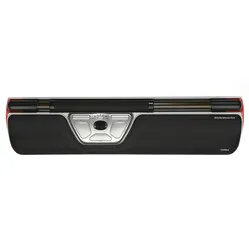
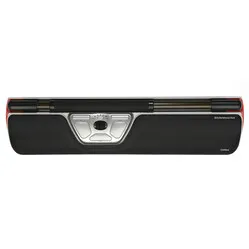
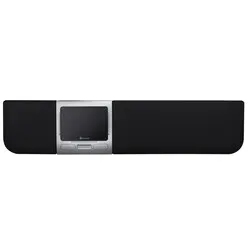
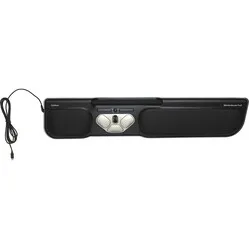
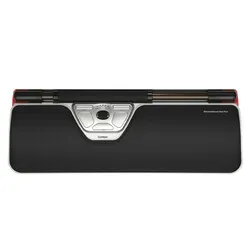
Contour Design Rollermouse Red Plus wireless trackpad


Product description of Contour Design Rollermouse Red Plus wireless trackpad
Which size fits your hand?
Measure your hand as shown in the image and choose your size using the table below:
| Size | Width | Length |
|---|---|---|
| Any hand size | suitable | suitable |

Ode to the wireless Red Plus
Wireless flagship
HMS Rollermouse Red Plus wireless has had its christening and is ready to set sail. This modern piece of technology from Sweden will soon reinforce the Netherlands ergonomically. Its construction makes it stable, ruling out any wandering across the desk. Its capacity is a crew of 2 hands, more than enough to get things done in the right pain-free conditions.
Why the Red Plus wireless?
Not a familiar sight in the office, while it can actually do so much. Even compared to other ergonomic mice, it comes out ahead on a number of points.
Shoulder love
Its central position is one of them. The ability to operate the Red Plus wireless with 2 hands ties in nicely with that. The Rollermouse sits between you and your keyboard, so you can work in a relaxed way without having to reach for your mouse. Your shoulders in particular will thank you for it.
Strong and versatile
To start with, the wireless Red Plus can do everything a normal mouse can. Clicking, scrolling, dragging, it's child's play for it. You move the cursor on the screen using the bar at the top of the Rollermouse. You can roll and slide it to get the cursor anywhere. It has no limitation in that. Sensors on the side register when you move the bar to the far left or far right. The cursor will keep moving regardless. Thanks to the extra buttons present, you can also call up all sorts of handy functions in a flash, such as copy and paste.
The Red Plus distinguishes itself from other Rollermice in 2 ways. The thick textured bar provides plenty of grip. In addition, the long palm rest gives extra comfort while mousing.
Whether or not to select with the bar
The previously mechanical click is gone on the wireless Rollermouse Red. With the virtual click in its place, you get more precision and personalisation options. You can adjust the pressure the bar needs for a click and even change the volume for the accompanying click. The bar in the Rollermouse is precisely tracked by 2 lasers, which register the sliding, rolling and clicking. Partly because of this, it can be operated with the smallest movement.
The cursor sensitivity of the Plus wireless is adjustable, with as many as 10 settings. These range from 600 to 2800 DPI. So you can crawl and fly with it, depending on your tasks and wishes. Thanks to the LEDs on the Rollermouse, it is always immediately clear which setting you are on.
Don't lose your receiver
The wireless Red Plus can be used wirelessly up to 8 metres. If you decide to take it with you sometime, know that you can store the nano receiver in the bottom of the Rollermouse. That way you'll never lose that little thing. On the bottom you'll also find an on/off button to turn the trackpad off and on.
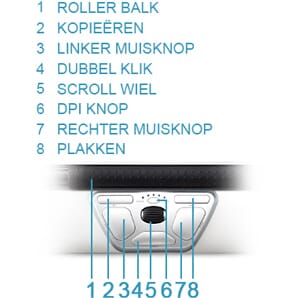
You can find the default functions of all the buttons in the image alongside. Personalising the functions is recommended; you can read more about this under the heading 'don't miss this either'.
Battery matters
The Red Plus has a rechargeable integrated battery. With 6 hours of charging, it can be used for up to 3 months. You charge it on your computer with the included cable, even while working. You can even check the battery status while you work. Press the DPI button once. First the Rollermouse will indicate which DPI setting it is on, then it shows the battery level. You can read more about this in the manual.
This is what makes a centred mouse so good
For your posture and health, this wireless trackpad does 2 things excellently. #1: it centres your workspace and lets you mouse within shoulder width. Your shoulders will be able to find more relaxation than when operating a mouse outside shoulder width. #2: You can share the load. 2 arms can handle a long day's work better than 1 arm. That sharing will definitely do you good.
The transition from keyboard - mouse - keyboard - mouse, all day long, is lightning fast. Your mouse and keyboard connect nicely to each other with the Rollermouse, so the transition can be made with minimal effort.
Get the most out of it
Two-handed operation
With the Red Plus wireless on the edge of your desk, your keyboard up against it and you in the right posture, you gain maximum benefit for your shoulders. Teach yourself to use your weaker hand for mousing too. Tasks are easy to alternate. Drag with the left, click with the right, just to give an example.
You will always keep doing certain tasks with your favourite hand. Think of a precise action such as navigating through an Excel file. That doesn't matter either. Give your other hand at least a cut or paste command. Bit by bit you go from a possible 90/10 (right/left) split to perhaps 60/40 over time. A win! Meanwhile your hands rest relaxed on that lovely long support, which makes the transition from your desk to the Rollermouse more pleasant.
Over time, the experienced user will also be able to do the clicking with the bar. Do note that you easily move the cursor if you apply pressure to the bar incorrectly. For the beginner, the click can be turned off, after which you can adjust the pressure needed to register a click. That way you can gradually become a real Red Plus professional.
Bring your keyboard to the same height
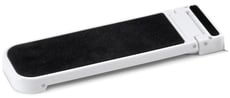
Because not every keyboard is the same, Contour has developed keyboard risers for the Red trackpad. You slide these onto the Rollermouse, after which you can set it to different heights. Almost any keyboard can be set to more or less the same height as the wireless Plus with the risers.
Don't miss this either
Customise your buttons - Driver!
Contour has developed its own driver. This allows you to assign functions to the buttons yourself.
You can personalise it very extensively. The click under the roller bar, the one under the scroll wheel and all other buttons present can be changed. You can even programme a number of buttons per program. Do you undo a lot in Excel? Then you add that function.
The Mac download also ensures that the copy & paste buttons work. You can find them here. The Rollermouse has a mode for Windows, Mac and HID (such as Linux).
2024 update
In the spring of 2024, Contour gave a fresh update to a large part of their range, including the RollerMouse Red Plus. A number of well-known benefits, such as the large and textured roller bar, programmable buttons and adjustable settings, have of course remained. The update concerns a number of changes within the production and the design;
| Old model | Model from spring 2024 | |
| Large and textured roller bar | ||
| Adjustable setting | ||
| Reducing the number of movements | ||
| Prevents 'gripping' the mouse | ||
| Variation of working posture | ||
| Antibacterial wrist rest of vegan leather | ||
| Wrist rest with memory foam | ||
| Bluetooth connectivity (on the wireless versions) | ||
| Charging via USB-C | ||
| Lower ecological footprint* |
How happy will my body be?
| Shoulder | |
| Arm | |
| Hand | |
| Wrist |
Pros and cons
- Also a palm/wrist rest
- Usable with both hands
- With extra-large palm rest
- Adjustable button functions
- Wireless up to 8 metres
- Not easy to take with you
Key specifications
| Warranty | 2 years |
| Ergonomic design | |
| Use | Left- and right-handed |
| Number of buttons | 6 |
| Connection | Wireless |
| View all specifications > |
Product features
- Prevents RSI complaints
- Promotes a relaxed shoulder posture
- Wireless up to 8 metres
- Ergonomic design
- Centrally placed
- More buttons for extra functionality
- Personalise buttons with the driver
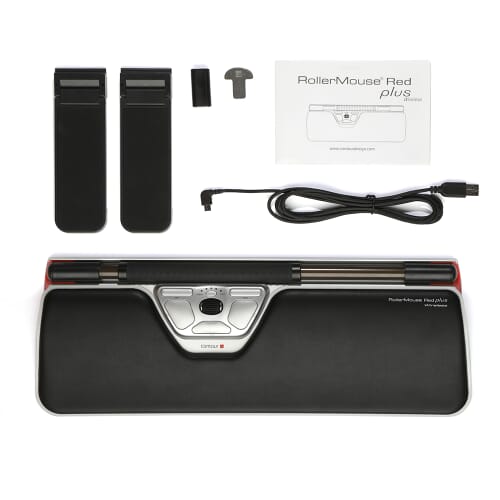
What's in the box?
- 1 x Rollermouse Red wireless
- 1 x Nano USB receiver
- 1 x USB 2.0 cable adapter
- 1 x USB to micro-USB 180 cm charging cable
- 1 x Plus (large) palm/wrist rest
- 1 x Wrist rest removal tool
- 2 x Short keyboard risers
- 2 x Long keyboard risers
- 1 x Manual
Button functions
The following image shows the default function for each button.
Keyboard risers
Keyboard risers are included with the Rollermouse. This way you can always make the most of this mouse's benefits.
Frequently asked questions
3D design Rollermouse Red Plus
Specifications
| Item number | ERGO-MI069PWL |
| Manufacturer's item number | RM-RED PLUS-WL |
| Brand | Contour |
| Warranty | 2 years |
| Type of guarantee | The Ergowerken free return guarantee service |
| Colour | Black and silver grey with red accents |
| Ergonomic design | |
| Management | Trackpad |
| Left- or right-handed | Left- and right-handed |
| Hand length | Suitable for any hand size |
| Hand width | Suitable for any hand size |
| Operation | Buttons and trackpad |
| Connection | Wireless |
| Included receiver | Yes, 2.4 GHz nano receiver |
| Bluetooth | |
| USB port | Yes, USB-C |
| USB version | 2.0 |
| Number of buttons | 6 |
| On/off button | |
| Adjustable buttons | Yes, with the help of the driver |
| Scroll wheel | |
| Trackball | |
| Adjustable sensitivity | |
| Sensitivity | 600/800/1000/1200/1400/1600/1800/2000/2200/2400 dpi |
| Type of power supply | Integrated battery |
| Rechargeable | |
| Minimum system requirements | Mac OS X and above or Windows 7 and above |
| Plug and play | Yes, the driver is only necessary for programming the additional buttons. |
| Dimensions length x width x height | 155 x 430 x 23 mm, the wrist rest has a depth of 130 mm |
| Product weight | 1040 grams |
Reviews Contour Design Rollermouse Red Plus wireless trackpad
Customers who write a review enter a prize draw for a voucher. We pick one winner and publish all reviews, including critical ones.