






5 essentials for a healthy office design
Table of Contents
Introduction: 5 essential products1. Adjustable office chair
2. Adjustable desk
3. (Adjustable) monitor stand
4. Ergonomic keyboard
5. Ergonomic mouse
Tim’s top 5
5 essential products, chosen from the basics
“What do I REALLY need to be able to work comfortably?”. We get questions like this quite often. The question is mainly about accessories. That’s not surprising, because accessories such as a mouse mat or backrest are items you buy and set up, expecting them to make you more comfortable.
Our answer to the above question is almost always “Is your foundation already in place?”. We covered that foundation quite recently, discussing good posture in the office and sitting and standing comfortably whilst working at a computer screen.
Building on that foundation, we have selected five essential product groups. With these products, you can really tackle a healthy working posture and make your working day more comfortable. We’ll go through the five products step by step, in the same way you would normally fine-tune your working posture. We’ll also throw in some product advice, as making a choice isn’t always easy.
1. Adjustable office chair
Although you’d prefer to move around a lot during the day, sitting remains an unavoidable part of your routine. Standing all day isn’t good for you either, and unfortunately you can’t go for a walk every five minutes, as you still have work to do.
You still spend quite a lot of time sitting down, so you might as well do so in a good chair. A good chair has a few requirements that are fairly easy to identify. How? By going through the step-by-step guide to adjusting a chair. Focus on the steps where the chair needs to adapt to you, and you’ll have the most important features. I’ve put together an overview for you:
| Key features of an office chair | ||
| # | Chair feature | Step |
| 1 | Height adjustment | Feet flat on the floor |
| 2 | Sliding seat | There should be enough space for a fist between the back of the knee and the edge of the seat |
| 3 | Adjustable backrest | Adjust the backrest so that the upper and lower body form an angle of at least 90˚ |
| 4 | Height-adjustable backrest and adjustable lumbar support | Ensure adequate support in the curve of the lower back |
| 5 | Adjustable armrests (depth and width) | Set your armrests to the correct height and depth so that your forearms rest lightly on them |
If your chair allows for every adjustment step, then you’ve got a good chair. Otherwise, it might be worth looking at a chair that is fully adjustable.
Advice on office chairs
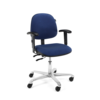
Choosing a chair can be quite a task, because (déjà vu) “which one is the right one?” Below, I’ve put together an overview of the features of our best chairs, so that this overview can make your choice a little easier.
| Choose your ideal office chair | |||||
| Ergohuman Elite2 | Score 2300 | Score 5100 | Score At Work | Score 5000 | |
 |  |  |  |  | |
| Feature | |||||
| Budget | |||||
| Height adjustment | |||||
| Sliding seat | |||||
| Reclining backrest | |||||
| Synchronous mechanism - The backrest and seat tilt in unison | |||||
| Height-adjustable backrest | |||||
| Adjustable lumbar support | |||||
| Armrests | |||||
| Adjustability of armrests | Height / Angle / Depth | Height / Width | Height / Width / Angle | Height / Width / Angle / Depth | Height / Width |
| Type of cladding | Mesh | Trevira / Faux leather / Wool | Wool | Trevira | Trevira / Wool |
| Chair size (S/M/L/XL) | Large | Small / Medium | Small / Medium / Large | Small / Medium / Large | Large / Extra large |
= Standard on seat
= Optional at extra cost
= Not available
Our favourite, you ask? That would have to be the At Work, as this chair is highly adjustable, its options make it suitable for both tall and short people, and thanks to its interchangeable parts, it is also very durable.
2. Adjustable desk
Fortunately, most desks are adjustable. Is yours not? Then you can’t call it a desk and you’d better get it into the canteen in a flash.
Not just a shelf to put things on
For many, the desk is still just a wooden slab you sit at whilst working. We regularly notice that people don’t immediately realise that not only their chair, but also their desk needs to be adjusted correctly to work comfortably. That adjustment simply comes down to the right height: just below the armrests when sitting and just below the elbows when standing.
Older desks can often be raised or lowered using a screw mechanism or a pull-out cap, but there are also desks available with lever mechanisms.
Our favourite is, of course, the electric sit-stand desk. This desk is not only ideal for alternating between standing and sitting, but also benefits flexible workspaces. You sit down, adjust your chair and quickly set the desk to your ideal sitting or standing height.
Why you want a sit-stand desk
You might not be ready for a sit-stand desk just yet, but after reading the list of benefits below, you’ll probably find yourself thinking, “Hmmmmmm, well now… I’ll give it some thought”.
- Your desk is easier to adjust
- You can alternate between sitting and standing
- Ideal for flexible workspaces
- Studies show a number of health benefits, such as fewer lower back complaints and increased life expectancy
- It gives a professional look
- (For businesses) Employees clearly see an investment in their health
Advice on sit-stand desks
There aren’t really any major considerations to bear in mind when choosing an electric sit-stand desk. Whatever you choose, you’ll be in good hands with our desks. The adjustability is always more than adequate, the maximum load capacity is high, the quality is just as good (with a minimum 2-year warranty up to 5 years), and we’ll come and assemble it for you with a brief explanation of how it works.
When choosing, it’s mainly about practical considerations. Think about the dimensions and colour of the desktop, the colour of the base, whether to go for a corner desk or a rectangular desk, a dual workstation for two employees, and even taking aesthetics into account .
Advice for when a sit-stand desk is not an option
There are situations where it is not possible to use a sit-stand desk. For example, in workspaces where an interior designer has installed a 6-metre-long worktop for the sake of the office’s appearance. It looks nice, but it’s not very practical. You’ll soon find yourself with around eight people working at a table that cannot be adjusted for anyone.
Fortunately, there are solutions for this too: so-called sit-stand workstations. You place or clamp these stations onto the desktop, allowing everyone to create a workspace that is adjustable after all. The stations provide space for your monitor, keyboard, mouse and sometimes even a landline telephone.
3. (Adjustable) monitor riser
You’ve just gone to all that trouble with your chair and desk to sit and stand comfortably, only to realise your screen is at belly button height. There goes that relaxed posture. Because with a screen that’s too low, you unconsciously but inevitably tilt your head forwards, putting a lot of strain on your neck muscles. What you need is a screen at eye level.
Up in the air with that thing
If you don’t touch-type, the top edge of your monitor should be at eye level; if you do touch-type, you can position the centre of the screen at eye level. The former is sometimes possible if your monitor’s standard stand has good height adjustment. But often even those don’t offer sufficient adjustability, certainly not when you touch-type.
There are two solutions for raising your monitor. Option 1 is a monitor stand. Its operation is basically as simple as the name suggests: you place your monitor on it and thereby gain height. Option 2 is the monitor arm, an arm to which you attach your monitor. Both have their pros and cons. I have listed the main advantages of both products below:
Monitor stand

- Good value for money
- Quick to set up
- Ideal for 1 monitor
- Suitable for a fixed workstation
Monitor arm

- Highly versatile
- Suitable for flexible workspaces
- Helps keep your desk tidy
- Professional appearance
Advice on monitor risers
The advice we give regarding the type of monitor stand can be derived, more or less, from the advantages listed above and the importance you attach to those advantages. The table below makes it a little easier to choose between a monitor stand and a monitor arm.
| monitor stand | Monitor arm | |
| How many monitors do you want to mount? | Max. 1 | 1 or more |
| How much height adjustment is required? | 0–15 cm | 0–55 cm |
| Does the height need to be adjustable, for example for flexible workspaces? | No | Yes |
| How much space is there on the desk? | Plenty | Little |
| What is the budget? | Low | Low-High |
| How much effort are you willing to put into raising your monitor? (assembly) | 0–10 mins | 15–30 mins |
4. Ergonomic keyboard
Here we are. The first of two products that you secretly had your eye on from the start. That’s not surprising, as most people do the same. As I mentioned at the beginning, many people don’t start with the basics, but go straight to looking for tools they’re familiar with. The ergonomic keyboard is one of them – and, after the ergonomic mouse, it’s also the best known.
Different keyboards
There’s a big difference between ergonomic keyboards. The word ‘ergonomic’ is attached to a keyboard because, compared to a standard keyboard, it has a feature that allows you to work more comfortably or helps prevent a particular ailment. We distinguish between them based on different features and their benefits. I’ve created a handy little table for this as well.
| Hand | Wrist | Shoulder | |
| Compact | |||
| Split | |||
| Mechanical | |||
| Flat | |||
| With touchpad |
As you can see, the benefits vary greatly depending on the type of keyboard. A compact keyboard allows you to position the mouse closer to you, helping you maintain a compact posture and keeping your shoulders relaxed.
A split keyboard aligns better with your arms, which is particularly good for your wrists.
The keys on a mechanical keyboard are characterised by registering a keystroke without the key needing to be fully depressed. This means your fingers need to apply less pressure, which helps keep your hand relaxed.
When using a flat keyboard, you don’t have to lift your hands as high to reach the keys. Your wrists will thank you for it.
Do you prefer a truly compact setup for maximum shoulder relaxation? Then choose a keyboard with a touchpad.
Advice on choosing an ergonomic keyboard
There’s a wide choice, but the table above may have already given you some guidance. To make it even easier for you, we’ve categorised keyboards by type of work.
Select the category that best suits your work and then filter further on the left-hand side of the page.
Although you can filter by wired, wireless or Bluetooth connection, we advise against focusing on this straight away (unless, of course, your computer or laptop doesn’t support Bluetooth). When choosing a suitable ergonomic keyboard, it’s wise to consider the comfort and convenience it offers. With wireless and Bluetooth connections, the choice is also considerably more limited.
5. Ergonomic mouse
If this is the first sentence you’ve read, head back to the top! Don’t let this be your first stop, or you’ll miss out on important information.
We’ve now reached the cream of the crop, the icing on the cake, the crème de la crème when it comes to ergonomic aids. An ergonomic mouse, if you choose the right one, can offer a great deal of relief and convenience. In some professions, you rely on that device on your desk – the one you use to move the cursor on your screen – for up to 10 hours a day. So why settle for the first piece of plastic that comes with your computer as standard?
Different types of mice
There is such a huge variety of mice that if you make the wrong choice, you’ll notice little improvement. Different mice address different issues, are more or less suitable for specific tasks, and you must always check whether the mouse fits the size of your hand. It’s therefore wise to do your research or seek our advice before choosing one.
The effect of the different types of mice is slightly easier to understand if you rate them. See the table below for further clarification.
| Hand | Wrist | Elbow | Shoulder | Precision | |
| Vertical mouse | |||||
| Left / right mouse button | |||||
| Trackpad / centred | |||||
| Trackball | |||||
| Graphics tablet |
When we recommend a mouse, we start by asking four simple questions:
- What is your hand size?
- What tasks do you mainly carry out using the mouse?
- Do you have any specific complaints?
- Do you already have experience with ergonomic mice?
Based on the answers to these questions and additional filters on our website, you can narrow down the wide selection considerably. Below, I have compiled a table featuring 10 of our best/most popular mice.
| Top 10 ergonomic mice | |||||
| Good for | Price | Precision | Unique feature | Downside | |
| Evoluent 4 | Wrist / Forearm | Most vertical model | Requires a little more squeezing | ||
| Delux Wow Grip mouse | Wrist / Forearm | Good value for money | Relatively small model | ||
| Handshoemouse | Hand | Supports the whole hand | Lack of precision | ||
| Penguin mouse | Shoulder / Wrist / Forearm | Can be used left- or right-handed | Takes up a lot of space on the desk | ||
| Unimouse | Hand / Wrist / Forearm | Adjustable angle | No pinky finger rest | ||
| Evoluent D | Wrist / Forearm | Most vertical model | Requires a little more squeezing | ||
| Rollermouse Go | Shoulder | Mobile-friendly trackpad | High price | ||
| Contour Rollermouse Red | Shoulder | Great control thanks to the ribbed bar | High price | ||
| Delux mini | Wrist / Forearm | Mobile vertical mouse | Thumb buttons not ideally positioned | ||
| HE mouse | Hand / Wrist / Forearm | All-round mouse | |||
Your 5 essentials (and Tim’s)
Have you managed to tick them all off? Hopefully so, because then you’re really ready to get started. Although we do our best to provide clear, helpful information to help you make the best choice, it can still be tricky. Chat, call, email or pop in with your questions and I’m sure we’ll sort it out together. Oh, and by the way, if you’re curious about my (Tim’s) top 5 favourites that I love working with, check out the following:
- Chair: Score At Work
- Desk: Ergopro sit-stand
- Monitor stand: Equip Basic double gas spring (great, 2 screens!)
- Ergonomic keyboard: Mistel MD770 RGB split with brown switches
- Ergonomic mouse: Optapad Extended (my trusty companion)