Geweldig
"Het is even wennen maar daarna werkt het heerlijk en geen pijn meer in mijn rechterarm."



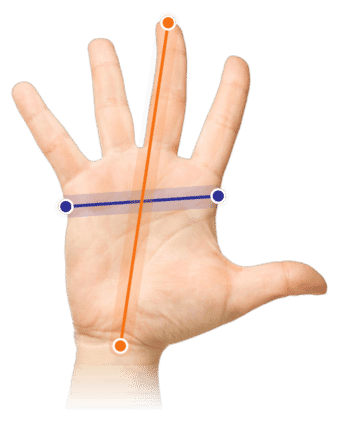
Measure your hand as shown in the image and choose your size using the table below:
| Size | Width | Length |
|---|---|---|
| Any hand size | suitable | suitable |
You've had enough! Those annoying mice that make you feel like you need a massage at the end of every day. The constant movement of the mouse across the desk makes your mouse arm look like Jeromeke's, while your other arm has more the proportions of Suske. Unless you have no problem with that, here's the solution!
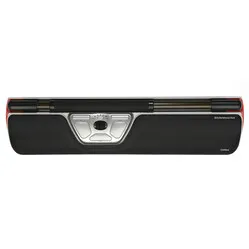
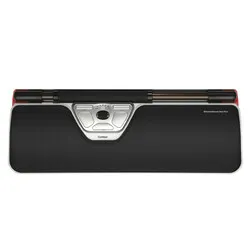
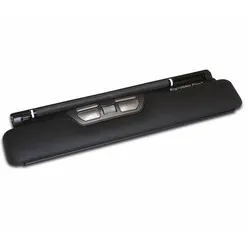
The Ergoslider probably doesn't look quite like the mouse you're used to. The low design of the mouse ensures a natural posture while working. The soft, large wrist rest distributes pressure across the wrist.
Furthermore, it features an extensive number of buttons with which you can easily perform any task. Additionally, you work more relaxed due to the central positioning of the mouse. You don't have to twist your arm outwards to grasp your mouse, which reduces tension in the neck and shoulders. Thanks to the central positioning of the mouse, you can operate it with both hands. This allows you to distribute the workload.
You move the cursor by rolling the navigation bar and moving it from left to right. To prevent a lack of freedom of movement, there is a built-in end detection in the roller bar. It can happen that the bar has moved completely to the side, but the cursor has not yet reached the edge of the screen. In this situation, you only need to push the bar slightly to the right or left to keep the cursor moving.
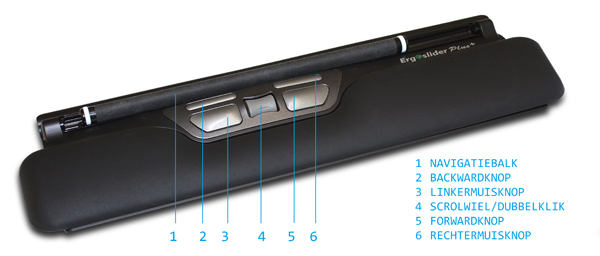
The Ergoslider also features 5 buttons, including a forward and backward button. This allows you to navigate through pages easily and quickly.
An ergonomic mouse is designed to combat complaints such as RSI. The shape of the mouse ensures a natural posture, preventing unnecessary muscle tension. Furthermore, the mouse often has an extensive array of functions that allow tasks to be performed more easily, quickly, and thus with less tension.
The accessibility of the Ergoslider is where it has an advantage over other types of mice. It sits directly in front of you. You can therefore operate it with both hands. You will have a preference for a certain hand, but you can still take over certain functions with the other.
Place the trackpad as close to you as possible to optimally utilise its benefits. Rest your arms relaxed on the table to relieve even more tension from your neck and shoulders.
The following image shows the function of each button.
hand - wrist - arm - shoulder
The Ergoslider plus ensures a natural posture for the hand, wrist, and arm. Furthermore, the wrist rest provides optimal support for the wrist.
| Warranty | 2 years |
| Ergonomic design | |
| Usage | Left and right-handed |
| Number of buttons | 5 |
| Plug & play | Yes |
| view all specifications |
| Item number | ERGO-ES001B |
| Brand | Ergoslider |
| Warranty | 2 years |
| Type of guarantee | Ergowerken free warranty return service |
| Colour | Black/silver |
| Ergonomic design | |
| Management | Optical |
| Left- or right-handed | Can be operated with either the left or right hand |
| Hand length | Suitable for any hand size |
| Hand width | Suitable for any hand size |
| Operation | Buttons and a trackpad |
| Included receiver | not applicable |
| Bluetooth | not applicable |
| USB port | |
| USB version | 2.0/3.0 |
| Number of buttons | 5 buttons |
| On/off button | not applicable |
| Adjustable buttons | |
| Scroll wheel | |
| Trackball | |
| Adjustable sensitivity | |
| Sensitivity | 800 dots per inch |
| Type of power supply | Wire |
| Battery type | not applicable |
| Rechargeable | not applicable |
| Minimum system requirements | Mac OS X v10.5, Mac OS X v10.6, Mac OS X v10.7, Mac OS X v10.8, Mac OS X v10.9, Mac OS X v10.10, Mac OS X v10.11, Windows XP, Windows Vista, Windows 7, Windows 8, Windows 10 |
| Plug and play | |
| Dimensions length x width x height | 390 x 102 x 23 millimetres |
| Product weight | 300 grams |
Customers who write a review enter a prize draw for a voucher. We pick one winner and publish all reviews, including critical ones.