Supergoed
"Ik had deze met snoer maar nu zonder echt een hele fijne muis dit!"



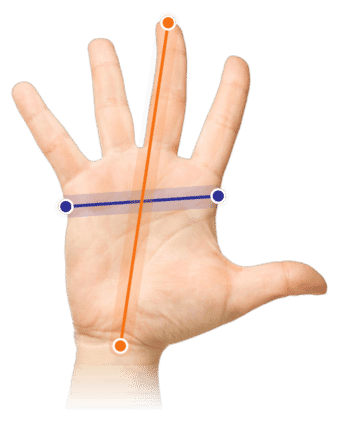
Measure your hand as shown in the image and choose your size using the table below:
| Size | Hand width | Hand length |
|---|---|---|
| One size | < 90 mm | < 190 mm |
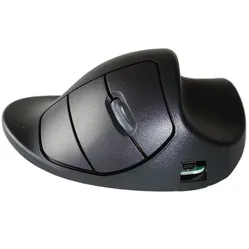
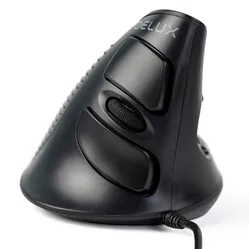
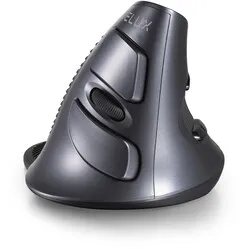
It's the delightful rubber grip that gives you so much control over the Delux mouse. The mouse gives your hand and arm a natural posture. You feel it immediately. You move the mouse across the desk in a wonderfully relaxed way.
The design of the Delux mouse has been specially developed to force the hand, wrist, and arm into a natural posture. This relieves tension from your muscles and provides a comfortable working posture.
The Delux mouse is ideal for preventing RSI complaints. Its so-called 'handshake' design largely contributes to this. For a large number of people, it has already provided relief from hand, wrist, and arm complaints.
The detachable wrist rest provides that extra bit of necessary support. This makes it harder to move the mouse from the wrist. It promotes movements from the arm, using the large muscles. This reduces the likelihood of developing complaints.
For precise tasks, such as working in Photoshop, InDesign, or a CAD program, the wrist rest can be easily removed. This gives you more precision. However, you must be careful not to work too much from the wrist, as this will cause complaints to manifest more quickly.
The mouse itself has a delightfully tactile ribbed rubber section where the hand rests. The scroll wheel also has this composition and provides good feedback during scrolling. Furthermore, you can adjust the mouse's sensitivity with the DPI button on the top.
The mouse is Plug&Play, which means you only need to plug the wireless receiver into your PC or laptop and you can start working immediately.
The Delux has 5 buttons + a DPI button. In addition to the standard buttons, it has a forwards and backwards button, allowing you to easily navigate through pages. With the DPI button, the mouse can be set to 800, 1200, or 1600 DPI. This makes the mouse very versatile in use. The Delux works optimally for both precise tasks and frequent, fast clicking.
On Windows computers, you can use all the mouse functions. On MAC OS, the backward and forward buttons do not work. The buttons that work on each system are indicated below.
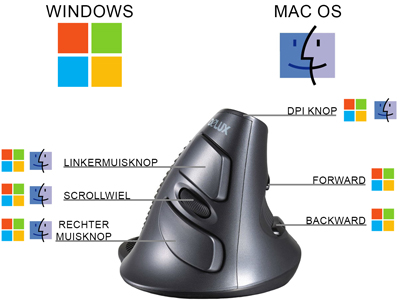
If you're a Mac user and want to use all the buttons, consider purchasing the USB Overdrive program. With this, you can not only get all the buttons working, but you can also assign any function you have in mind to them. Please note when purchasing; it may be cheaper to pay in dollars.
| Warranty | 2 years |
| Ergonomic design | |
| Usage | Right-handed |
| Number of buttons | 5 |
| Plug & play |
| Wrist | |
| Arm | |
| Hand | |
| Shoulder |
| Item number | ERGO-MI005 |
| Manufacturer's item number | M618GL |
| Brand | Deluxe |
| Warranty | 2 years |
| Type of guarantee | Ergowerken free warranty return service |
| Colour | Anthracite with black accents |
| Ergonomic design | |
| Management | Laser |
| Left- or right-handed | Right-handed |
| Hand length | Less than 190 mm, measured from the tip of the middle finger to the edge of the wrist |
| Hand width | Smaller than 90 mm, measured on the palm, 1 cm below the four fingers |
| Operation | Buttons and scroll wheel |
| Included receiver | Yes, 2.4 GHz nano receiver |
| Bluetooth | not applicable |
| USB port | |
| USB version | 2.0 |
| Number of buttons | 5 buttons |
| On/off button | |
| Adjustable buttons | |
| Scroll wheel | |
| Trackball | |
| Adjustable sensitivity | |
| Sensitivity | 800/1200/1600 dpi |
| Type of power supply | Battery |
| Battery type | 2x AAA batteries |
| Rechargeable | |
| Minimum system requirements | Mac OS X v10.5, Mac OS X v10.6, Mac OS X v10.7, Mac OS X v10.8, Mac OS X v10.9, Mac OS X v10.10, Mac OS X v10.11, Windows XP, Windows Vista, Windows 7, Windows 8, Windows 10 |
| Plug and play | |
| Dimensions length x width x height | 103 x 95 x 87 millimetres |
| Product weight | 115 grams |
Customers who write a review enter a prize draw for a voucher. We pick one winner and publish all reviews, including critical ones.