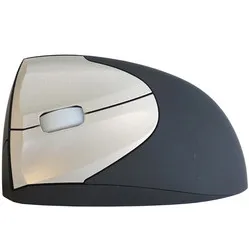
An ode to the Unimouse
ATS!...?
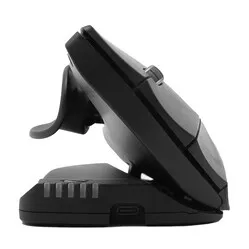
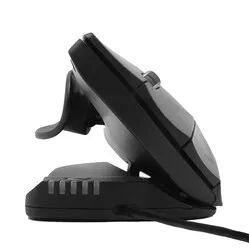
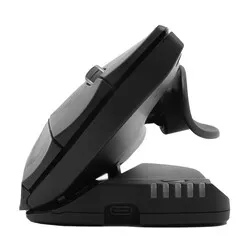
"Arm Tension Soreness?" No, it's not an abbreviation for an arm or wrist condition. It's the name Contour has given to the ultra-adjustable thumb rest of the Unimouse. It stands for: Articulating Thumb Support. That's the advantage when you create something unique, you get to invent the name.
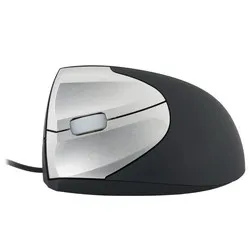
Why the left-handed wired Unimouse?
What does it mean for you as a user? A lot of comfort and possibilities. You can move the thumb rest in all conceivable directions, both horizontally and vertically. And you can also adjust the angle of the mouse as desired.
Uni(que) mouse
Few mice can do it, adapt to the user. The Unimouse is a particularly unique case in this regard. We've seen mice tilt before, but the Unimouse takes it to a higher level. You can set it to the most comfortable angle for you, between 35 and 70 degrees.
If you get tired of it, you can just as easily adjust it again. Are you going to do precise (drawing) work? Then set it to the position where you have the most control, adjust the sensitivity to one of the 10 DPI settings (between 800 and 2800 DPI), a small adjustment of the thumb rest, and off you go!
Suitable for every task
Its adaptable grip makes the Unimouse suitable for every profession. Below is a small selection:
- • Graphic designer
- • Administrative assistant
- • Industrial designer
- • Accountant
Control over the Unimouse
The mouse buttons provide pleasant feedback, with consistent resistance regardless of where you press the button. Only at the very beginning of the button does it offer slightly more resistance, but in practice, you'll barely notice this.
The scroll wheel rolls smoothly and provides pleasant click feedback. Thanks to the rubber finish, you'll never lose control.
Dynamic working with the wired Unimouse
One of the most important aspects of ergonomic working is dynamism. Contour's developers emphasised this when conceiving the Unimouse.
For example, you can continuously adjust the tilt angle of the Unimouse, and the thumb support can also be easily adjusted 35 degrees in any direction. The Unimouse allows you to change your posture while mousing, which reduces fatiguing static load.
Do you suffer from wrist pain? Then set it more vertically to give your wrist muscles more rest. Do you have some complaints in your hand? Then set it flatter to give your hand maximum support. Also, raise the thumb rest so you don't have to squeeze.
Get the most out of it
The Contour mouse features a Pixart PMW3330 sensor. Thanks to this sensor, the mouse works excellently on almost any surface. Furthermore, you have 10 different mouse sensitivities to play with. For reflective surfaces, based on our own tests, we advise using a mouse mat.
The 5 LEDs at the front of the mouse show the DPI setting. The green LEDs indicate DPI from 800 to 1600. The red lights are for serious high-speed work and show 2000 to 4000 DPI. It has 6 buttons, including 2 buttons for forwards/backwards. The Unimouse cable is 200 cm long and has a USB-A connection. It weighs 150 grams without the cable (180 grams including the cable).
Practical example: administrative assistant
Clicking, dragging, and scrolling – you're busy with it. From window to window, field to field. A mouse that feels solid in your hand and offers sufficient support is important for you. Find the right angle for maximum relaxation and raise the thumb rest slightly so your thumb can rest comfortably. That way, you'll get through those long days.
Don't miss this either
The angle adjustment is done using 4 friction hinges. This allows you to continuously adjust it between 35 and 70 degrees, without compromising on sturdiness. This offers countless possible postures for comfortable working. Do make sure you don't accidentally press one of the buttons while adjusting the mouse.
With the Contour driver for your Unimouse, you can assign other functions to the buttons. You can even change several buttons per programme, allowing you to tick off your tasks even faster.
2024 update
In spring 2024, Contour gave a fresh update to a large part of their product range, including Unimouse. Several well-known advantages, such as the adjustable thumb rest, have naturally remained. The update concerns a number of changes within production and design;
| | Old model | Model from spring 2024 |
| Adjustable tilt angle | | |
| Unique thumb support | | |
| Programmable buttons | | |
| Left/right version | | |
| Relaxed grip and variation | | |
| 4000 DPI in 10 steps | | |
| New matte black colour | | |
| Lower ecological footprint* | | |
* Made from recycled aluminium (GRS-certified) and a reduction of CO2-eq per product by more than 50% compared to previous versions.