Stel hier je vraag over dit product
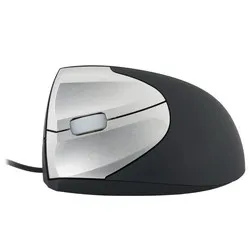
Minicute EZMouse2 Wired Left-Handed Ergonomic Mouse


Product description of Minicute EZMouse2 Wired Left-Handed Ergonomic Mouse
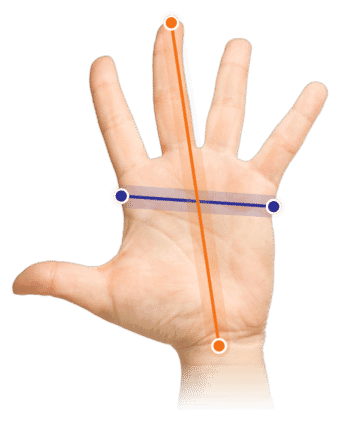
Which size fits your hand?
Measure your hand as shown in the image and choose your size using the table below:
| Size | Hand width | Hand length |
|---|---|---|
| One size | 70 - 87 mm | 160 - 210 mm |
An ode to the Minicute
One for every hand
Minicute has finally made one of its renowned mice available for left-handed users. Now, as a left-handed person, you can also choose a 'healthy' mouse and work with increased comfort and relaxation.
Why the Minicute EZMouse2 left-handed mouse?
Minicute has been at the forefront of ergonomic mice for several years. With the EZmouse2 Left, a Minicute mouse has finally become available for left-handed users.
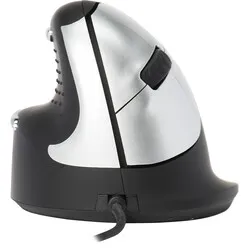
The left-handed EZmouse2 features the well-known vertical 'handshake' design, which forces the fingers, wrist, and arm into a more natural posture. This encourages a relaxed posture and reduces the risk of RSI complaints, such as mouse arm.
Why does this design promote a healthy posture? Just let your arms hang loosely by your sides and observe the position of your arms and hands. This posture is better maintained with an ergonomic mouse like the Minicute.
The exterior of the left EZmouse2 is largely made of rubber, which feels pleasant and provides good grip. In addition to the standard buttons, the EZmouse2 also features a 'backwards' button, just above the thumb area. This allows you to easily navigate back in your browser, for example. You can adjust the cursor sensitivity. The left-handed Minicute can be set to 400, 800, 1600, or 3200 DPI.
This is what makes an ergonomic mouse so good
The ergonomic mouse is a tilted model, different from the traditional flat mouse. This forces your wrist, arm, and hand into a natural posture. This reduces tension on your muscles and allows you to work more relaxed. RSI complaints are prevented and counteracted in this way.
Get the most out of it
The wired Minicute mouse is available not only for right-handed users but also for left-handed users among us. Due to the mouse's design, your hand remains in its natural posture. This also applies to your arm, allowing you to work freely and easily with the mouse. The mouse has been treated with rubber spray, giving you more control over it.
In addition to the standard buttons, the mouse has an extra button, namely the backwards button. This button allows for easy navigation through pages and documents.
Don't miss this either
The Minicute itself does not have an operating program to manage the buttons. There are programs available that do offer this support. You can find them here for Windows and Mac.
Pros and Cons
- Ergonomic handshake design
- Backwards button
- Wear-resistant
- No DPI indication
Brief specifications
| Warranty | 2 years |
| Ergonomic design | |
| Usage | Left-handed |
| Sensitivity | 400/800/1600/3200 DPI |
| Controls | Buttons and scroll wheel |
How happy will my body be with this?
| Hand | |
| Wrist | |
| Arm | |
| Shoulder |
Product features
- Thumb rest
- Extra grip due to rubber use
- Left-handed wired mouse
- Antibacterial coating on scroll wheel
- Prevents RSI complaints
What's in the box?
- 1 x Left-handed wired mouse
Frequently asked questions
Specifications
| Item number | ERGO-MI015 |
| Brand | Minicute |
| Warranty | 2 years |
| Type of guarantee | Ergowerken free warranty return service |
| Colour | Black with silver buttons |
| Ergonomic design | |
| Management | Optical |
| Left- or right-handed | Left-handed |
| Hand length | Between 160 and 210 millimetres, measured from the tip of the middle finger to the edge of the wrist |
| Hand width | 70 to 87 mm, measured on the palm, 1 cm below the four fingers |
| Operation | Buttons and scroll wheel |
| Included receiver | not applicable |
| Bluetooth | not applicable |
| USB port | |
| USB version | 2.0/3.0 |
| Number of buttons | 4 buttons |
| On/off button | not applicable |
| Adjustable buttons | |
| Scroll wheel | |
| Trackball | |
| Adjustable sensitivity | |
| Sensitivity | 400/800/1600/3200 dpi |
| Type of power supply | Wire |
| Battery type | not applicable |
| Rechargeable | not applicable |
| Minimum system requirements | Mac OS X v10.5, Mac OS X v10.6, Mac OS X v10.7, Mac OS X v10.8, Mac OS X v10.9, Mac OS X v10.10, Mac OS X v10.11, Windows XP, Windows Vista, Windows 7, Windows 8, Windows 10 |
| Plug and play | |
| Dimensions length x width x height | 120 x 70 x 65 millimetres |
| Product weight | 150 grams |
Reviews Minicute EZMouse2 Wired Left-Handed Ergonomic Mouse
Customers who write a review enter a prize draw for a voucher. We pick one winner and publish all reviews, including critical ones.