Enter your e-mail address here and we will send you an update as soon as this product is back in stock.
After submitting your e-mail address, you will receive an e-mail confirming your subscription.
This notification is no guarantee that you can claim items from the new stock. Want to be more certain of receiving the product? Then order and pay for it right away. Your order will be reserved and shipped as soon as the new stock arrives.
Privacy
Your e-mail address is stored in a closed database that we cannot access. After the stock update, your e-mail address is automatically deleted.
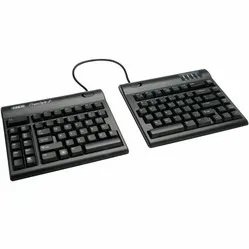
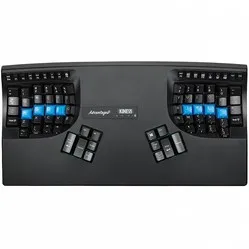
Kinesis Advantage360 compact split keyboard
0 reviews
Tell us about yourself
We'll get back to you as soon as possible with a proposal.
The Advantage360 keyboard is designed for optimal comfort. Thanks to the concave design of the keys and the tilt angle of the entire keyboard, you can continue typing in a relaxed manner.
Product description of Kinesis Advantage360 compact split keyboard
Is this keyboard right for me?
Width
19.05 cm (per half)
Depth
20.32 cm
Height
7.62 - 10.16 cm
Compatibility
Windows, Mac and Linux
Key layout
QWERTY
Switches
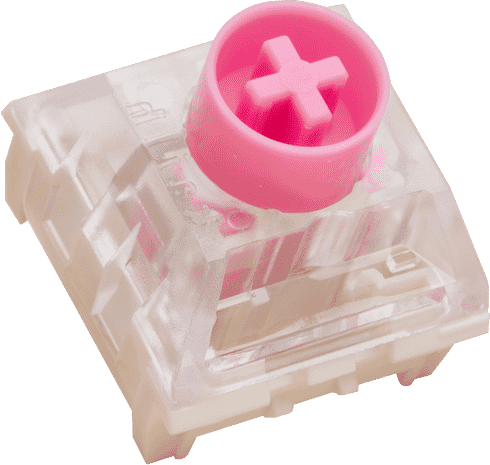
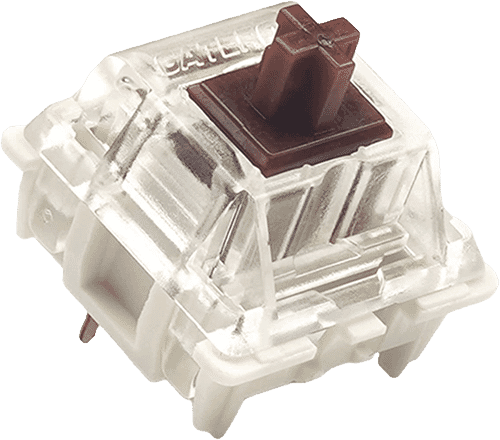
Gateron KS-9 brown or Kailh Box pink
Ode to the Advantage 360
Rome wasn't built in a day
After an hour of wrestling with the new Advantage360, you'll probably think "I really regret this purchase". Give it some time. Tomorrow it'll go better, and in about three weeks you won't be able to do without this masterpiece.
Why the Advantage 360
Maximum comfort
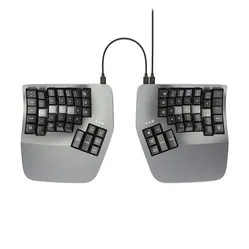
At first glance, the Advantage 360 mechanical keyboard looks very complex. However, this complexity is exactly what allows you to work completely free of complaints. Because this compact, split keyboard consists of two parts, you can position them as you wish. By placing them at a slight angle relative to each other, you can relieve your wrists. Your wrists no longer have to make the bend you get with a regular keyboard.
In addition to the position of the two halves, you can also adjust the tilt angle of the halves to 3 different heights. That means you can effectively tilt the keyboard. This way you can keep your arms and wrists at a comfortable angle while typing. Not ready for the full adjustability yet? Then you can attach the included bridge connection for the traditional Advantage separation. Finally, the integrated palm rest offers extra support to the palms. The magnetic cushions, by the way, are not included but available separately.
The bowl-shaped design also provides extra comfort. Because the keyboard is shaped in a concave way, fingers don't have to fully stretch and you can relax your hands better. Being able to work quickly with the Advantage 360 will require some practice, but we can tell you it's well and truly worth it.
Little-finger and thumb keys
Frequently used and "heavier" keys such as backspace, enter and shift are often pressed with the little finger. Kinesis, however, has placed these keys at the thumb. The reason for this is that the thumb is stronger than the little finger, so pressing takes less effort.
What makes the Advantage360 so good?
Mechanical
The Advantage360 is fitted with brown Gateron switches, which have a tactile action. That means they give a slight resistance when you press the keys. The advantage of a mechanical keyboard is that you get more feedback while typing. In addition, mechanical keyboards often last longer and are easier to clean or repair when needed.
USB-C connection
You connect the Advantage 360 to your computer using the included USB-C cable (190 cm). A wired keyboard has the advantage that you don't have to charge it. The two halves of the keyboard are also connected to each other using a 25 cm long USB-C cable. A downside of a wired keyboard is that you have a little less freedom of movement.
Programmable
The Advantage360 is compatible with Windows 7-11, macOS, Linux, Android & Chrome. The keyboard has 76 keys which are fully programmable using on-the-fly macros. The advantage of this is that you can give all the keys the function you want. For example, cut or paste with one press of a button. Finally, the Advantage360 is fitted with PBT keycaps. You also get 16 extra keycaps, including 4 for Mac.
SmartSet
As mentioned, you can programme the Advantage 360. The ergonomic keyboard features a new and improved SmartSet Programming from the brand Kinesis. With it you can adjust the layout of the keyboard without having to use external software or the internet, as the program is already installed on the Advantage 360. You can get started straight away as soon as the keyboard is connected to your computer.
If for some reason this doesn't work, you can still find the software on this page. We recommend downloading it anyway, because it lets you clearly see how you are setting up the Advantage 360.
SmartSet contains 9 programmable layouts, each with 5 programmable layers. You can switch between them by clicking or holding. In addition, you can give macros a fixed playback speed, so shortcut functions don't get mixed up. All settings are stored on the keyboard's internal memory (8 MB).
Overview of the buttons
Don't miss this either
Advantage360 VS Advantage360 Pro
The Advantage360 is available in a regular and a Pro variant. You can read the differences between the two models in the table below.
Integrated palm rest (cushions available separately)
Compact layout
Bowl-shaped
Vertical key configuration
Separate thumb keys
Optional fixed split
Frequently used keys at the thumb instead of the little finger
Mechanical switches (Gateron Brown)
Suitable for Windows 7-11, macOS, Linux, Android and Chrome
76 keys
Fully programmable
USB-C connection to computer
25 cm long USB-C connection cable (detachable)
PBT keycaps
Switches
Mechanical switches are the mechanisms located beneath the keycaps of mechanical keyboards. With the Advantage360 you have the choice between Gateron Brown (tactile) or Kailh pink (linear). You can find more explanation about mechanical switches here.
Which switch suits you?
With this keyboard you choose which switches go underneath. They cost the same, so it comes down to preference. A linear switch travels smoothly with no noticeable bump; a tactile switch has one, and a clicky switch lets you hear it too.
Kailh BOX Silent Pink
Gateron KS-9 Brown
Type:Linear travels evenly. Tactile has a noticeable bump. Clicky adds an audible click to that bump.
Linear (silent)
Tactile
Actuation force:Force:The force needed to register a keystroke. A regular rubber dome keyboard needs 55 to 60 g, so lower means lighter typing.
35 g
55 g
Tactile bump force:Bump force:The force at the point where you clearly feel the key give way. Only tactile and clicky switches have this; a linear switch does not. A dash means the switch does have one, but the manufacturer states no figure. Technical term: pressure point force.
Not applicable
–
Registers after:The distance the key travels before the keystroke registers. You do not have to press the key all the way down. Technical term: pre-travel or actuation point.
1.8 mm
2.0 mm
Full travel:Travel:The total distance until the key can go no further.
3.6 mm
4.0 mm
Lifespan:The number of keystrokes per key stated by the manufacturer.
80 million
60 million
Sound:Indication for normal typing. Even a silent switch makes noise if you bottom out the key.
Silent
Quiet
Downloads
Advantage360 manual
Quick start guide
What's in the box?
1 x Keyboard
1 x Bridge connector
1 x Keycap puller
1 x Quick start guide
16 x Extra keycaps
Required cables
The Advantage360 & its predecessor the Advantage2 through the eyes of Kinesis
The split parts can be positioned completely independently of each other (the Pro version even more so, due to the absence of a cable), which makes the 360 more pleasant for the shoulders
Adjustable tilt angle. By default it is set to the 'Classic' angle (as on the Advantage2), but you also have 'Medium' and 'High'
5 instead of 2 programmable layers (the Pro even many more)
Higher build quality and reduced noise
The Gateron Brown Low-Force switch on the 360 types more pleasantly and quietly than the Cherry Brown on the Advantage2
Vertical key configuration
Magnetic detachable palm rests are an improvement over the adhesive models on the Advantage2
The same industrial designer was involved in the Advantage2 and the Advantage 360
The aim was a look that can last 30 years
The Advantage360 is handmade in the United States
Positioning the keyboard
Frequently asked questions
"What if I'm not happy with the keyboard after all?"
At Ergowerken you can always return your purchase free of charge within 90 days. Then we can look at an alternative together, or we'll refund the purchase amount. You'll never face any surprises with us.
"Dankzij hun widget kreeg ik de bevestiging dat dit een goede keuze was. Ik kende het product al, maar dit gaf net dat extra zetje om het daadwerkelijk aan te schaffen.
Ik had in de loop van drie maanden geleidelijk schouderpijn ontwikkeld, en dat begon me behoorlijk in de weg te zitten. Totdat ik dit product ging gebruiken: al na één week waren mijn klachten vrijwel volledig verdwenen. Dat verschil is echt ongelofelijk!
In het begin moest ik even wennen, en lag mijn typesnelheid iets lager omdat ik blijkbaar een verkeerde manier van blind typen had aangeleerd. Maar dat had ik verrassend snel weer onder controle. De duimtoetsen zijn bovendien super intuïtief en echt ontzettend makkelijk om aan te leren.
Achteraf kan ik maar één ding denken: had ik dit maar veel eerder gekocht. Ik heb serieus nog geen seconde spijt gehad van deze aankoop. Absoluut een aanrader!"
— Gertjan R. (5/5)
Advantage 360 ergonomisch toetsenbord
"Ongeveer een maand geleden de keuze gemaakt om dit ergonomische toetsenbord aan te schaffen in verband met mijn pols/duimklachten. In de periode voor mijn polsoperatie merkte ik dat ik met gebruik van het toetsenbord wat minder snel last had van pijnklachten. Dat was voor die periode al een winst, hoewel het doel van het aanschaffen van dit toetsenbord met name gericht was op het voorkomen van het terugkeren van de RSI-klachten. Het wennen aan het toetsenbord viel me mee. Het voelde voor mij al relatief snel natuurlijk aan om woorden te typen. De gewenning gaat wat trager bij het gebruik van de speciale karakters, al merk ik dat dit ook al wat gemakkelijker gaat, en zie ik de toegevoegde waarde van het gebruik van de duimclusters al goed in. Al met al heb ik geen seconde spijt gehad van de aankoop, en heb ik goede hoop dat dit me in de toekomst gaat helpen bij het voorkomen van nieuwe hand/polsklachten."
— Sanne A. (5/5)
Fijner dan ik had verwacht
"Het typen wat ik als developer meerder tijd van de dag doe is met dit toetsenbord minder zwaar geworden. Mijn handen blijven nu in een neutrale positie en op schouder breedte. Het is wel wennen als je van een normaal toetsenbord komt.
Zelf had ik geen klachten aan mijn armen of handen en is het voor preventie van die klachten"
— Mark H. (5/5)
Even wennen, maar echt beste wat er is
"Het is absoluut wennen en om sneltoetsen te maken moet je wel IT-kennis hebben, maar als je polsklachten hebt, is het echt top."
— Abel K. (5/5)
Fantastisch voor overbelaste polsen
"Dit toetsenbord biedt me de mogelijkheid te typen zonder mijn polsen onnodig te belasten. Alleen het numerieke toetsenbord en bepaalde combinaties van toetsen voor Windows, die mis ik of gaan lastig (alt tab, ctrl c of ctrl v). Ik moet me nog verdiepen in de mogelijkheden om toetsen te programmeren en ook de gelaagdheid heb ik nog niet goed door. Wellicht gaat dat helpen.
Gewoon typen is echt fantastisch. De extra snufjes zijn niet altijd intuïtief en vragen wat onderzoek.
Ik heb dit toetsenbord al een aantal weken, maar mag het slechts beperkt gebruiken wegens acute polsklachten. Ik heb gemerkt dat een gratis typecursus van het internet plukken helpt om snel je vingers te laten wennen aan waar de letters op het toetsenbord zitten. Dat is soms net onder een andere hoek dan je gewend bent."
— Jaap l. (4/5)
Customizable and healthy
"I'm a software developer and I'm on a keyboard the whole day, every day. I decided to buy the best ergonomic keyboard to prevent potential injuries. And this keyboard delivers. The shape of it is perfect, it feels really natural for my fingers. The fact that I can position each side wherever fits best for my wrists is also awesome. The build is of great quality. An the customizability is superb. I assigned 2 keys for copy and paste. And I now I can't live without it, why doesn't every keyboard have buttons for such a basic flow?! The software for assigning keys is simple and intuitive, really good.
The only downside is the lack of the function keys (F1-F12) which I need a lot for development and I'd prefer to access them without an extra key press. And the arrow keys, I still didn't get used to their position. But I'll get there eventually."
— Adriana f. (5/5)
Perfect toetsenbord
"Het toetsenbord is van hoge kwaliteit. De switches (bruin) maken aardig wat geluid maar het is niet heel storend. Een split keyboard zelf is even wennen. Aan het begin type je erg langzaam en maak je constant fouten - maar na een paar dagen typed het heel prettig.
De klachten in mijn arm zijn een stuk minder geworden na het gebruik. Omdat het toetsenbord erg hoog is vanwege de enclave moest ik mijn bureau wel lager zetten om het toetsenbord op een comfortabele hoogte te krijgen. Om hiervoor te compenseren heb ik mijn muis en monitor op een verhoging gezet.
Met de Pro versie kan je de toetsen naar eigen wens aanpassen. Dit is niet ingewikkeld als je zelf een programmeur bent, maar zal voor leken wel redelijk lastig zijn. De documentatie hiervoor is goed, maar je moet zelf een github repository clonen en de firmware uploaden naar het toetsenbord, dus het is niet heel eenvoudig. Het voordeel is wel dat je het toetsenbord helemaal naar eigen wens kan inrichten."
— Mark R. (5/5)
toetsengebruik van advantage 360
"zeer aangenaam de toetsen te gebruiken. beide handen voelen ontspannen. het aanraken met de toetsen is zeer precies. het voldoet de verwachting van de inkoop."
— R S. (5/5)
Top
"De Kinesis Advantage 360 heeft mijn polspijn als developer aanzienlijk verminderd. Het ergonomische en gesplitste ontwerp houdt mijn handen en polsen in een natuurlijke positie, wat de belasting veel vermindert. De duimclusters voor toetsen als “Enter” en “Backspace” minimaliseren ook de handbewegingen, waardoor ik urenlang comfortabel kan coderen.
Het neemt toch wel een aantal weken om deze layout gewend te geraken, maar het loont de moeite. Eens je de Kinesis gewend bent wil je geen ander toetsenbord meer gebruiken. Voor elke developer die worstelt met pijn in de pols is dit een investering die het zeker waard is."
— Laurence C. (5/5)
niet voor kleine handen
"Algemeen een goed product
Het verplaatsen van toetsen als shift/ctrl naar de duim werkt volgens mij zeer prettig, maar mijn handen zijn er gewoon te klein voor.
Daarnaast is de prijs ook niet mis."








.png)