Enter your e-mail address here and we will send you an update as soon as this product is back in stock.
After submitting your e-mail address, you will receive an e-mail confirming your subscription.
This notification is no guarantee that you can claim items from the new stock. Want to be more certain of receiving the product? Then order and pay for it right away. Your order will be reserved and shipped as soon as the new stock arrives.
Privacy
Your e-mail address is stored in a closed database that we cannot access. After the stock update, your e-mail address is automatically deleted.
Kinesis Advantage360 Pro compact split keyboard
0 reviews
Tell us about yourself
We'll get back to you as soon as possible with a proposal.
The Advantage360 keyboard is designed for optimal comfort. Thanks to the concave design of the keys and the tilt angle of the entire keyboard, you can continue typing in a relaxed manner.
Product description of Kinesis Advantage360 Pro compact split keyboard
Is this keyboard right for me?
Width
19.05 cm (per half)
Depth
20.32 cm
Height
7.62 - 10.16 cm
Version
Windows, Mac and Linux
Key layout
QWERTY
Switches
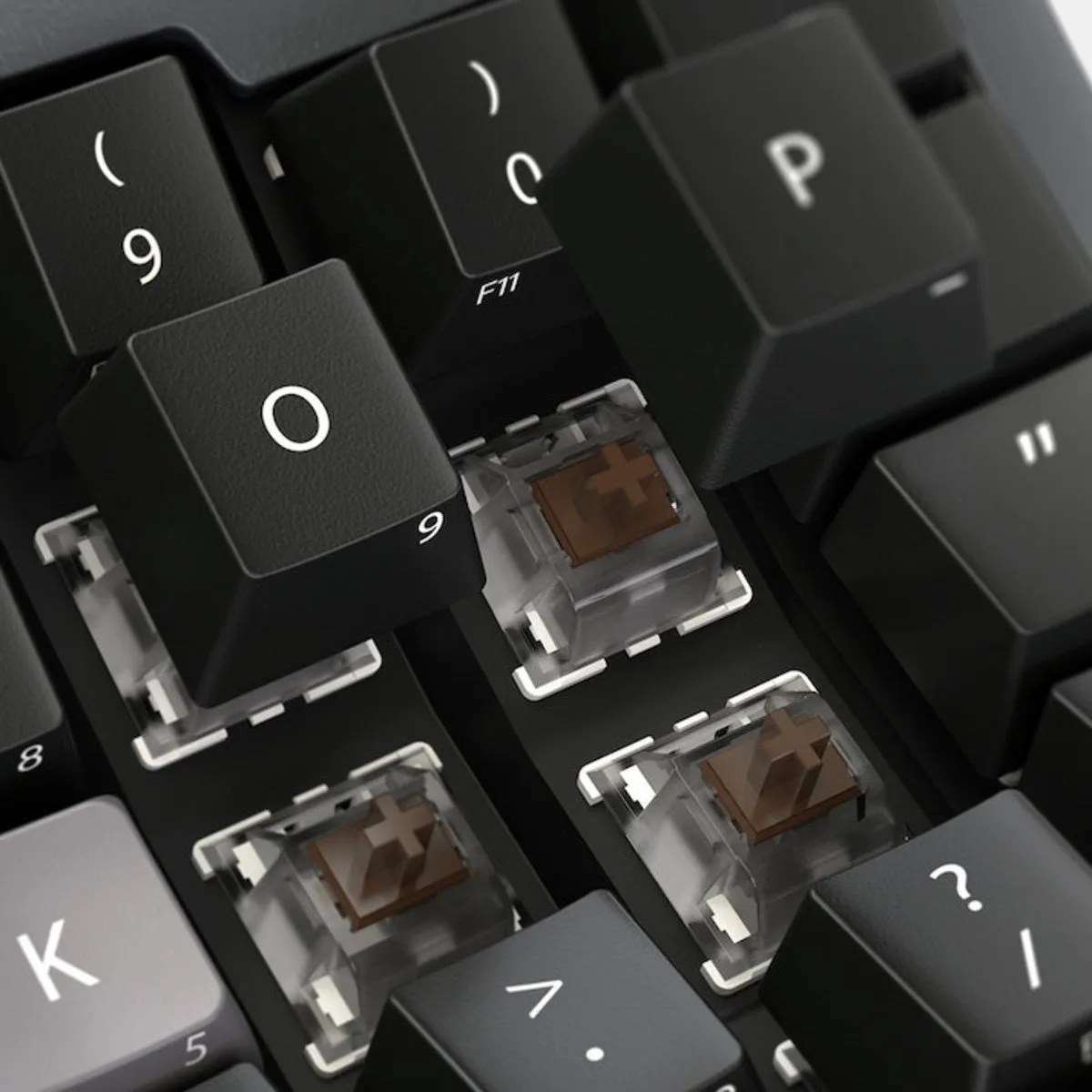
Gateron G Pro Mechanical Brown
An ode to the Advantage 360 Pro
Rome was not built in a day
After an hour of wrestling with your new Advantage360 Pro, you will probably think "I really regret this purchase". Give it some time. Tomorrow will go better, and within about three weeks you will not want to be without this masterpiece.
Why the Advantage 360 Pro
Maximum comfort
At first glance, the Advantage360 Pro mechanical keyboard looks very complex. That complexity is exactly what lets you work entirely free of complaints. Because this compact, split keyboard is made up of two parts, you can position it however you like. By placing the halves at a slight angle to each other, you can relieve your wrists. Your wrists no longer have to make the bend that a regular keyboard forces on them.
Besides the position of the two halves, you can also adjust the tilt angle of the halves across 3 different heights. In other words, you can tent the keyboard, so to speak. This way you can keep your arms and wrists at a comfortable angle while typing. Not ready for full adjustability yet? Then you can attach the supplied bridge connector for the traditional Advantage separation. Finally, the integrated palm rest offers extra support for the palms of your hands. The magnetic cushions are not included, but are available separately.
The bowl-shaped design also adds extra comfort. Because the keyboard is shaped concavely, your fingers do not have to stretch fully and you can relax your hands more. Working quickly with the Advantage 360 Pro will take some practice, but we can tell you it is well worth it.
Little-finger and thumb keys
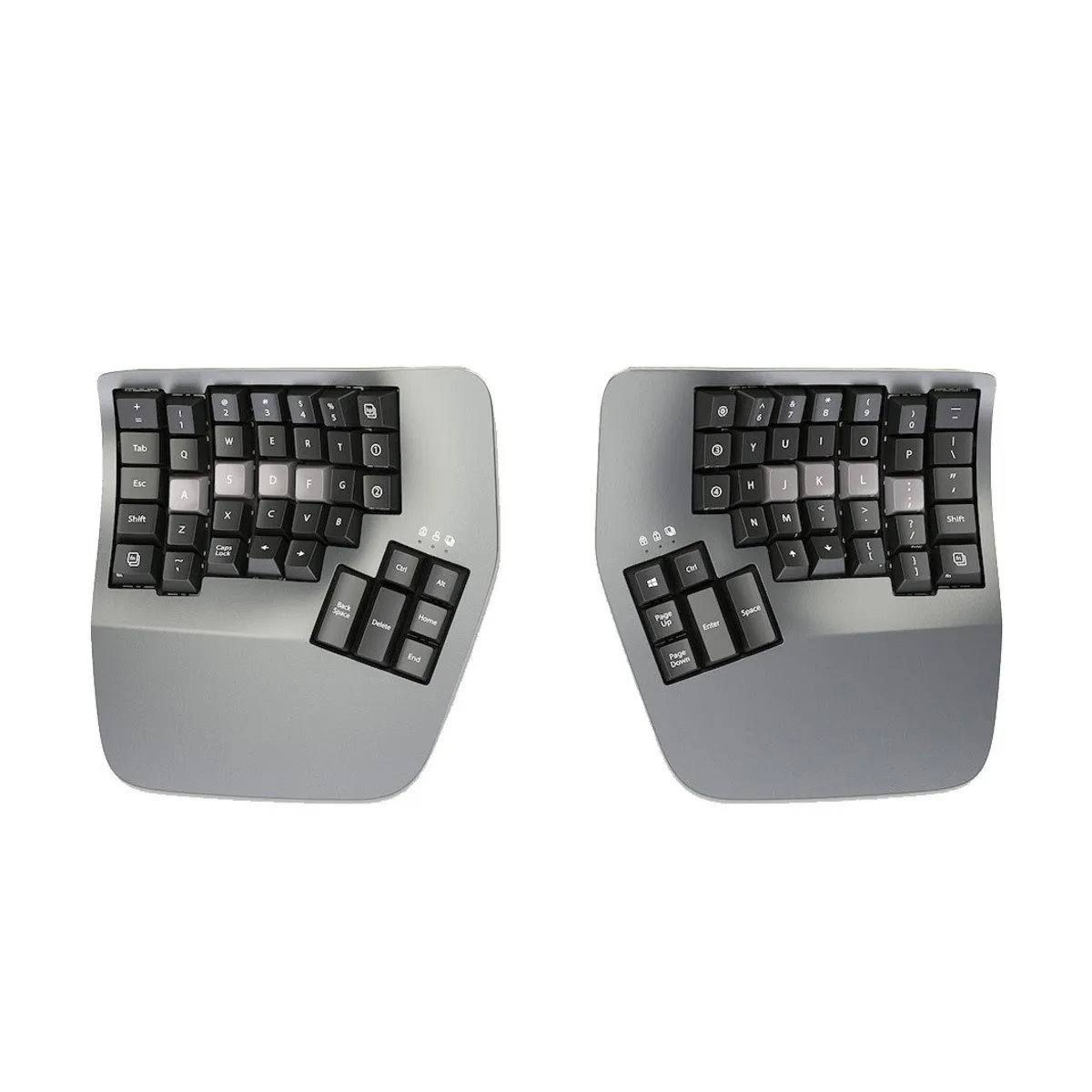
Frequently used and "heavier" keys such as backspace, enter and shift are often pressed with the little finger. Kinesis, however, has placed these keys near the thumb. The reason is that the thumb is stronger than the little finger, so pressing them takes less effort.
What makes the Advantage360 Pro so good?
Mechanical
The Advantage360 Pro is fitted with brown Gateron switches, which have a tactile action. That means they give a little counter-pressure when you press the keys. The advantage of a mechanical keyboard is that you get more feedback while typing. Mechanical keyboards also tend to last longer and are easier to clean or repair when needed.
Wireless & wired
The Advantage360 Pro can be connected wirelessly via bluetooth. The connection between the two halves of the keyboard can also be entirely wireless. The advantage of this is that you have a little more freedom of movement than you would with a wired keyboard. This way you can connect the Advantage Pro to 5 devices at once. Switching between them takes a single press of a button.
You charge it using the supplied cable (190 cm). A fully charged keyboard lasts a full day with the backlight on. Without the backlight, this stretches to several months.
Prefer to work wired? Then connect the left half of the keyboard to your computer or laptop with the supplied cable. Only with this connection will the keyboard register keystrokes on your computer over a wired link
Programmable with ZMK
The Advantage 360 Pro is compatible with Windows 7-11, macOS, Linux, Android & Chrome. The keyboard has 76 keys, all of which are fully programmable using the ZMK platform. The advantage of this is that you can give every key the function you want. For example, cutting or pasting with a single press of a button. You can read more about it here.
Finally, the Advantage360 Pro is fitted with Global White backlighting and (partly) translucent ABS keycaps. You also get 16 extra of those keycaps, including 4 for Mac.
Overview of the keys
Not to be missed either
Advantage360 VS Advantage360 Pro
The Advantage360 is available in a standard and a Pro version. You can read the differences between the two models in the table below.
Integrated palm rest (cushions available separately)
Compact layout
Bowl-shaped
Vertical key configuration
Separate thumb keys
Optional fixed split
Frequently used keys near the thumb instead of the little finger
Mechanical keys (Gateron Brown)
Suitable for Windows 7-11, macOS, Linux, Android and Chrome
76 keys
Fully programmable
Wireless Bluetooth or wired connection (via left half of the board)
Global White backlighting
ABS shine-through keycaps
Switches
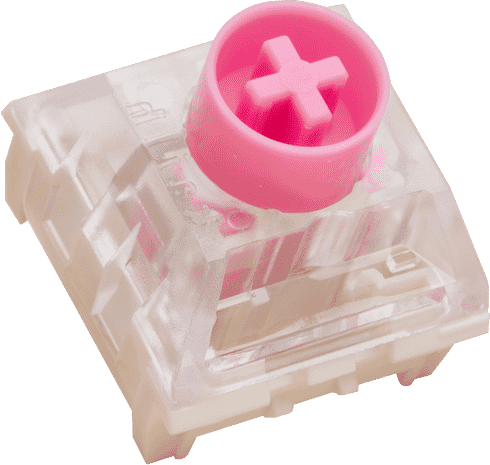
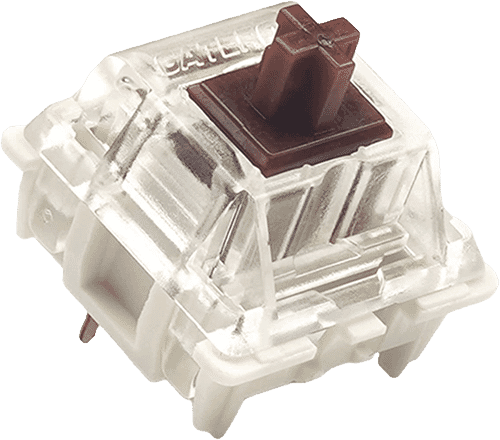
Mechanical switches are the mechanisms that sit beneath the keycaps of mechanical keyboards. With the Advantage360 you can choose between Gateron Brown (tactile) or Kailh pink (linear). You can find more explanation about mechanical switches here.
Which switch suits you?
With this keyboard you choose which switches go underneath. They cost the same, so it comes down to preference. A linear switch travels smoothly with no noticeable bump; a tactile switch has one, and a clicky switch lets you hear it too.
Kailh BOX Silent Pink
Gateron KS-9 Brown
Type:Linear travels evenly. Tactile has a noticeable bump. Clicky adds an audible click to that bump.
Linear (silent)
Tactile
Actuation force:Force:The force needed to register a keystroke. A regular rubber dome keyboard needs 55 to 60 g, so lower means lighter typing.
35 g
55 g
Tactile bump force:Bump force:The force at the point where you clearly feel the key give way. Only tactile and clicky switches have this; a linear switch does not. A dash means the switch does have one, but the manufacturer states no figure. Technical term: pressure point force.
Not applicable
–
Registers after:The distance the key travels before the keystroke registers. You do not have to press the key all the way down. Technical term: pre-travel or actuation point.
1.8 mm
2.0 mm
Full travel:Travel:The total distance until the key can go no further.
3.6 mm
4.0 mm
Lifespan:The number of keystrokes per key stated by the manufacturer.
80 million
60 million
Sound:Indication for normal typing. Even a silent switch makes noise if you bottom out the key.
Silent
Quiet
Downloads
Advantage360 Pro manual
Quick start guide
What is in the box?
1 x Keyboard
1 x Bridge connector
1 x Keycap puller
1 x Quick start guide
16 x Extra keycaps
Required cables
The Advantage360 & its predecessor the Advantage2 through the eyes of Kinesis
The split parts can be positioned completely independently of each other (even more so on the Pro version thanks to the absence of a cable), which makes the 360 kinder to the shoulders
Adjustable tilt angle. By default it sits at the 'Classic' angle (as on the Advantage2), but you also have 'Medium' and 'High'
5 programmable layers instead of 2 (the Pro even many more)
Higher build quality and reduced noise
The Gateron Brown Low-Force switch on the 360 types more pleasantly and quietly than the Cherry Brown on the Advantage2
Vertical key configuration
Magnetic detachable palm rests are an improvement over the stick-on models on the Advantage2
The same industrial designer was involved in both the Advantage2 and the Advantage 360
The aim was a look that can last 30 years
The Advantage360 is handmade in the United States
Unboxing the Advantage360 Pro
Positioning the keyboard
Frequently asked questions
"What if the keyboard turns out not to suit me?"
At Ergowerken you can always return your purchase free of charge within 90 days. We can then look at an alternative together, or we refund the purchase amount. You will never face any surprises with us.
"Dankzij hun widget kreeg ik de bevestiging dat dit een goede keuze was. Ik kende het product al, maar dit gaf net dat extra zetje om het daadwerkelijk aan te schaffen.
Ik had in de loop van drie maanden geleidelijk schouderpijn ontwikkeld, en dat begon me behoorlijk in de weg te zitten. Totdat ik dit product ging gebruiken: al na één week waren mijn klachten vrijwel volledig verdwenen. Dat verschil is echt ongelofelijk!
In het begin moest ik even wennen, en lag mijn typesnelheid iets lager omdat ik blijkbaar een verkeerde manier van blind typen had aangeleerd. Maar dat had ik verrassend snel weer onder controle. De duimtoetsen zijn bovendien super intuïtief en echt ontzettend makkelijk om aan te leren.
Achteraf kan ik maar één ding denken: had ik dit maar veel eerder gekocht. Ik heb serieus nog geen seconde spijt gehad van deze aankoop. Absoluut een aanrader!"
— Gertjan R. (5/5)
Advantage 360 ergonomisch toetsenbord
"Ongeveer een maand geleden de keuze gemaakt om dit ergonomische toetsenbord aan te schaffen in verband met mijn pols/duimklachten. In de periode voor mijn polsoperatie merkte ik dat ik met gebruik van het toetsenbord wat minder snel last had van pijnklachten. Dat was voor die periode al een winst, hoewel het doel van het aanschaffen van dit toetsenbord met name gericht was op het voorkomen van het terugkeren van de RSI-klachten. Het wennen aan het toetsenbord viel me mee. Het voelde voor mij al relatief snel natuurlijk aan om woorden te typen. De gewenning gaat wat trager bij het gebruik van de speciale karakters, al merk ik dat dit ook al wat gemakkelijker gaat, en zie ik de toegevoegde waarde van het gebruik van de duimclusters al goed in. Al met al heb ik geen seconde spijt gehad van de aankoop, en heb ik goede hoop dat dit me in de toekomst gaat helpen bij het voorkomen van nieuwe hand/polsklachten."
— Sanne A. (5/5)
Fijner dan ik had verwacht
"Het typen wat ik als developer meerder tijd van de dag doe is met dit toetsenbord minder zwaar geworden. Mijn handen blijven nu in een neutrale positie en op schouder breedte. Het is wel wennen als je van een normaal toetsenbord komt.
Zelf had ik geen klachten aan mijn armen of handen en is het voor preventie van die klachten"
— Mark H. (5/5)
Even wennen, maar echt beste wat er is
"Het is absoluut wennen en om sneltoetsen te maken moet je wel IT-kennis hebben, maar als je polsklachten hebt, is het echt top."
— Abel K. (5/5)
Fantastisch voor overbelaste polsen
"Dit toetsenbord biedt me de mogelijkheid te typen zonder mijn polsen onnodig te belasten. Alleen het numerieke toetsenbord en bepaalde combinaties van toetsen voor Windows, die mis ik of gaan lastig (alt tab, ctrl c of ctrl v). Ik moet me nog verdiepen in de mogelijkheden om toetsen te programmeren en ook de gelaagdheid heb ik nog niet goed door. Wellicht gaat dat helpen.
Gewoon typen is echt fantastisch. De extra snufjes zijn niet altijd intuïtief en vragen wat onderzoek.
Ik heb dit toetsenbord al een aantal weken, maar mag het slechts beperkt gebruiken wegens acute polsklachten. Ik heb gemerkt dat een gratis typecursus van het internet plukken helpt om snel je vingers te laten wennen aan waar de letters op het toetsenbord zitten. Dat is soms net onder een andere hoek dan je gewend bent."
— Jaap l. (4/5)
Customizable and healthy
"I'm a software developer and I'm on a keyboard the whole day, every day. I decided to buy the best ergonomic keyboard to prevent potential injuries. And this keyboard delivers. The shape of it is perfect, it feels really natural for my fingers. The fact that I can position each side wherever fits best for my wrists is also awesome. The build is of great quality. An the customizability is superb. I assigned 2 keys for copy and paste. And I now I can't live without it, why doesn't every keyboard have buttons for such a basic flow?! The software for assigning keys is simple and intuitive, really good.
The only downside is the lack of the function keys (F1-F12) which I need a lot for development and I'd prefer to access them without an extra key press. And the arrow keys, I still didn't get used to their position. But I'll get there eventually."
— Adriana f. (5/5)
Perfect toetsenbord
"Het toetsenbord is van hoge kwaliteit. De switches (bruin) maken aardig wat geluid maar het is niet heel storend. Een split keyboard zelf is even wennen. Aan het begin type je erg langzaam en maak je constant fouten - maar na een paar dagen typed het heel prettig.
De klachten in mijn arm zijn een stuk minder geworden na het gebruik. Omdat het toetsenbord erg hoog is vanwege de enclave moest ik mijn bureau wel lager zetten om het toetsenbord op een comfortabele hoogte te krijgen. Om hiervoor te compenseren heb ik mijn muis en monitor op een verhoging gezet.
Met de Pro versie kan je de toetsen naar eigen wens aanpassen. Dit is niet ingewikkeld als je zelf een programmeur bent, maar zal voor leken wel redelijk lastig zijn. De documentatie hiervoor is goed, maar je moet zelf een github repository clonen en de firmware uploaden naar het toetsenbord, dus het is niet heel eenvoudig. Het voordeel is wel dat je het toetsenbord helemaal naar eigen wens kan inrichten."
— Mark R. (5/5)
toetsengebruik van advantage 360
"zeer aangenaam de toetsen te gebruiken. beide handen voelen ontspannen. het aanraken met de toetsen is zeer precies. het voldoet de verwachting van de inkoop."
— R S. (5/5)
Top
"De Kinesis Advantage 360 heeft mijn polspijn als developer aanzienlijk verminderd. Het ergonomische en gesplitste ontwerp houdt mijn handen en polsen in een natuurlijke positie, wat de belasting veel vermindert. De duimclusters voor toetsen als “Enter” en “Backspace” minimaliseren ook de handbewegingen, waardoor ik urenlang comfortabel kan coderen.
Het neemt toch wel een aantal weken om deze layout gewend te geraken, maar het loont de moeite. Eens je de Kinesis gewend bent wil je geen ander toetsenbord meer gebruiken. Voor elke developer die worstelt met pijn in de pols is dit een investering die het zeker waard is."
— Laurence C. (5/5)
niet voor kleine handen
"Algemeen een goed product
Het verplaatsen van toetsen als shift/ctrl naar de duim werkt volgens mij zeer prettig, maar mijn handen zijn er gewoon te klein voor.
Daarnaast is de prijs ook niet mis."












.png)