Notify me when is back in stock.
Enter your email address and we’ll notify you when it’s back in stock.
Once you submit your email address, we’ll send you a confirmation email for your sign-up.
This notification does not guarantee that you’ll be able to claim the product when new stock arrives. Want a better chance of getting it once it’s back in stock? Order and pay for it now, and you’ll be first in line when new stock becomes available.
Privacy Your email address is stored in a secure, closed database that we cannot access. After the stock update, your email address will be automatically deleted.
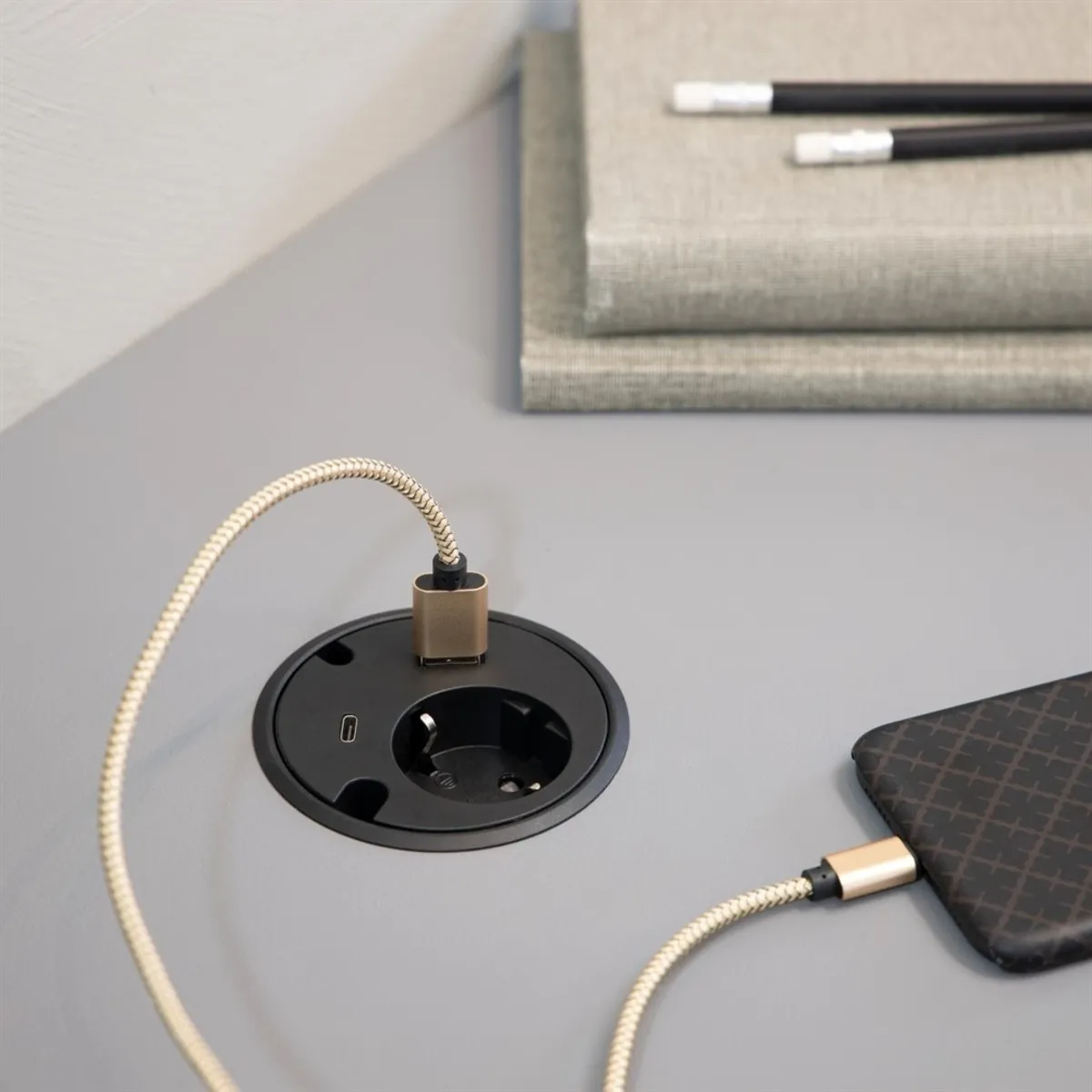
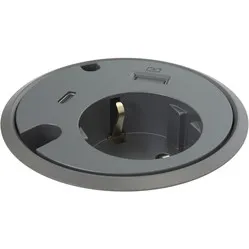
Powerdot 16 with USB-A charger and USB-C Ø79 mm black
0 reviews
73,45

Your custom quote, within 24 hours in your inbox. For when you're interested in larger quantities or need approval for your order.

Powerdot 16 with USB-A charger and USB-C Ø79 mm black

You are requesting a quote for:

Powerdot 16 with USB-A charger and USB-C Ø79 mm black
Just follow along, requesting a quote is this easy.
1
Complete the quick form and get your quote fast.
2
Tap the orange button and we’ll get right on it.
3
You’ll receive a custom quote within 24 hours. Need a little more time? We’ll let you know. Simple and clear.
Powerdot 16 with USB-A charger and USB-C Ø79 mm black
Request quote
Stel vraag

Powerdot 16 with USB-A charger and USB-C Ø79 mm black

Configure your product
73,45
Incl. tax
60,70
Excl. tax
Article number: ERGO-SL015B
The product is in stock and, if ordered before 17:00 on business days, will be delivered the next day.
Hierboven staat de verwachte levertijd. Zodra het pakket verstuurd is, ontvang je een berichtje.
  • Order 2 for 71,25 each (incl. VAT) and save 3%
  • Order 4 for 69,04 each (incl. VAT) and save 6%
  • Order 10 for 67,57 each (incl. VAT) and save 8%
  • Order 20 for 66,11 each (incl. VAT) and save 10%

Product description of Powerdot 16 with USB-A charger and USB-C Ø79 mm black

An ode to the Powerdots

Power to you!

Everyone knows the feeling; you're either frantically searching for a power socket or you're crawling under your desk for the 10th time within the hour to plug in or unplug your charging cables. With the Powerdot, that's a thing of the past. Now you only need to crawl under your desk once: To plug in your Powerdot.

Why the earthed Powerdot with USB charger and USB-C?

This Powerdot provides space for one earthed plug. Additionally, you have the option to charge your phone, tablet, or laptop via the fast-charging USB-A port. The USB-C port can also be used as a charging point, but it's particularly good at "keeping your desk tidy".

At the bottom of the Powerdot (under your desk) there is a USB-C cable that you can connect to, among other things, a Thin Client. This way, above your desk, you only need one cable from the Powerdot to, for example, your laptop or monitor to provide it with power, internet, display, and keyboard and mouse connection.

Furthermore, the Powerdot features two cable pass-throughs. For installation, drilling a hole in the desktop is necessary. Once mounted, the Powerdot can be set in two positions; flush with the desktop and 6 mm lower than the desktop.

What makes a Powerdot so good?

With the right Powerdot for you, you provide yourself with the power and connection you need within reach. The Powerdot takes up little space and can be mounted in the most ideal position for you. This way, you won't be bothered by excessive loose cables under, along, and over your workspace, and your devices will always be with you.

Get the most out of this product

There are many different Powerdots, and some look very similar. So, take your time to look and read carefully to ensure you choose the right one: how it is earthed, whether it has the correct types of extra ports, and the size of the Powerdot.

How happy will my body be with this?

  • Back
  • Neck
  • Arm
  • Shoulder
  •      
  •      
  •      
  •      

Pros and Cons

  •  Convenient charging points at hand
  •  Suitable for charging phone, tablet, and laptop
  •  Sleek design
  •  Can be lowered below desktop height
  •  Includes USB-C "multi" cable
  •  Installation requires tools

Brief specifications

EarthingEarthed
Number of USB connections2
InstallationIn the desktop
Connection cable length1.5 metres
Dimensions (LxWxH)Ø 78 x 68 mm
  view all specifications

Product features

  •  Earthed socket
  •  USB-A charger
  •  USB-C connection point
  •  1.5-metre connection cable
  •  With cable pass-throughs
  •  Mounting hole Ø79

What's in the box?

  •  Powerdot
  •  Mounting ring
  •  Manual

Downloads

  Manual
  Line drawing

Frequently asked questions

No, the USB port functions as a charger for your phone or tablet, for example.
From the bottom of the Powerdot comes a plug with a Schuko connection of 1.5 metres. You can easily connect this to a power socket or another power strip.
Yes, the Powerdot must be placed in the desktop. A hole must be made for this. This can be done with a hole saw, for example.
The USB-C cable transfers all established connections with just one cable from a central hub to the system where you need these connections. For example, you might use a Thin Client as a central hub for your internet connection, video and audio, and connection to your mouse and keyboard. To get these connections above the desk without all the associated cables, you only need to plug the USB-C cable into the Thin Client, and route another USB-C cable from the Powerdot to, for example, your laptop, above the desk.
Item number ERGO-SL015B
Brand Powerdot
Warranty 2 years
Type of guarantee The Ergowerken free return guarantee service
Number of sockets 1x 230 V connection
Implementation Black - 1x 230 V connection, 1x USB charger, 1x USB-C connection point and 2x cable grommets
Cable length 1.25 m Connection cable
Earthing Earthing
Surge protection No
Surge protection No
Product weight 180 grams