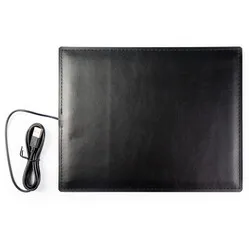
verwarmde muismat
"Prima ding alleen wordt hij niet erg warm en het is jammer dat je de warmte niet kan instellen"



Nice, isn't it, such a chic mouse mat. What a wonderfully warm appearance! Ha, get it? "Warm appearance", because the mat emits warmth... Oh, never mind.
The mouse mat features an integrated infrared heating element across its entire surface. This type of heating has a relieving effect on muscle and joint pain, RSI complaints, rheumatic complaints, osteoarthritis, and Raynaud's phenomenon.
You simply connect it by plugging in the USB port (only suitable for 3.0 or higher!). The cable has a length of 140 centimetres. The durable synthetic leather can be cleaned with a damp cloth. However, first unplug the USB cable from the power source and do not use any cleaning agents. Also, ensure no water gets into the mat.
With a heated mouse mat, you can always use your mouse anywhere. This special mouse mat also ensures your hands stay nice and warm.
Currently, September 2022, energy prices are soaring. So it's not surprising if you wonder what it costs to turn on a heated mat. In this document, we have provided an overview of the costs per hour and per working day. We have calculated here with a rate of €0.875 per kWh. If you wish to calculate with a different rate, please use the formula at the bottom of the document.
Never completely cover the product. This can prevent heat from escaping and cause damage to the mat. Ensure the power cord does not kink and unroll it properly when in use. The mat is not foldable.
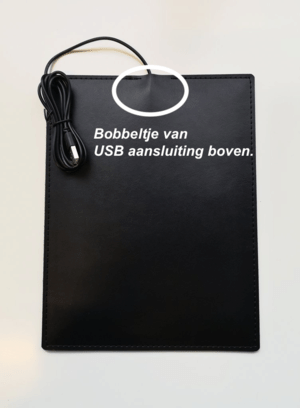
The mouse mat is constructed from 2 sheets of synthetic leather, a heating element, and cardboard for extra rigidity. The cardboard must always be at the bottom, so it doesn't 'curl' due to the heat.
You can tell the top and bottom by the curve of the USB cable in the mat. The curved side should face upwards, as you can see in the photo here.
Has your mouse mat already started to curl? Then place it correctly and continue to use it. It should flatten out by itself.
| Warranty | 2 years |
| Dimensions | 25 x 20 cm |
| Colour | Black/Anthracite/Tobacco |
| Material | Synthetic Leather |
| view all specifications |
| Hand | |
| Wrist |
| Item number | ERGO-WM04BK | ERGO-WM04A | ERGO-WM04T |
| Manufacturer's item number | MU-01 | MU-06 | MU-05 |
| Brand | The WarmMat |
| Warranty | 2 years |
| Type of guarantee | The Ergowerken free return guarantee service |
| Colour | Black |
| Assembly materials included | Not applicable |
Customers who write a review enter a prize draw for a voucher. We pick one winner and publish all reviews, including critical ones.