Update mij als weer op voorraad is.
Vul hier je e-mailadres in en wij geven jou een update wanneer wij weer voorraad hebben.
Je ontvangt na het versturen van jouw e-mailadres een e-mail met daarin de bevestiging van jouw inschrijving.
Wij kunnen met deze notificatie geen garantie bieden dat je 100% zeker weten aanspraak maakt bij nieuwe voorraad. Wil je meer kans om het product te krijgen bij nieuwe voorraad? Kies er dan voor om het nu gelijk te bestellen en af te rekenen. Dan krijg je
Privacy Je e-mailadres wordt opgeslagen in een gesloten database. Wij kunnen die niet inzien. Je e-mailadres wordt na de voorraad update automatisch weer verwijderd.
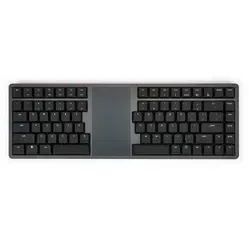
Kinesis Form split wireless keyboard with touchpad
0 beoordelingen
279,00

Jouw offerte op maat, binnen 24 uur in je mailbox. Voor als je interesse hebt in aantallen. Of goedkeuring nodig hebt voor je bestelling.

Kinesis Form split wireless keyboard with touchpad

Je vraagt een offerte aan voor:

Kinesis Form split wireless keyboard with touchpad
Tel je even mee? Zo simpel is het aanvragen van een offerte.
1
Je vult het korte formulier razendsnel in voor een razendsnelle offerte
2
"NEW MESSAGE" Zodra jij die oranje knop aanraakt zitten wij er bovenop
3
Binnen 24 uur heb jij een offerte op maat. En mochten we ietsje meer tijd nodig hebben, dan laten we dat weten. Lekker duidelijk!
Kinesis Form split wireless keyboard with touchpad
Vraag offerte aan
Stel vraag

Kinesis Form split wireless keyboard with touchpad

Configure your product
279,00
Incl. tax
230,58
Excl. tax
Artikelcode: ERGO-KINFORM
The product is in stock and, if ordered before 17:00 on business days, will be delivered the next day.
Hierboven staat de verwachte levertijd. Zodra het pakket verstuurd is, ontvang je een berichtje.
Is this the right product for you?
Use our handy selection check

Beschrijving Kinesis Form split wireless keyboard with touchpad

Is this keyboard right for me?

keyboard dimensions
Width 407 mm
Depth 132 mm
Height18 mm
VersionWindows and Mac
Key layoutQWERTY (ANSI US int.)
SwitchesGateron KS-33 Red (linear)
ConnectivityBluetooth and wired via USB

An ode to the Kinesis Form

Give your wrists a well-deserved break! The Kinesis Form is the wireless keyboard with touchpad that allows you to type and navigate effortlessly. Thanks to its split design and integrated touchpad, you'll never have to search for a mouse again. Less hassle, more productivity. That's what we call smart working!

Why the Kinesis Form?

Have you ever suffered from cramped wrists or stiff shoulders after a day's work? The Kinesis Form offers the solution. Thanks to its split design, you place your hands in a more natural posture, reducing tension in your neck and shoulders.

And the built-in Windows Precision Touchpad? That ensures effortless navigation without a separate mouse. This keeps your working posture compact, giving your shoulders even more rest.

What makes the Kinesis Form so good?

In addition to its ergonomic benefits, the Kinesis Form also features low-profile mechanical switches for a smooth and precise typing experience. The switch in the board is a Gateron KS-33 Red with a linear actuation. This means it provides no tactile feedback at the moment of actuation. The distance before the key registers when pressed is 3 mm. Because the keyboard is made of premium materials and has a sturdy aluminium casing, it produces little noise. This makes it suitable for both home and office.

Get the most out of your Kinesis Form split keyboard

Do you really want to benefit from your new keyboard? Use the touchpad's multitouch gestures for even more efficient working. Connect it wirelessly to your laptop, tablet, or even your smart TV for ultimate flexibility. The multitouch gestures only work on computers with Windows 10 or higher operating system.

And don't forget: the Kinesis Form supports multiple devices simultaneously, allowing you to switch between work and relaxation with a single press of a button.

Don't miss this either

Where many keyboards are limited to standard functions, the Kinesis Form gives you the freedom to customise it completely. Thanks to the programmable keys, you can set up shortcuts and macros that speed up your workflow. To use this feature, called Clique, you need to update the keyboard's firmware. You can read how to do this on the Kinesis website. See the following link: Explanation of Clique and firmware update.

The keyboard features an adjustable (white) backlight with 4 brightness levels. You can also easily switch it off to save battery. It's good to know that without the backlight, the keyboard lasts approximately 2-3 months on a full charge. This is shorter when you have the backlight switched on, as it then only lasts 1-2 weeks on a charge. These are factory specifications and may therefore vary slightly.

 

Pros and Cons

  •  Split design
  •  Low-profile mechanical keys
  •  Wireless via Bluetooth and wired via USB
  •  Integrated touchpad
  •  Multitouch only on Windows

Brief specifications

Key typeGateron KS-33 Red
Ergonomic design 
Operating force50 +/- 15 gf
Travel3 mm
Noise levelLow
View specifications >

How beneficial is this for my body?

Hand     
Arm     
Wrist     
Shoulder     

Product features

  •  Plug and play
  •  Multitouch support (Windows 10 and higher only)
  •  Mac keycaps included
  •  Integrated touchpad
  •  2100mAh rechargeable battery
  •  Battery life 2-3 months (without backlight)
  •  Wireless via Bluetooth, wired via USB
  •  Split design
  •  Full aluminium casing
  •  Equipped with mechanical Gateron KS-33 Low profile switches

What's in the box?

  • 1 x Keyboard
  • 1 x USB-A to USB-C adapter cable (180cm)
  • 1 x Set of Mac keycaps
  • 1 x Keycap puller

Frequently asked questions

 "Is the Kinesis Form suitable for all devices?"
Yes! This keyboard works wirelessly with PCs, MacBooks, tablets, and even smart TVs. You can also use it wired via USB. Please note that multitouch is only supported by Windows 10 and higher.
 "How long does the battery last?"
With normal use, the keyboard lasts 2-3 months wirelessly. If you use the backlight, this is significantly shorter, namely 1-2 weeks. You can also continue to use it wired while charging.
 "Can I take the keyboard with me?"
Although it's a substantial device, it has everything to be the ideal travel companion. Thanks to the Bluetooth connection, you won't have separate USB receivers, and you won't need to carry a separate mouse. It is advisable to use a protective case when travelling.
Item number ERGO-KINFORM
Manufacturer's item number KB-100W
Brand Kinesis
Warranty 2 years
Type of guarantee The Ergowerken free return guarantee service
Keyboard type Split wireless keyboard with touchpad
Ergonomic design Yes
Keyboard layout QWERTY (ANSI US int.)
Connection Wireless via Bluetooth and wired via USB
Bluetooth Yes
USB version USB C, comes with a USB-C to USB-A adapter cable
Type of keys Low profile mechanical switch
Numeric keypad No
Shortcut keys Yes
Programmable buttons Yes, after firmware update
Trackball/touchpad Integrated touchpad with multi-touch support (only with Windows 10 and higher)
Type of power supply Battery
Battery type Li-ion
Rechargeable Yes
Minimum system requirements Includes multitouch: Windows 10 and above | Excludes multitouch: macOS, iOS, iPadOS, Android, and Chrome
Plug and play Yes
Dimensions length x width x height 407 x 132 x 18 millimetres
Product weight 907 grams