Stel hier je vraag over dit product
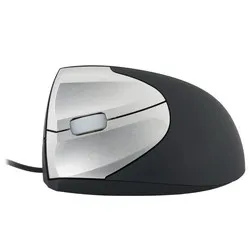
Handshoemouse Original wired left-handed


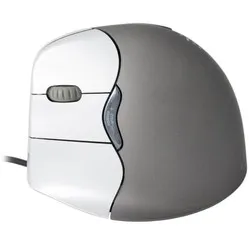
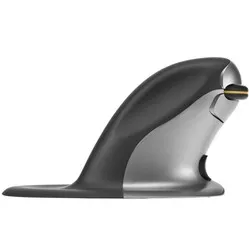
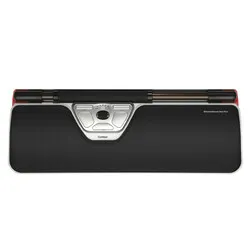
Product description of Handshoemouse Original wired left-handed
Description of the Handshoemouse left-handed wired
Which size fits your hand?
Measure your hand as shown in the image and choose your size using the table:
| Size | Hand length |
|---|---|
| Small | 140 - 170 mm |
| Medium | 170 - 190 mm |
| Large | 190 - 210 mm |
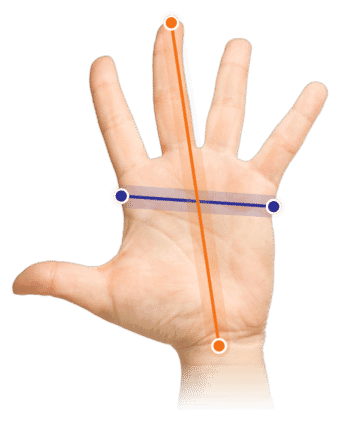
Important: are you right between 2 sizes? Then choose the larger model. We can say this based on our experience with previous customers.
Description
A saddle for your hand
42% of office workers have at some point experienced discomfort from intensive mouse use. That is 42 out of every 100. A good mouse could well make the difference for you too. What makes a mouse a good one? For example, one that took more than 2 years to develop.
Why the ergonomic Handshoemouse?
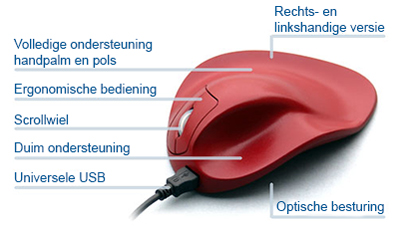
With the Handshoemouse you have a mouse designed entirely around the contours of your hand. It takes a number of important things into account, such as the natural position of your arm. That keeps your hand, wrist and arm nicely relaxed while you work with your mouse.
The left-handed Handshoemouse has one big advantage: it is available in several sizes. No two hands are the same. The size is therefore very important when it comes to finding a good mouse and getting the best possible ease of use. The left-handed Handshoemouse is available in 3 sizes. That way you can be sure it will feel like a glove that fits.
The mouse has three buttons, including a scroll wheel. You plug the USB cable into your computer and it works straight away (plug&play).
This is what makes an ergonomic mouse so good
The difference between a traditional mouse and an ergonomic mouse is easy to recognise in its shape. The shape is also exactly where the benefits come from: because an ergonomic mouse is tilted, your wrist, arm and hand keep a natural posture. This helps counter complaints such as RSI. Or, better still, helps prevent them.
Get the most out of it
To make sure the mouse does not cause unnecessary muscle tension, the latest models have the 'Light Click' system. This makes the buttons on the mouse easy to press. As a result, clicking is smooth and relaxed.
The left-handed mouse also has 'Blueray Track'. This technique makes the mouse even more sensitive and quicker to respond to small movements. Thanks to Blueray Track the Handshoemouse has a resolution (sensitivity) of 1500 DPI. With its light clicking and quick response, the Handshoemouse is a popular choice for tasks involving a lot of mouse activity.
You should not miss this either - Development of the Handshoemouse
The Handshoemouse was developed in collaboration with the Erasmus University Hospital.
1 in 6 office workers experiences RSI complaints or Carpal Tunnel Syndrome. This is partly caused by working for long periods with the wrong tools, such as a traditional mouse. It has the wrong shape and is often too small for the user. This is what prompted the people at Hippus to develop the Handshoemouse.
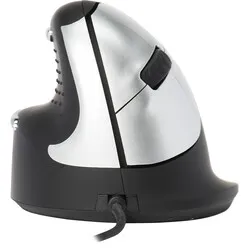
What sets the Handshoemouse apart from old-fashioned mice above all is its well-considered shape. The entire hand rests on the mouse, so you do not have to "grip" it. It is also tilted 25-35 degrees to put the arm in its natural posture and let it relax. Because all the fingers rest on the mouse, there is no friction between your fingers and the desk either.
The development also took account of "fingers hovering above the buttons". If the fingers repeatedly hover above the buttons, this puts unnecessary tension on the muscles, which together with gripping the mouse can lead to complaints. The arch in the Handshoemouse helps this happen less quickly. The complaints you can end up with include the following:
- Tension in the neck muscles
- Headache
- Tingling hand and arm
- Reduced mobility of the head
- Loss of strength in the hands
- Reduced blood circulation
How happy will my body be with this?
- Hand
- Arm
- Wrist
- Shoulder
Pros and cons
- Full support for the hand
- No friction between hand and desk
- Guides the arm into a natural posture
- Less suitable for precise tasks
Brief specifications
| Warranty | 3 years |
| Ergonomic design | |
| Use | left-handed |
| Hand length | <155 mm to 210 mm |
| Plug & play | |
| view all specifications |
Product features
- Helps prevent RSI complaints
- Available in 4 sizes
- Above-average warranty of 3 years
- Most chosen model for hand complaints
- Designed with the Erasmus University Hospital
What is in the box?
- Left-handed wired mouse
- Manual
- USB connection cable
- Protective case
Frequently asked questions
Specifications
| Item number | ERGO-MI062LS (small)/LM (medium)/LL (large) |
| Manufacturer's item number | LS2WL (small)/LM2WL (medium)/LL2WL (large) |
| Brand | Hippus |
| Warranty | 3 years |
| Type of guarantee | Ergowerken free warranty return service |
| Colour | Black |
| Ergonomic design | |
| Management | BRT (Bluray Track), works on any surface |
| Left- or right-handed | Left-handed |
| Hand length | S: 155–170 mm, M: 170–190 mm and L: 190–210 mm, measured from the top of the ring finger to the edge of the wrist |
| Hand width | not applicable |
| Operation | Buttons and scroll wheel |
| Included receiver | not applicable |
| Bluetooth | not applicable |
| USB port | |
| USB version | 2.0 |
| Number of buttons | XS/S/M have three buttons, including a scroll wheel. The L has a third button with the same function as the scroll wheel. |
| On/off button | not applicable |
| Adjustable buttons | |
| Scroll wheel | |
| Trackball | |
| Adjustable sensitivity | |
| Sensitivity | 1500 dots per inch |
| Type of power supply | Wire |
| Battery type | not applicable |
| Rechargeable | not applicable |
| Minimum system requirements | Mac OS X v10.5, Mac OS X v10.6, Mac OS X v10.7, Mac OS X v10.8, Mac OS X v10.9, Mac OS X v10.10, Mac OS X v10.11, Windows XP, Windows Vista, Windows 7, Windows 8, Windows 10 |
| Plug and play | |
| Product weight | 250 grams |
Reviews Handshoemouse Original wired left-handed
Customers who write a review enter a prize draw for a voucher. We pick one winner and publish all reviews, including critical ones.