Superfijne toetsenbord
"Klein, fijn en super makkelijk om te gebruiken. Het koppelen met mijn computer ging heel makkelijk."



| Width | 285 mm |
| Depth | 147 mm |
| Height | 19 mm |
| Key layout | QWERTY (ANSI US int.) |
| Key type | Scissor mechanism |
| Connection | Bluetooth, up to 5 devices |
| Works with | Windows, macOS, iOS, Android and Linux |
Laptop, tablet, phone, the office PC and that second phone you never really wanted. The UltraBoard 950 Wireless talks to all of them. One key combination and you carry on typing on another device. The only thing it won't do is decide which message you answer first.
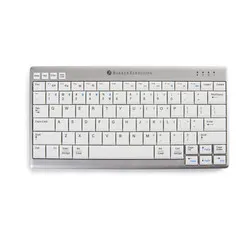
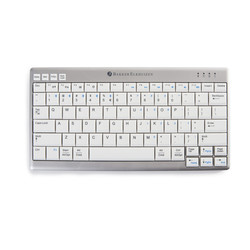
The BakkerElkhuizen UltraBoard 950 Wireless is a compact wireless keyboard without a separate numeric keypad. That keeps it just 285 mm wide, so your mouse sits right next to the keys. You don't have to move your arm as far out to reach the mouse. That can help reduce tension in your forearm and shoulder.
The UltraBoard 950 Wireless connects via Bluetooth and remembers up to five devices. With the Fn key and a number from 1 to 5 you switch between your laptop, tablet, phone or the office computer. You don't need a dongle, but you do need a device with Bluetooth.
The UltraBoard 950 Wireless has a built-in rechargeable battery. According to BakkerElkhuizen, a full charge lasts about four weeks and charging takes around 3.5 hours. At 430 grams and 19 mm high, it fits in any laptop bag with the protective sleeve that comes with it.
The keys of the UltraBoard 950 Wireless use a scissor mechanism and have a key pitch of 19 mm, the same as on a regular keyboard. They press down lightly and quietly. The keys are slightly hollow (concave) and cradle your fingertips, only the space bar is curved outwards. That way you can feel where you are without looking.
The UltraBoard 950 Wireless has a matt surface with white keys and dark letters 4 mm high. If you often look back and forth between a bright screen and the keyboard, that means less difference in contrast and little glare.
The UltraBoard 950 Wireless has keys labelled for both Windows and Mac. Fn + W switches it to the Windows and Android mode, Fn + A to the macOS and iOS mode. If you work on several systems, you simply switch along.
Fully charge the UltraBoard 950 Wireless before first use. Then pair it like this:
To switch device, press Fn and that device's number. The blue LED flashes a few times and you carry on typing on the chosen device. Store your main workstation under number 1: the UltraBoard 950 Wireless selects that number automatically when you switch it on.
The real benefit of the UltraBoard 950 Wireless is the space that opens up on the right. Place your mouse right next to the keyboard, directly in front of your right shoulder. For the first few days you may still reach past the mouse once or twice. You'll get used to it quickly.
If you touch type, keep the feet of the UltraBoard 950 Wireless folded in. Your wrists then bend upwards less. If you often look at the keys while typing, you can fold the feet out for a better viewing angle.
The UltraBoard 950 Wireless charges via micro-USB, not USB-C. The charging cable is in the box, as is a USB-A to USB-C adapter, so you can also charge it from a laptop that only has USB-C. You can keep typing while the keyboard charges.
If the green LED flashes slowly, the battery of the UltraBoard 950 Wireless is almost empty. According to BakkerElkhuizen, a connection that drops now and then is usually also a sign that the keyboard needs charging. Switch the keyboard off when you carry or store it, and the battery lasts longer.
On a Mac the UltraBoard 950 Wireless works in the macOS mode (Fn + A). According to BakkerElkhuizen, not all shortcut keys and Apple command keys work. If your Mac no longer connects after a system update, remove the keyboard from the Bluetooth list, switch off both Mac and keyboard, start the Mac once without the keyboard and then pair again.
The UltraBoard 950 Wireless works without a receiver, so your computer needs Bluetooth of its own. According to BakkerElkhuizen, the range is about 3 metres. If you use a separate Bluetooth dongle, bear in mind that not every dongle fully supports the keyboard.
In short: the BakkerElkhuizen UltraBoard 950 Wireless is a compact Bluetooth keyboard without a numeric keypad, for anyone who works on several devices and wants their mouse closer to their body. Important: US QWERTY layout, Bluetooth without a dongle and charging via micro-USB.
| Warranty | 3 years (5 years after registration) |
| Dimensions | 285 x 147 x 19 mm |
| Weight | 430 grams |
| Connection | Bluetooth 3.0, range about 3 m |
| Devices | Up to 5 |
| Battery | 450 mAh, about 4 weeks per charge |
| Charging time | About 3.5 hours |
| Charging | Micro-USB, 100 cm cable |
| Colour | Silver grey with white keys |
| Plug & Play |
Key figures: 285 x 147 x 19 mm, 430 grams, up to 5 devices, 450 mAh, about 4 weeks per charge, about 3.5 hours charging, 3 years warranty.
| Shoulder | |
| Hand | |
| Wrist | |
| Arm |
Score overview: Shoulder 5/5, Hand 4/5, Wrist 4/5, Arm 3/5.
| Item number | ERGO-BEU950WUS |
| Manufacturer's item number | BNEU950WUS |
| Brand | BakkerElkhuizen |
| Warranty | 3 years (5 years after registration) |
| Type of guarantee | Ergowerken free warranty return service |
| Colour | silver grey |
| Keyboard type | Compact |
| Ergonomic design | |
| Keyboard layout | QWERTY (ANSI US int.) |
| Connection | Wireless via Bluetooth |
| Bluetooth | |
| USB version | 2.0 |
| Type of keys | Flat keys with scissor mechanism |
| Numeric keypad | Integrated |
| Shortcut keys | |
| Programmable buttons | |
| Trackball/touchpad | |
| Type of power supply | Battery |
| Battery type | Li-ion Polymer | +3.7 V | 450 mAh | 1.67 Wh |
| Rechargeable | |
| Minimum system requirements | Windows, macOS, iOS, Android and Linux (on macOS, not all keyboard shortcuts and Apple command keys work) |
| Plug and play | |
| Dimensions length x width x height | 147 x 285 x 19 millimetres |
| Product weight | 430 grams |
Customers who write a review enter a prize draw for a voucher. We pick one winner and publish all reviews, including critical ones.