







Stel hier je vraag over dit product
Keychron Silent K Pro Brown Switches - 110 pcs


Product description of Keychron Silent K Pro Brown Switches - 110 pcs
An ode to switches
Imagine keyboards having a beach day. The mechanical switches would cling to their laptops as if they couldn't miss their deadlines, while the rubber keys would sway in the sea breeze, enjoying the relaxed atmosphere without worrying about work.
What are switches?
Mechanical switches are the mechanisms located under the keycaps of mechanical keyboards. Switches come in various types and sizes. In principle, they all do the same thing; the mechanism ensures that a keystroke is registered when you press a key. Each colour or type of switch provides a different feel when pressed.
Some mechanical keyboards are hot-swappable, which means you can easily remove the switches and replace them with new ones. This way, you can customise a keyboard to your liking.
About the Keychron K Pro Switches
The factory pre-lubricated Keychron Silent K Pro switches aim for an extra smooth, quiet, and natural typing experience. As the name suggests, the noise level with a silent switch is significantly lower.
Silent K Pro switches are designed with gold alloy contacts to offer higher antioxidant performance. This means they last for up to 50 million keystrokes. With an ultra-transparent top housing, these SMD-LED compatible switches provide a better backlight effect, bringing out the keyboard's backlighting to its full potential.
Red vs brown
 | 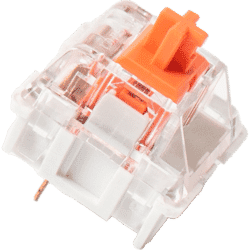 | 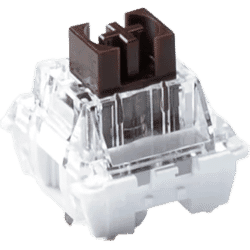 |
| Colour: | Red | Brown |
| Type: | Linear | Tactile |
| Force (gr.): | 45 | 55 |
| Actuation point (mm.): | 2 | 2 |
| Max. travel (mm.): | 4 | 3.9 |
| Lifespan (clicks): | 80 million | 80 million |
| Noise level: | ||
| Ideal for: | Office & gaming | Typing |
| Keystroke feel | Vertical, light press force, soft rebound | Bump, moderate press force, clear rebound |
Types of switches
Linear switchesLinear switches have the simplest operation. They move straight up and down without any tactile feedback or click sound. The smooth keystroke ensures fast movement, which is why linear switches are very popular among gamers. Red switches are often linear.
Tactile switchesTactile switches provide a slight counter-pressure at the moment of actuation to indicate that the keystroke has been registered. There is a noticeable bump. They are ideal for typing because you get an indication without having to fully press the key. Brown switches are often tactile.
Clicky switchesClicky switches work similarly to tactile switches, as they also have a noticeable bump. However, there is a small difference: a click sound is added at the moment of key activation. Clicky switches are suitable for people who want to hear a clear indication of their keystroke or for those who want to retain the clicking sound. Blue switches are often clicky.
Differences between types
Not only does the keystroke feel differentiate between switches, but several other characteristics are also involved. Depending on what suits you and your work, you can choose the right switch.
ForceThe force (or Operating Force) indicates how hard you need to press the key. This is expressed in gram-force (e.g., 50gf).
Actuation pointAlso known as Pre-travel. This is the point at which the keystroke is recognised by the keyboard. This is indicated in millimetres (e.g., 2.3mm).
Maximum travelAlso known as Travel distance. This is the distance between the resting position and the full depression of the key. This is also indicated in millimetres (e.g., 4.0 mm).
Frequently Asked Questions
Reviews Keychron Silent K Pro Brown Switches - 110 pcs
Customers who write a review enter a prize draw for a voucher. We pick one winner and publish all reviews, including critical ones.
