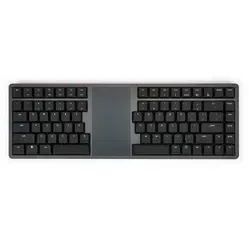
An ode to the Kinesis Form
Give your wrists a well-deserved holiday! The Kinesis Form is the wireless keyboard with touchpad that allows you to type and navigate effortlessly. Thanks to its split design and integrated touchpad, you'll never have to look for a mouse again. Less hassle, more productivity. That's what we call smart working!
Why the Kinesis Form?
Have you ever suffered from cramped wrists or stiff shoulders after a day's work? The Kinesis Form offers the solution. Thanks to its split design, you place your hands in a more natural position, reducing tension in your neck and shoulders.
And the built-in Windows Precision Touchpad? That ensures effortless navigation without a separate mouse. This keeps your working posture compact, giving your shoulders even more rest.
What makes the Kinesis Form so good?
In addition to its ergonomic benefits, the Kinesis Form also features low-profile mechanical switches for a smooth and precise typing experience. The switch in the board is a Gateron KS-33 Red with a linear actuation. This means it provides no tactile feedback at the moment of actuation. The distance before the key registers when pressed is 3 mm. Because the keyboard is made from premium materials and has a sturdy aluminium casing, it produces little noise. This makes it suitable for both home and office use.
Get the most out of your Kinesis Form split keyboard
Do you really want to benefit from your new keyboard? Use the touchpad's multi-touch gestures for even more efficient working. Connect it wirelessly to your laptop, tablet, or even your smart TV for ultimate flexibility. The multi-touch gestures only work on computers running Windows 10 or higher.
And don't forget: the Kinesis Form supports multiple devices simultaneously, allowing you to switch between work and relaxation with a single press of a button.
You shouldn't miss this either
Where many keyboards are limited to standard functions, the Kinesis Form gives you the freedom to configure it exactly as you wish. Thanks to the programmable keys, you can set up shortcuts and macros that speed up your workflow. To use this feature, called Clique, you need to update the keyboard's firmware. You can read how to do this on the Kinesis website. See the following link: Explanation of Clique and firmware update.
The keyboard features an adjustable (white) backlight with 4 brightness levels. You can also easily switch it off to save battery. It's good to know that without the backlight, the keyboard lasts approximately 2-3 months on a full charge. This is shorter when the backlight is enabled, in which case it only lasts 1-2 weeks on a charge. These are, however, factory specifications and may therefore vary slightly.