Stel hier je vraag over dit product
Mistel Air One Silver Cherry ULP mechanical keyboard


Product description of Mistel Air One Silver Cherry ULP mechanical keyboard
Is this keyboard right for me?
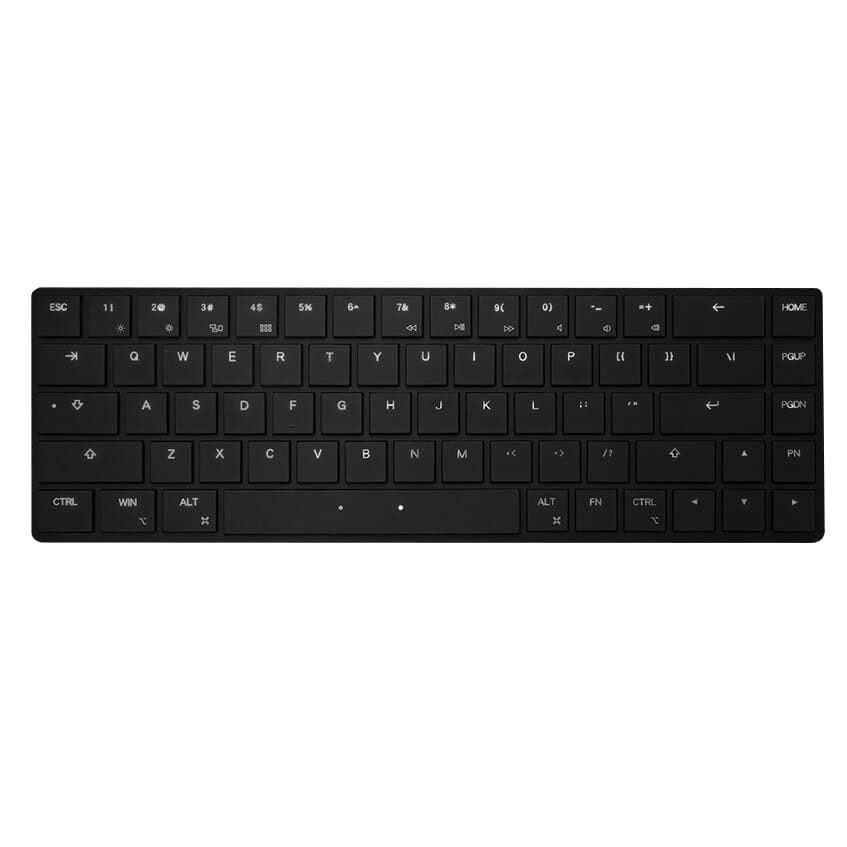
| Width | 308.1 mm |
| Depth | 99.6 mm |
| Height | 13.01 mm |
| Version | Windows and Mac |
| Key layout | QWERTY (ANSI US int.) |
| Switches | Cherry MX ULP |
| Connection | Wired |
An ode to the AirOne Compact keyboard
Typ-ically
Meet the Air One from Mistel, the world's flattest, smoothest, and lightest keyboard! So thin that even paper gets jealous! So light that it flirts with the wind! Typing feels like dancing on marshmallows. Goodbye heavy keys, hello finger aerobics! Warning: May cause a floating sensation.
Why the AirOne Compact keyboard?
Compact keyboard
The new AirOne from Mistel is a smart approach to ergonomics and efficiency. Its compact 65% size offers users a comfortable typing experience that helps prevent shoulder complaints. The keyboard is designed to minimise the reach between mouse and keyboard, thereby preventing shoulder tension.
At the top of the keyboard, there is a series of multimedia keys. These allow you to regulate the volume or adjust your screen's brightness, for example. Unfortunately, there is no numeric section on the right side, but you won't miss it thanks to the numbers at the top.
Robust frame
The keyboard is made from very sturdy (but very light!) CNC aluminium. Sound-absorbing foam is incorporated into the keyboard, ensuring a delightful typing experience. The AirOne is equipped with Cherry ULP switches (we'll get back to these later) and features RGB lighting. This creates a cheerful colour spectacle on your desk. If you don't like this RGB, you can always switch it off. Finally, this gem is topped with wafer-thin ABS keycaps (with translucent letters). The keycaps are not suitable for disassembly.
What makes the AirOne Compact keyboard so good?
You wouldn't think it at first glance because the keyboard is so thin, but the AirOne is a mechanical keyboard. It features mechanical Cherry ULP Switches ( clicky or tactile ). These ultra-low switches ensure that the keyboard is built so flat. This benefits wrist complaints. The disadvantage, however, is that you feel less feedback than with a regular ergonomic keyboard. A typo is therefore made a little faster, but that's a matter of getting used to it.
Get the most out of your AirOne Compact keyboard
Macro function
The AirOne features a 3-layer macro function. Macros are sequences of pre-recorded commands that are played back to automate tasks. These actions can consist of keystrokes, mouse movements, or other operations. Their use is intended to perform recurring tasks more quickly. Unfortunately, this function is only suitable for Windows users. Under the "Downloads" heading on this page, you will find a link that leads you to the Mistel website, where you can download the firmware you need for programming.
Don't miss this either
The AirOne keyboard is available with a black or silver casing and is suitable for both Windows and Mac. You can set up its use with small sliders on the underside of the keyboard. You can carry the keyboard in the included sleeve, keeping it free from scratches and ensuring all keycaps stay neatly in place. Finally, the keyboard can only be used with the (included) USB-C cable. Unfortunately, the keyboard does not have a wireless connection.
Pros and Cons
- Easy to carry
- Compact size
- Included protective sleeve
- Programmable keys
- Macros for Windows only
- Wired use only
Brief specifications
| Layout | ANSI |
| Keycap material | ABS |
| Number of keys | 68 |
| RGB lighting | Yes |
| Macro capabilities | Yes, 3-layer |
How happy will my body be with this?
| Shoulder | |
| Wrist | |
| Arm | |
| Fingers |
Product features
- 65% layout
- Compact design
- With RGB lighting
- Wired use only
- Suitable for Windows and Mac
- 3-layer macros
- With Cherry ULP switches
- Included travel sleeve
- With sound-absorbing layer
What's in the box?
- 1 x Air One keyboard
- 1 x Manual
- 1 x Sleeve
- 1 x USB-C to USB-C cable (30cm)
- 1 x USB-A to USB-A cable (120cm)
Frequently asked questions
Which switch suits you?
With this keyboard you choose which switches go underneath. They cost the same, so it comes down to preference. A linear switch travels smoothly with no noticeable bump; a tactile switch has one, and a clicky switch lets you hear it too.
| Cherry MX ULP Tactile | Cherry MX ULP Click | |
| Type:Linear travels evenly. Tactile has a noticeable bump. Clicky adds an audible click to that bump. | Tactile | Tactile clicky |
| Actuation force:Force:The force needed to register a keystroke. A regular rubber dome keyboard needs 55 to 60 g, so lower means lighter typing. | 52 g | 52 g |
| Tactile bump force:Bump force:The force at the point where you clearly feel the key give way. Only tactile and clicky switches have this; a linear switch does not. A dash means the switch does have one, but the manufacturer states no figure. Technical term: pressure point force. | – | 65 g |
| Registers after:The distance the key travels before the keystroke registers. You do not have to press the key all the way down. Technical term: pre-travel or actuation point. | 0.8 mm | 0.8 mm |
| Full travel:Travel:The total distance until the key can go no further. | 1.8 mm | 1.8 mm |
| Lifespan:The number of keystrokes per key stated by the manufacturer. | 50 million | 50 million |
| Sound:Indication for normal typing. Even a silent switch makes noise if you bottom out the key. | Quiet | Audible click |
Specifications
| Item number | ERGO-AIRONEGCL | ERGO-AIRONEGTA |
| Brand | Mistletoe |
| Warranty | 2 years |
| Type of guarantee | The Ergowerken free return guarantee service |
| Colour | Silver with black keycaps |
| Keyboard type | Flat and compact |
| Ergonomic design | |
| Keyboard layout | QWERTY (ANSI US int.) |
| Connection | Cable |
| Bluetooth | |
| Type of keys | Mechanical (Cherry MX ULP) |
| Numeric keypad | |
| Shortcut keys | |
| Programmable buttons | |
| Trackball/touchpad | |
| Type of power supply | Cable |
| Minimum system requirements | Mac OS X v10.5, Mac OS X v10.6, Mac OS X v10.7, Mac OS X v10.8, Mac OS X v10.9, Mac OS X v10.10, Mac OS X v10.11, Windows XP, Windows Vista, Windows 7, Windows 8, Windows 10 |
| Plug and play | |
| Dimensions length x width x height | 308.1 x 99.6 x 13.1 millimetres |
| Product weight | 295 grams |
Reviews Mistel Air One Silver Cherry ULP mechanical keyboard
Customers who write a review enter a prize draw for a voucher. We pick one winner and publish all reviews, including critical ones.