Stel hier je vraag over dit product
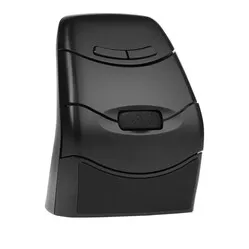
DXT 3 Precision Mouse wireless left/right


Product description of DXT 3 Precision Mouse wireless left/right
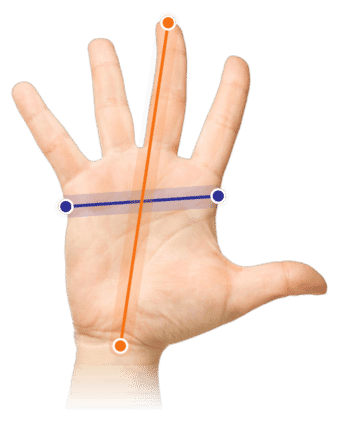
Which size fits your hand?
Measure your hand as shown in the image and choose your size using the table below:
| Size | Width | Length |
|---|---|---|
| One size | > 69 mm | suitable |
An ode to the DXT 3 Precision Mouse
Meet the DXT 3 ergonomic mouse, the ultimate ambidextrous companion for every type of hand. Left-handers, right-handers and even octopuses can cheer. This mouse will never judge you for your hand preference.
Why the DXT 3 Precision Mouse?
Ultimate precision ergonomics
The DXT 3 is the big brother of the DXT Precision Mouse, and it is designed for precise work on the computer. The DXT 3 is built in such a way that you keep a natural position despite the grip. That position means you can keep working relaxed, even with fine movements.
Just like a pen
You hold the DXT 3 mouse with the same grip you would use for a pen, with your fingertips. This grip lets you make small and precise movements while mousing. Because the pen-like grip is so familiar, you get used to the DXT-3 easily. On the thumb side of the mouse you can adjust the sensitivity and choose from four different levels, ranging from 800 to 2400 DPI.
What makes the DXT 3 Precision Mouse so good?
The DXT mouse is designed for left-handed and right-handed users alike. The mouse is symmetrical, so you can easily switch it between left and right. That is useful if you have complaints in your arm, elbow or shoulder, for example. By alternating between left and right you give your painful arm some rest. It will probably take some getting used to at first, but we promise you it is worth it. The DXT 3 comes in a wireless and a wired version.
Get the most out of your DXT 3 Precision Mouse
Wired or wireless
The DXT 3 is available in a wireless and a wired version. The wired version has a cable length of 150cm. The wireless version comes with a USB receiver that connects straight away as soon as you plug it into the computer. On delivery the receiver sits in the compartment intended for it on the underside of the mouse. You can put the receiver in there when you switch workplaces, for example.
Only the wired version of the DXT 3 mouse has programmable buttons.
You should not miss this either
Handy links in the manual
In the manual of the DXT 3 you will find three QR codes. You can scan them with your phone and they take you to videos that show, for instance, how to hold the mouse.
Suitable for everyone
The DXT 3 can be used on Windows, Mac and Linux, with the following operating systems: Android, iOS, Linux, Windows, Mac OS, Unix, ChromeO. The mouse can also be connected to a phone and tablet, which is handy if you are often on the move.
Difference from the DXT 2
Compared with its predecessor (the DXT 2 ) the 3 has had a number of changes. The DXT 3 is 15% larger than the 2, which makes it suitable for bigger hands. The 3 has also been given a number of extra buttons so you can work faster. On the wired version of the DXT 3 these buttons can be programmed. Some changes have been made in the materials used as well.
| DXT 2 | DXT 3 | |
| Weight | 85 grams | 116 grams |
| Dimensions | 56 x 45 x 81 mm | 87 x 42 x 67 mm |
| Mouse size | Universal | Medium/large |
| Sensor | Laser | Optical |
| Number of buttons | 3 | 7 |
| Functions | DPI adjustable, horizontal scrolling, clickable scrolling, switching between right and left, copy/paste | Back, forward, DPI adjustable, vertical scrolling, clickable scrolling, programmable (wired version only), switching between right and left, copy/paste |
| Programmable buttons | No | Wired version only |
| DPI settings | 500, 1000, 1500, 2000 | 800, 1200, 1600, 2400 |
| Materials | Plastic, Steel, Zinc | Aluminium, Plastic, Rubber |
Pros and cons
- With extra buttons
- Effective against shoulder complaints
- For left-handed and right-handed use
- Easy to take with you
- No silent click
Brief specifications
| Dimensions | 87 x 42 x 67 mm |
| Plug & play | |
| Weight | 116 grams |
| Material | Aluminium, plastic and rubber |
| Control | Sensor |
How happy will my body be with this?
| Shoulder | |
| Wrist | |
| Hand | |
| Fingers |
Product features
- Wired or wireless
- Left-handed and right-handed
- Vertical design
- Suitable for precision work
- Sensitivity of 800,1200,1600,2400 DPI
- 7 buttons
- Sensor control
- Suitable for PC, Mac, tablet and phone
- Dimensions: 87 x 42 x 67 mm
- Weight: 116 grams
What is in the box?
- 1 x DXT 3 mouse
- 1 x Manual
- 1 x Charging cable
- 1 x USB receiver
Frequently asked questions
Specifications
| Item number | ERGO-DXT3W |
| Warranty | 2 years |
| Type of guarantee | Ergowerken free warranty return service |
| Colour | Black |
| Ergonomic design | |
| Management | Sensor |
| Left- or right-handed | Can be used by left- and right-handed people |
| Hand length | Suitable for any arm length |
| Hand width | Wider than 69 mm |
| Operation | Buttons and scroll wheel |
| Connection | Wireless USB (or wired with charging cable) |
| Included receiver | Yes, 2.4 GHz nano receiver |
| Bluetooth | |
| USB port | |
| USB version | 2.0/3.0 |
| Number of buttons | 7 |
| On/off button | |
| Adjustable buttons | |
| Scroll wheel | |
| Trackball | |
| Adjustable sensitivity | Yes, 4 DPI settings |
| Sensitivity | 500/1000/1500/2000 dpi |
| Type of power supply | Rechargeable battery |
| Battery type | Lithium Polymer battery (250 mAh) |
| Rechargeable | Wireless version only |
| Minimum system requirements | Mac OS X v10.5 and above / Windows XP and above |
| Plug and play | |
| Dimensions length x width x height | 87 x 42 x 67 millimetres |
| Product weight | 116 grams |
Reviews DXT 3 Precision Mouse wireless left/right
Customers who write a review enter a prize draw for a voucher. We pick one winner and publish all reviews, including critical ones.