






VERTICAL MOUSE
FROM JUST €35.95


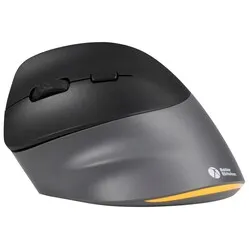
Customer reviews of their vertical mice
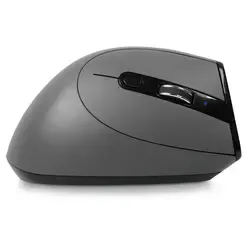
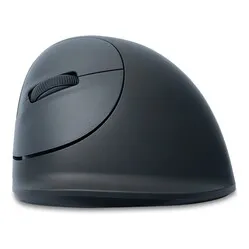
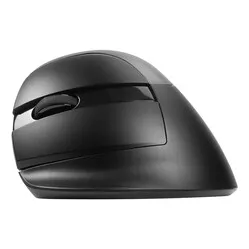
One of the most vertical mice in our range is the Posturite Penguin Mouse. Sylvana bought it because of her complaints and recommends it to everyone: “It feels incredibly comfortable in the hand, much more natural than a flat mouse. It weighs almost nothing and glides smoothly across the desk”.
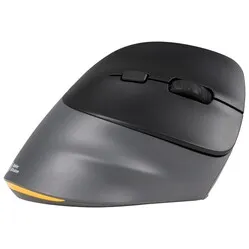
Evoluent’s mice are also very highly rated. Lobke is very happy with the design of the Evoluent Verticalmouse 4. She says: “The mouse feels wonderful in the hand; it ‘fills’ it out, as it were, allowing my hand to move the mouse in a wonderfully relaxed way. I wouldn’t want to use a ‘normal’ mouse again!”
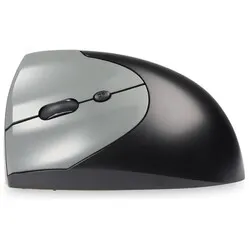
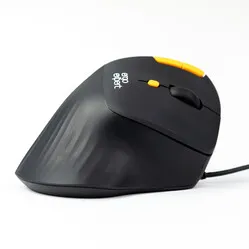
The Unimouse from the Contour brand can be fully customised to suit your needs. For example, the angle of the mouse can be adjusted to your liking, as can the thumb rest. Carla suffered from RSI symptoms and shoulder problems, but these have disappeared since she bought the Unimouse: “It’s well worth the money. Not just any ergonomic mouse, but one that allows you to work with great precision in Photoshop. I should have done this years ago.”
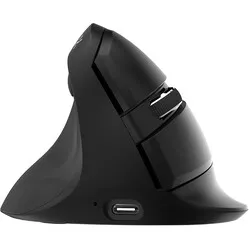
The Mini from the Delux brand has already been reviewed over 100 times, with an average rating of 4.7 out of 5.0. Diana says: “I’ve been sitting in an awkward position for 14 years. And now I’m in a natural position. I’ll give it a bit of time. But the mouse works brilliantly, almost silently. It feels good.” Robin is also very impressed by the wonders the Mini works: “After just a week, I already noticed relief in my wrist and forearm. Just a bit longer and soon all my complaints will have disappeared.”
Why do I need a vertical mouse?
With their tilted design, vertical mice ensure your arm is in a relaxed position. Such a mouse is ideal, particularly for RSI symptoms in the wrist. Many users with wrist problems notice a difference within just a few days compared to their old, often flat mouse.
A vertical mouse doesn’t just put your arm in a better position. Because your hand rests more on the mouse, contact between your wrist and the desk is better avoided. This makes it easier for you to move the mouse using your arm and take the strain off your wrist. After all, you want to avoid pivoting from your wrist when operating the mouse.
Although using a vertical model takes some of the strain off the wrist, you can still move the mouse with great precision. Small wrist movements are still possible. For tasks such as Photoshop, CAD or video editing, this is an absolute must.

With a flat model (top photo), the ulna and radius overlap. Maintaining this position for long periods can cause irritation. The transition from a traditional flat mouse to a vertical mouse is therefore very comfortable for many people. It allows you to use the mouse comfortably for longer periods.
| Vertical mouse | Flat mouse | |
|---|---|---|
| Ergonomic | ||
| Relaxed wrist | ||
| Greater precision | ||
| Holds the arm in a natural position | ||
| Increases comfort | ||
| Good grip | ||
| Effective against RSI | ||
| Work comfortably for long periods |
Delux Mini
Best-selling vertical mouse
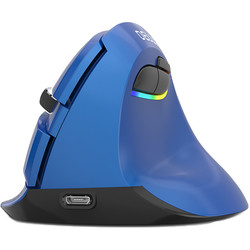
Don’t be fooled – the Delux Mini fits hands up to 19 cm long. Even though it has ‘Mini’ in its name, it packs a big punch. The vertical mouse sits comfortably in the hand and is gentle on the wrist. Its buttons are whisper-quiet, making it ideal for intensive use.
- Effective against wrist and elbow complaints
- Forces the arm into a natural position
- Wireless USB and Bluetooth
- DPI button on the mouse
- Silent mouse buttons
Evoluent D
Our favourite upright
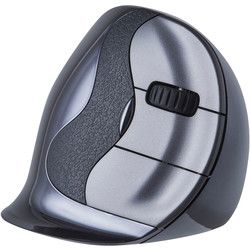
You won’t find a mouse more vertical than the Evoluent D. And although your hand is held almost completely vertical, the mouse still offers sufficient support and grip. The thumb rest and little finger lip provide just that little bit extra to ensure the mouse is easy and comfortable to use.
- Effective against wrist and elbow complaints
- Programmable buttons
- Curved buttons for greater control
- Fine indentation specially designed for the thumb
- Available in sizes Small, Medium & Large
Contour Unimouse
Tiltable up to 70 degrees

Different people, different preferences. That is the idea behind the Unimouse. You can adjust it continuously. Both the palm rest and the thumb rest are adjustable. Tilt it upright for maximum relaxation of the forearm or make it a bit more compact for precise tasks.
- Infinitely adjustable angle
- Adjustable thumb rest
- Long mouse buttons
- Tiltable between 35˚ and 70˚
- Available in wired and wireless versions
Delux Seeker
Vertical and horizontal scrolling

The vertical Seeker is Delux’s latest gem. It fits perfectly in your hand, the buttons and scroll wheel are positioned just right, and it features a magnetic, detachable palm rest. There’s so much more to it – click below to find out more.
- Thumb scroll ball for horizontal scrolling
- Can be used on 4(!) devices at the same time
- Driver for customising the buttons
- Lightweight
- Can be used wirelessly or with a cable
Evoluent 4
Unstoppable star

The Evoluent 4 has been with us for over a decade, but it shows no signs of slowing down. Its rounded curve caresses the hand, whilst its strikingly vertical design is a delight for the forearm.
- Ergonomic design
- One of the most vertical models on the market
- Buttons customisable with the Evoluent driver
- Thumb close to fingers ensures a relaxed hand
- Available in 2 sizes
Frequently asked questions about ergonomic mice
- Is a mouse better for the wrist if it is as vertical as possible?
We find that many customers find a more vertical model more comfortable for the wrist. Do bear in mind, however, that such a model offers less support for the hand
- What do you recommend if I’m between two sizes in terms of hand size?
In that case, it’s best to go for the larger model. A model that’s too small will make you grip it too tightly
- I’m torn between a couple of models. What should I do?
Please contact us by phone, email or chat. We can help you make the right choice by asking a few specific questions
- I have problems with both my hand and my wrist. Is a vertical model the best choice in that case?
Definitely, but in that case, choose a model that isn’t quite as vertical. A suitable model for relaxing your hand and wrist is the semi-vertical HE mouse
- Will I need to get used to a vertical mouse?
Any new mouse will always take a bit of getting used to. Fortunately, the adjustment period for a vertical mouse is only 2–5 days, after which you’ll be using it just as you always have
- How long will it take for my symptoms to disappear with a vertical mouse?
It’s hard to say in advance. It depends on the severity of your symptoms, how long you’ve had them, and factors such as the strain on your wrist outside of working hours (such as sport). We do see that many users of a vertical mouse experience relief after just a few days, to some extent