Stel hier je vraag over dit product
X-PER 70 wired right-handed


Product description of X-PER 70 wired right-handed
Which size fits your hand?
Measure your hand as shown in the image and choose your size using the table below:
| Size | Hand width | Hand length |
|---|---|---|
| One size | suitable | 165 - 195 mm |

An ode to the X-PER 70 right-handed mouse
Expert
The X-PER 70 is your new loyal companion during long hours of computer work. Its ergonomic design is simple, yet ingenious. The soft clicks are reassuring and relax hands and wrists. Wired and reliable, a small hero in the world of ergonomic mice. Thank you, X-PER 70, for lightening the workload and protecting our health.
Why the X-PER 70 right-handed mouse?
Ergonomically sound
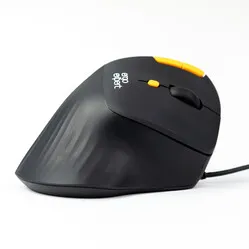
The X-PER 70 ergonomic computer mouse is tilted 70º. This allows the elbow, wrist, and hand to be placed in a natural and ergonomic position during use. This ensures you can work at your computer relaxed and free from discomfort. The mouse is suitable for right-handed users with a hand length of 165-195mm (measured from the base of the hand to the tip of the middle finger).
What makes the X-PER 70 right-handed mouse so good?
The X-PER 70 features 6 buttons, including a scroll wheel. That's more buttons than an average mouse. The left and right mouse buttons are self-explanatory. Using the DPI button between these two, you can adjust the mouse's sensitivity (800/1200/2400/3200). The scroll wheel can also be used for clicking. Above the left mouse button are two additional buttons. The mouse is equipped with a fixed cable (200cm long) with a USB-A connection.
Extra buttons help reduce the number of actions for a specific function. This results in less strain on hands and arms. You can assign certain functions to the extra buttons, such as copy and paste or backward and forward (navigating between web pages in the browser). Assigning specific functions to buttons can be done using a driver such as Mac Mouse Fix for Mac or X-Mouse Button Control for Windows.
Pros and cons
- Design ensures a natural posture
- Silent mouse click
- Extra buttons
- Only one variant available
Brief specifications
| Weight | 140 grams |
| Number of buttons | 6 |
| Sensitivity | 800/1200/2400/3200 DPI |
| Brand | Ergo Expert |
| Usage | Right-handed |
| Connection | Wired (USB-A) |
How happy will my body be with this?
| Wrist | |
| Arm | |
| Hand | |
| Shoulder |
Product features
- Ergonomic design
- Comfortable in hand
- Silent mouse buttons
- 4 DPI settings (sensitivity) (800/1200/2400/3200)
- 2 extra buttons (backward/forward or cut/paste)
- 70º tilted for a natural posture
- 6 buttons in total
- Fixed cable with USB-A connection (200cm)
- Medium size (for hands between 165-195mm)
- For Windows and Mac
- Buttons customisable with an (external) driver such as MacMouseFix
- Matte coating
What's in the box?
- 1 x X-PER 70 ergonomic mouse
- 1 x Very brief installation guide
Frequently asked questions
Specifications
| Item number | ERGO-AZXPER70 |
| Manufacturer's item number | X-Per |
| Brand | Ergo Expert |
| Warranty | 2 years |
| Type of guarantee | The Ergowerken free return guarantee service |
| Colour | Black with orange accents |
| Ergonomic design | |
| Management | Optical |
| Left- or right-handed | Right-handed |
| Hand length | 165–195 mm |
| Hand width | Suitable for any hand width |
| Operation | Buttons and scroll wheel |
| Connection | USB-A cable (200 cm) |
| Included receiver | not applicable |
| Bluetooth | not applicable |
| USB port | |
| Number of buttons | 6 |
| On/off button | |
| Adjustable buttons | |
| Scroll wheel | |
| Trackball | |
| Adjustable sensitivity | |
| Sensitivity | 800/1200/2400/3200 DPI |
| Type of power supply | Cable |
| Battery type | not applicable |
| Rechargeable | not applicable |
| Minimum system requirements | Mac OS X v10.5, Mac OS X v10.6, Mac OS X v10.7, Mac OS X v10.8, Mac OS X v10.9, Mac OS X v10.10, Mac OS X v10.11, Windows XP, Windows Vista, Windows 7, Windows 8, Windows 10 |
| Plug and play | |
| Dimensions length x width x height | +/- 95 x 150 x 70 mm |
| Product weight | 150 g |
Reviews X-PER 70 wired right-handed
Customers who write a review enter a prize draw for a voucher. We pick one winner and publish all reviews, including critical ones.