Stel hier je vraag over dit product
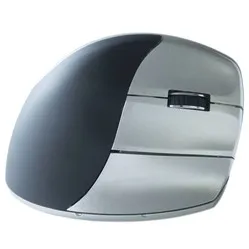
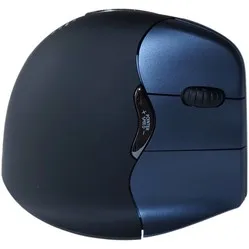
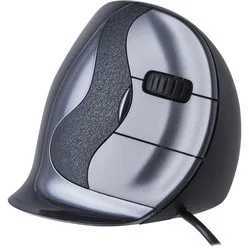
Evoluent D black glossy wired right-handed


Product description of Evoluent D black glossy wired right-handed
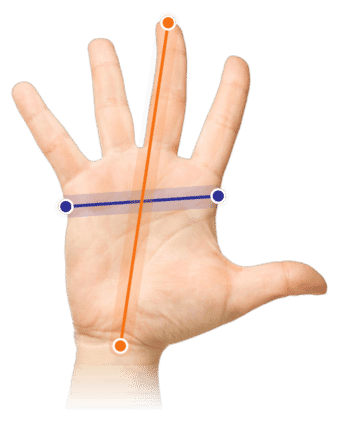
Which size fits your hand?
Measure your hand as shown in the image and choose your size using the table below:
| Size | Hand length |
|---|---|
| Small | < 178 mm |
| Medium | 178 - 190 mm |
| Large | > 190 mm |
An ode to the wired Evoluent D
The Evoluent Damn!
When something works, you don’t need to mess with it too much. And honestly, they’ve kept things nicely subtle. The design of the Evoluent 4 and the Evoluent C has been blended a little here, nothing too wild. You grab the mouse and think: “Woo hoo hoo, what’s this? Curved buttons? Have they completely lost their... hmm, actually, not bad at all.”
Why the wired Evoluent D?
The Evoluent D is a vertical mouse that puts your arm in a relaxed, natural position. Simply put, it’s a regular mouse tilted 90 degrees. Your forearm and wrist especially benefit from this. Your hand rests comfortably on the mouse, with your thumb sitting in the thumb groove. Thanks to the lip at the bottom, your little finger rests on the mouse too, so it won’t drag across your desk.
Curved buttons, more precision
Evoluent has come up with another clever little update. Not long after launching the Evoluent C, the Evoluent D is already here. We do wonder what they’ll do after the Evoluent Z, but luckily we’re not there yet.
The biggest change you’ll notice on this new model is the curve in the 3 mouse buttons at the front. Evoluent added this so you get a better feel for the buttons and can press them with more control. You have more surface area under your fingers and can better feel when you’re pressing a button. That means you can use the buttons with less tension, giving your hand more room to relax.
A complete mouse
Just like its predecessors, the Evoluent D comes with a solid set of buttons. Besides the 3 buttons for your fingers, you also get 2 buttons near your thumb. With the Mouse Manager — more on that below — you have loads of options to make your mouse work a lot more efficiently.
The small button behind the 3 mouse buttons is a DPI button. With this button, you can quickly switch between 4 different cursor sensitivity levels. Working on something that needs precision? Then it can be nice to slow the cursor down a bit. Doing lots of clicking and dragging in something like Excel? Set it to maximum. At the front of the thumb groove, 4 green LEDs show you which setting you’re on.
Another new feature on the Evoluent D is the anti-slip strip near the palm. This strip, positioned roughly between the first and second finger joints, gives you extra grip so your hand doesn’t easily slide off the mouse.
Available in 3 sizes
The Evoluent D is available in 3 sizes, which is great. Especially because of the curved buttons, choosing the right size really matters. You don’t want your fingertips hanging too far over the buttons, because that cancels out the benefit of the design. The Small version is for hands up to 17.8 cm long, the Medium is suitable for hands longer than 17.8 cm up to 19 cm. If your hand is bigger than that, go for the Large version.
The most popular for 18 years
Evoluent entered the market in the early 2000s as one of the first ergonomic mouse brands, and it has never really lost its leading position. They keep developing their models and thankfully continue to add small innovations. Where the Evoluent 4 has firm curves, the Evoluent C has sharper lines. With the D, you can see they’ve chosen a middle ground — and to be fair, it feels great in the hand.
What makes an ergonomic mouse so good?
A vertical mouse like the Evoluent D works really well for creating more relaxation in the wrist. It turns your hand into a more open position. You can even test the difference in tension in your forearm without holding the mouse. Grab your forearm with your other hand and rotate your hand from a flat mouse grip to a vertical mouse grip. You’ll feel the difference right away.
Get the most out of it with Mouse Manager
We actually recommend using the Mouse Manager driver with every Evoluent, but with the D it’s pretty much a must. You can download it from the Evoluent website. Here’s a quick overview of what Mouse Manager now lets you do:
- Customise button functions per program
- Hyper Scrolling
- Eye Comfort Control
- Break function
- Click Lock & Auto Click
Customising button functions
Evoluent has offered this feature since the Evoluent 4. The intuitive program clearly shows which button you’re adjusting and gives you plenty of options. You get 6 customisable buttons as standard, but with the help of the lower thumb button, this can even be expanded to 9 functions. Want to go all in? You can also customise the mouse per program.
Hyper Scrolling
A genuinely cool new feature from Evoluent. With Hyper Scrolling, the mouse reads how quickly you flick the scroll wheel. If you’re calmly scrolling notch by notch, the page will move up or down in small steps. But if you’re spinning the wheel like there’s no tomorrow, the mouse understands you want to pick up the pace and will fly through the page in much bigger jumps. It saves a lot of scrolling, which is great for keeping your hand more relaxed.
Eye Comfort Control
This feature isn’t exactly thrilling, but it can definitely come in handy. When you switch Eye Comfort on, you can adjust the brightness using a keyboard button and the Evoluent scroll wheel. Especially during the winter months, when it gets dark early, it can be nice to lower the brightness and give your eyes a break.
Break function
The Evoluent break function isn’t new either, but it’s definitely worth mentioning. You can set how often it tells you to take a quick break, and also how long it should be before you get back to work. If you struggle to give yourself time for a drink or a short walk, definitely give the break function a try.
Click Lock & Auto Click
Evoluent understands that clicking can create a lot of tension in the hand, so they’ve come up with something for that. With Click Lock, you can lock the left mouse click. So if you need to copy long pieces of text, for example, you don’t have to keep holding the button down the whole time. You activate the click by holding the mouse button for a period you set yourself, for example 1 or 3 seconds. Once you’ve used Click Lock, you simply click again to deactivate it.
Auto Click means you no longer have to physically click. You set a timer, and when you don’t use the mouse for the number of seconds you’ve chosen, it automatically clicks. Want to avoid clicking anything while keeping the mouse still? Just place the cursor somewhere on the page where nothing can be clicked.
Pros and cons
- Curved buttons for more control
- Programmable buttons
- Extra support for thumb and little finger
- Short adjustment period (1-4 days)
- Available in 3 sizes
- Anti-slip strip near the palm
- Not available left-handed yet
Brief specifications
| Warranty | 2 years |
| Ergonomic design | |
| Use | Right-handed |
| Hand length | For all lengths (3 sizes) |
| Number of buttons | 5 |
How happy will my body be?
| Wrist | |
| Arm | |
| Hand | |
| Shoulder |
Product features
- Effective against RSI complaints
- Wired right-handed model
- Thumb groove
- Supportive lip for the little finger
- Curved buttons for the fingers
- Available in 3 sizes
- 210 cm long USB cable
- Soft-touch strip for extra grip
- 3 buttons for the fingers, 2 for the thumb
Downloads
What’s in the box?
- Right-handed wired Evoluent D mouse
- Manual
Frequently asked questions
Specifications
| Item number | Small - ERGO-EVDS | Medium - ERGO-EVD | Large - ERGO-EVDL |
| Manufacturer's item number | Small - VMDS | Medium - VMDM | Large - VMDL |
| Brand | Evoluent |
| Warranty | 2 years |
| Type of guarantee | Ergowerken free warranty return service |
| Colour | Black glossy |
| Ergonomic design | |
| Management | Laser sensor |
| Left- or right-handed | Right-handed |
| Hand length | Small < 17.8 cm / Medium: 17.8 - 19 cm / Large: >19 cm |
| Hand width | not applicable |
| Operation | Buttons and scroll wheel |
| Connection | cable 210 cm |
| Included receiver | not applicable |
| Bluetooth | not applicable |
| USB port | |
| USB version | 2.0 |
| Number of buttons | 5 buttons |
| On/off button | not applicable |
| Adjustable buttons | Yes, you can configure the buttons as desired using the Evoluent software. |
| Scroll wheel | |
| Trackball | |
| Adjustable sensitivity | Yes, with DPI button |
| Sensitivity | 800/1600/2400/3200 DPI |
| Type of power supply | Cable |
| Battery type | AA battery |
| Rechargeable | not applicable |
| Minimum system requirements | Windows 7 and newer, OS X 10.5 and newer |
| Plug and play | |
| Dimensions length x width x height | Small 105 x 86 x 78 mm | Medium 110 x 86 x 78 mm | Large 117 x 92.3 x 81.8 mm |
| Product weight | Small 173.1 grams | Medium 174.4 grams | Large 188.8 grams |
Reviews Evoluent D black glossy wired right-handed
Customers who write a review enter a prize draw for a voucher. We pick one winner and publish all reviews, including critical ones.