







Stel hier je vraag over dit product
Matias Laptop Pro Bluetooth Compact Keyboard for Mac


Product description of Matias Laptop Pro Bluetooth Compact Keyboard for Mac
Is this keyboard right for me?
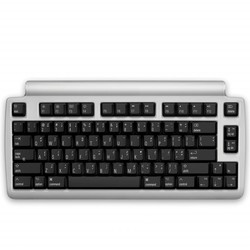
| Width | 340 mm |
| Depth | 165 mm |
| Height | 36 mm |
| Compatibility | Mac |
| Key layout | QWERTY (ANSI US int.) |
| Key type | Mechanical keys |
| Connection | Wireless (Bluetooth) |
Description
SHHHHHHHHHHH!!!
You want to enjoy typing on a mechanical keyboard, but you also don't want to produce as much noise as a shopping trolley rolling over a cobbled street. Then Matias has the keyboard for you!
Quiet Click is Quiet
In the workplace, noise pollution is often overlooked. Yet sound is constantly around us and also affects your productivity and comfort at your workstation. That's why Matias has specially developed the Quiet Click mechanism.
Conventional mechanical keyboards can be quite noisy when you're typing enthusiastically. That's not the case with the Matias Laptop Pro. The Quiet Click mechanism makes no more noise than a whispering librarian.
What makes the Matias Laptop Pro so good?
Is that all? No, with this compact Bluetooth keyboard, Matias set out to create the best Bluetooth keyboard for Mac in the world. They've pulled out all the stops for it.
For example, the Matias Laptop Pro is equipped with a more than capable battery. The capacity is 1600 mAh. That's more than enough to use the keyboard for 6 to 12 months(!) without having to charge it. For first use, Matias advises fully charging it first, which takes approximately 5 hours. Don't worry, you can still work on it while it's charging.
Charging has also been well thought out. The keyboard is equipped with three USB ports. One on the left, back and right side. So, no matter where the USB cable comes from, it will never be in the way. An additional advantage is that when you have one of the USB ports connected, the other two serve as charging points for your phone or tablet, for example.
Unfortunately, the USB ports do not function as a HUB and therefore cannot transfer data or control a mouse.
Healthy choice
The Laptop Pro is a so-called compact keyboard. This means that the numeric keypad on the right side is absent. This creates more space to keep the mouse closer to your body. This ensures a more relaxed working posture and reduces tension in the shoulder and arm muscles.
Mac fan
The Matias Laptop Pro Bluetooth keyboard is specially designed for Mac users. For example, you'll find the CMD keys on either side of the spacebar. On the letter ‘K’, you'll even find the Apple logo, which you can type with ‘option+shift+K’. What's also nice about the Matias keyboard is that most combinations are printed on the keys. This makes it easy to find the € symbol, for instance.
The Bluetooth connection allows you to easily pair with your Mac without needing a cable. You also don't have to sacrifice a USB port. Pairing is quite simple. At the back of the keyboard, in the middle, there is a small button. This has two functions.
- Press the button briefly to turn the keyboard on or off. In the left USB port, you'll find a light that flashes blue briefly when it turns on. It flashes orange briefly when it is switched off.
- Press and hold the button for a bit longer to start pairing. The light in the left USB port will flash blue when it's ready to pair. You can then find it via Bluetooth preferences. Please note that the keyboard must be switched on before you start pairing.
The light in the USB port also has an additional function: it will flash red when it's time to charge the battery.
Don't miss this either
The keyboard features 81 mechanical keys and is 340 mm wide. It is also 168 mm deep and 36 mm high at its highest point. By unfolding the feet, you add another 18 mm. We advise against doing the latter, as it creates an uncomfortable angle for your wrist.
Incidentally, it's not really an ideal travel companion. Weighing 944 grams, it's a bit on the heavy side. This is mainly due to the large battery.
How happy will my body be with this?
- Shoulders
- Hand
- Wrist
- Arm
Pros and cons
- Long battery life
- Mechanical yet quiet
- Compact and wireless
- Indicator light poorly visible
Brief specifications
| Warranty | 2 years |
| Product weight | 944 grams |
| Keyboard layout | QWERTY |
| Power supply type | Rechargeable battery |
| Key type | Mechanical |
| view all specifications |
Product features
- Compact design
- Quiet Click mechanical keys
- Wireless, more freedom
- Long battery life (6 to 12 months)
- 2-year standby time
- 2 USB charging ports
- Mac keys
- Works with all Bluetooth devices
- ™ € £ © keys easy to find
- Laser-etched keys, won't fade
- Traditionally curved keys
- With special Anti-Ghosting Circuits system
What's in the box?
- Laptop Pro compact keyboard
- 2 m charging cable (USB)
- Manual
Frequently asked questions
Productbundels
Specifications
| Item number | ERGO-MAQBMC |
| Manufacturer's item number | FK303QBT |
| Brand | Matias |
| Warranty | 2 years |
| Type of guarantee | Ergowerken free warranty return service |
| Colour | Silver-black |
| Keyboard type | Compact |
| Ergonomic design | |
| Keyboard layout | QWERTY (ANSI US int.) |
| Connection | Wireless via Bluetooth |
| Bluetooth | |
| USB version | not applicable |
| Type of keys | Mechanical keys with Matias Quiet Click technology |
| Numeric keypad | |
| Shortcut keys | |
| Programmable buttons | |
| Trackball/touchpad | |
| Type of power supply | Battery |
| Battery type | 1,600 mAh rechargeable lithium-ion polymer battery |
| Rechargeable | |
| Minimum system requirements | Mac OS X v10.5 and later |
| Plug and play | |
| Dimensions length x width x height | 340 x 165 x 36 millimetres |
| Product weight | 944 grams |
Reviews Matias Laptop Pro Bluetooth Compact Keyboard for Mac
Customers who write a review enter a prize draw for a voucher. We pick one winner and publish all reviews, including critical ones.