







Stel hier je vraag over dit product
R-Go HE Mouse wireless left-handed ergonomic mouse


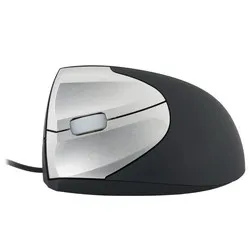
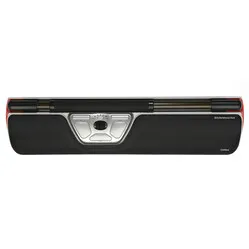
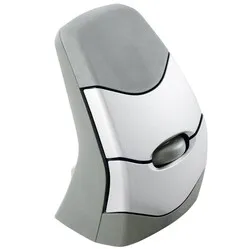
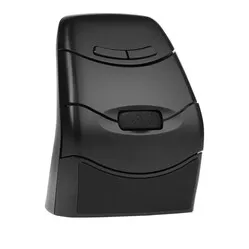
Product description of R-Go HE Mouse wireless left-handed ergonomic mouse
HE mouse left-handed wireless ergonomic mouse
Which size fits your hand?
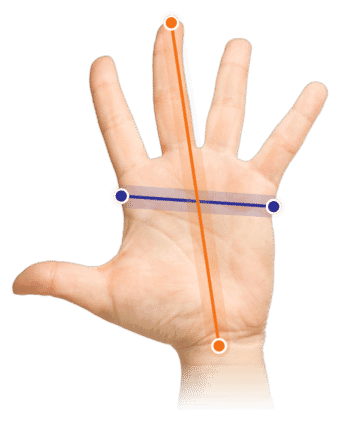
Measure your hand as shown in the image and choose your size using the table below:
| Size | Width | Length |
|---|---|---|
| One size | 70 - 90 mm | 140 - 190 mm |
Description
Wireless left-handed comfort
A mouse is inextricably linked to a computer. It is therefore strange that over all these years the computer has undergone rapid development, but we still often operate it with an old-fashioned mouse. You can change that bad habit today. You're just a few clicks away.
Why the left-handed HE Mouse wireless?
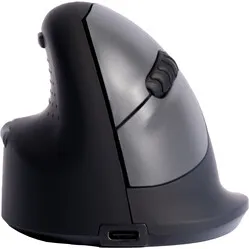
The HE mouse is characterised by its tilted ergonomic design. This keeps your hand, wrist, and arm in a natural position. The left-handed HE mouse is wireless, giving you complete freedom. Additionally, this mouse helps prevent RSI complaints.
The HE Mouse is cleverly designed and supports the entire hand. On the inside of the mouse, the thumb can rest comfortably in the indentation. Thanks to the lip on the left side of the mouse, the little finger does not come into contact with the desk. Furthermore, the mouse is largely made of rubber, which provides a pleasant grip.
There are 5 buttons on the HE Mouse and a DPI button. With the DPI button, you can set the mouse's sensitivity to 800, 1200, or 1600 DPI. The Li-ion battery in the HE Mouse lasts approximately 57 hours and can be charged via USB using the included cable.
The plastic components of the HE Mouse are made entirely from recycled material. Additionally, R-Go is a member of the WEEEE, a European body that regulates the collection and recycling of electronic devices.
What makes an ergonomic mouse so good
An ergonomic mouse offers the user more comfort. RSI complaints in the wrist or arm are a thing of the past. This is because the arm remains in its natural position and the muscles do not have to strain as much.
Get the most out of it
The left-handed ergonomic HE wireless mouse is a lightweight mouse with useful features and a beautiful design. Thanks to soft rubber nubs on the aforementioned thumb indentation, the mouse offers a pleasant grip. Additionally, your thumb won't slip, ensuring optimal control of the ergonomic mouse.
The mouse is equipped with a backward and a forward button. This makes browsing through pages, among other things, even easier. The buttons are easy to reach and do not get in your way. On the mouse, you will find the rubber scroll wheel. This works smoothly and feels pleasant to your fingertips.
Don't miss this either
The buttons on the HE mouse work plug & play by default. Please note: on iMacs and Macbooks, the thumb buttons (backward and forward) do not work without additional software. The left-handed wireless HE mouse does not have its own operating program to change the functions of the buttons. Programs are available that do offer this support. You can find them here for Windows and Mac.
How happy will my body be with this?
- Wrist
- Hand
- Arm
- Shoulder
Pros and cons
- 3-year warranty from a Dutch brand

- 100% recycled plastic components

- Specially designed for left-handed users
- Backward/ forward buttons
- Wireless
- Lightweight mouse
Brief specifications
| Warranty | 3 years |
| Ergonomic design | |
| Use | Left-handed |
| Sensitivity | Between 800 and 1600 DPI |
| Operation | Buttons and scroll wheel |
| view all specifications |
Product features
- Indentation for the thumb
- Extra grip
- Left-handed mouse
- Wireless mouse
- Helps prevent RSI complaints
What's in the box?
- Left-handed wireless mouse
- Charging cable
- Nano USB receiver
- Manual
Differences between the HE mice
| Model | Versions | Connectivity | Hand size | Unique feature |
| HE | Left- and right-handed | Wired and USB wireless | S/M and M/L | Available for all hands |
| HE Break | Right-handed | Wired | S/M and M/L | With break assist |
| HE Sports | Left- and right-handed | Bluetooth wireless | S/M | Bluetooth and nubs for extra grip |
Frequently asked questions
Specifications
| Item number | ERGO-MI020-L |
| Brand | R-Go |
| Warranty | 3 years |
| Type of guarantee | Ergowerken free warranty return service |
| Colour | Black with silver-grey buttons |
| Ergonomic design | |
| Management | Optical |
| Left- or right-handed | Left-handed |
| Hand length | Between 140 and 190 mm, measured from the tip of the middle finger to the edge of the wrist |
| Hand width | Between 70 and 95 mm, measured on the palm, 1 cm below the four fingers |
| Operation | Buttons and scroll wheel |
| Included receiver | Yes, 2.4 GHz nano receiver |
| Bluetooth | |
| USB port | |
| USB version | 2.0/3.0 |
| Number of buttons | 5 buttons |
| On/off button | |
| Adjustable buttons | |
| Scroll wheel | |
| Trackball | |
| Adjustable sensitivity | |
| Sensitivity | 800/1200/1600 dots per inch |
| Type of power supply | Battery |
| Battery type | Lithium-ion battery |
| Rechargeable | |
| Minimum system requirements | Mac OS X v10.5, Mac OS X v10.6, Mac OS X v10.7, Mac OS X v10.8, Mac OS X v10.9, Mac OS X v10.10, Mac OS X v10.11, Windows XP, Windows Vista, Windows 7, Windows 8, Windows 10 |
| Plug and play | |
| Dimensions length x width x height | 106 x 83 x 75 millimetres |
| Product weight | 130 grams |