Which size fits your hand?
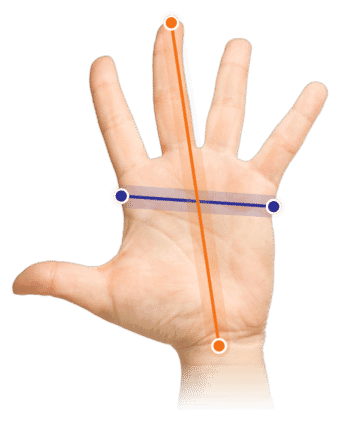
Measure your hand as shown in the image and choose your size using the table below:
| Size | Width | Length |
|---|
| One size | 70 - 95 mm | < 190 mm |
Important: Is your hand wider and/or longer than the measurements above? Then choose the larger Oyster large wireless.
Show us all your angles
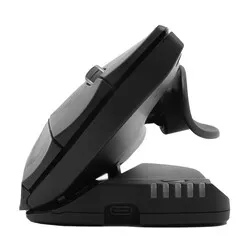
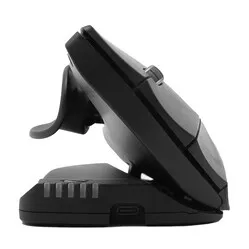
Would you finally like a mouse that does NOT tell you what a good working posture is? Then the Oyster was made for you. Not only can it be set at 5 different angles, it also has a symmetrical design so it can be used left-handed as well as right-handed.
The Oyster mouse owes its popularity to the fact that you can adjust it to your own wishes. The mouse can be set at 20-30-40-50-60 degrees, which really means you will always be able to find a posture that feels good to you.
Left-handed and right-handed operation
The mouse is also symmetrically designed in such a way that it can be used left-handed and right-handed. The two built-in scroll wheels contribute to this. It even gives you the option to switch hands for a while when you have minor aches (as long as you can operate the mouse with both hands).
Effective against RSI
The ergonomic Oyster was developed to help reduce or even relieve RSI-related complaints. Its vertical design supports a natural posture and gives your hand, wrist and arm room to relax. Because you can set the mouse to 5 different angles, your ideal posture is quickly found.
You can connect the mouse to your laptop or PC with its wireless 2.4 GHz USB receiver.
The Oyster wireless is a pleasant mouse with an original design. The mouse can be used by left-handed and right-handed users alike and is adjustable to 5 positions. That way you set the mouse in the position that is comfortable for you. You get the most out of the Oyster especially when you alternate between mousing left-handed and right-handed.
Extra buttons
The mouse comes with a number of handy buttons. Besides the left and right mouse button and the scroll wheel, you will find two more buttons on each side of the mouse. Two buttons perform a double click, so you can open documents easily. The other buttons are a cut and paste button, which lets you edit a document quickly.
The mouse is wireless and comes with a USB charger. So batteries are not needed. When the mouse is empty, you connect it to your computer and charge the built-in battery. You can keep using the mouse while it charges.
The cut and paste button on the mouse does not work on Mac computers.
"My RSI therapist said it did not glide very smoothly, but that was 6 years ago. Does it slide easily across the desktop?" Anne | 6-11-2017
It glides across the desk just as well as most other mice. There is really no difference there
"Why can this mouse be set at different angles?"
It has to do with the personal preferences of the user. It also makes it possible to adapt the mouse to a specific complaint.
"Is this mouse really both left-handed and right-handed?"
It certainly is. The mouse has a scroll wheel on both sides. So you can turn the mouse around and carry on working with your other hand.
"What if the Oyster turns out not to suit me?"
If the mouse does not suit you, you can return it free of charge within 90 days. Together we will look for a mouse that fits you better.