An ode to the R-Go Split keyboard
Not made to stand still
Do you also have that different feeling about certain things you own? You might find one thing perfectly in its place and never want to move it. And you might find another so fantastic precisely because it's perfect for quickly packing up, taking with you, and using anywhere. The R-Go Split belongs to the second group!
Why the R-Go Split keyboard?
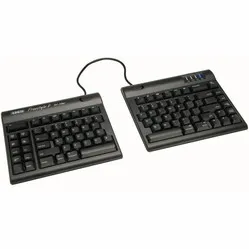
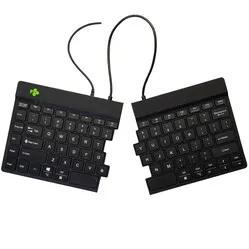
To put it simply, the R-Go split keyboard is a compact keyboard neatly divided into two pieces, allowing you to position them in the most optimal and comfortable way. The two pieces fit together perfectly, which means you can also use the R-Go Split as a normal compact keyboard.
The key press is wonderfully light, and the keyboard is very thin. These factors also play an important role in optimising relaxation, which helps prevent and alleviate complaints. The keyboard is also lightweight, making it the ideal partner for on the go.
Anyone who performs a lot of computer work knows that it can be strenuous for your wrists, shoulders, back, and neck. A good keyboard can help you with this. The R-Go Split, for example, has a compact design. The keys are also extra easy to press. Furthermore, you can position the left and right halves in the optimal position for you. All of this is to minimise muscle tension, thereby preventing or reducing injuries.
Get the most out of this product
The Split keyboard features an R-Go logo at the top of the keyboard that lights up green when you're working "well", orange when you need to take a break, and red when you've worked too long. In this way, the keyboard helps you work in a healthy way, in addition to its ergonomic benefits. For this, you need the R-Go Break pause software. Please note; this is only suitable for Windows.
Don't miss this either
The plastic components of the R-Go Split are made entirely from recycled material. In addition, R-Go is a member of the WEEEE, a European body that regulates the collection and recycling of electronic devices.
Step-by-step guide for Mac users
On devices using the OS operating system, the right half of the keyboard does not function entirely as desired. This can be easily resolved by following these steps:
1. Download, install, and open this software
2. Select the 'Simple Modifications' tab at the top of your screen
3. Click 'Add item'. Select 'left_shift' in the left column and 'right_shift' in the right column on the top row. Select 'right_shift' in the left column and 'left_shift' in the right column on the row below
4. Everything should work as it should! If it still doesn't work as desired, restart your computer
5. Still not working? Call us!