Zware toetsen
"Een goed compact toetsenbord. Helaas toetsen, voor mij (reuma) te zwaar."



| Width | 284 mm |
| Depth | 119 mm |
| Height | 13 mm |
| Compatibility | Windows and Mac |
| Key layout | QWERTY (ANSI US int.) |
| Connection | Wireless via Bluetooth (4.0 & 5.0) and USB dongle |
That's what many a colleague will do when they see this super sleek, sexy board on your desk.
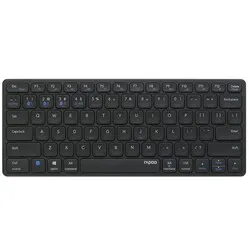
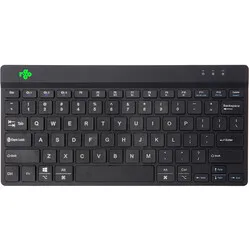
The Rapoo E9050L keyboard has a compact size. This means it does not have a separate numeric keypad on the right side of the board. This ensures you have more space to place your mouse close to your body, which can help prevent annoying neck and shoulder complaints.
Your wrists and forearms will also be more relaxed with this keyboard. It is only 0.5 cm high at the front and gently rises to 1 cm at the back. Including the keys, you reach a maximum height of 13 mm. In combination with the flat keys with a scissor mechanism (also known as laptop keys), this is truly a very flat keyboard.
An additional advantage of the keys with a scissor mechanism is that they are extremely quiet. This way, you can type entire swathes of text like a ninja, without anyone hearing you.
Nowadays, you have more and more devices around you where a keyboard comes in handy. Think of a desktop PC at work, a laptop, phone, or maybe even your TV. With the Rapoo E9050L, you only need one keyboard to connect up to four (4!) devices simultaneously. There are three Bluetooth channels and one 2.4 GHz channel. You can choose between Bluetooth 4.0 or 5.0. You can switch between the Bluetooth channels using the key combination FN+1, FN+2 or FN+3, and with FN+4, you activate the 2.4 GHz connection via the included USB dongle.
In terms of operating system, the keyboard is also a crowd-pleaser. With the help of FN, you can also switch between Windows and Mac mode. This makes certain functions reserved for Windows or Mac accessible as you are used to.
To relieve or prevent shoulder complaints, it is best to operate both the mouse and the keyboard within shoulder width. With a compact keyboard, you ensure that you have more space next to the keyboard, allowing you to place your mouse closer to your body. This reduces the strain on your shoulder and upper arm muscles.
A flat keyboard has advantages for your wrists. This means you no longer have to raise your hands and can place them in a relaxed position while typing. This reduces tension on the back of your hand, wrist, and forearm.
Combine the Rapoo E9050L with an ergonomic mouse for the most optimal working posture. Together, they form an ideal duo to address or prevent complaints in the hand, arm, and shoulders.
Should you still be looking for a separate numeric keypad, you can consider the larger versions E9350 and E9550.
The keyboard feels high-quality due to its weight and the use of an aluminium bottom. The keys are well-seated, and each keystroke feels solid. The keyboard is available in a white or black version.
The keyboard is equipped with a rechargeable battery with a capacity of 500 mAh, which you can charge using the included USB cable. On one charge, you can work for approximately 240 hours. The keyboard features a USB-C connection.
| Layout | QWERTY (ANSI) |
| Material | Aluminium and plastic |
| Number of keys | 78 |
| Backlight | No |
| Shoulder | |
| Wrist | |
| Arm | |
| Fingers |
| Item number | ERGO-RPE9050DG |
| Manufacturer's item number | E9050L DG |
| Brand | Rapoo |
| Warranty | 1 year |
| Type of guarantee | The Ergowerken free return guarantee service |
| Colour | Black |
| Keyboard type | Compact |
| Ergonomic design | |
| Keyboard layout | QWERTY (ANSI) |
| Connection | Wireless via Bluetooth and USB |
| Bluetooth | 4.0 and 5.0 |
| USB version | USB-A |
| Type of keys | Scissor mechanism |
| Numeric keypad | |
| Shortcut keys | |
| Programmable buttons | |
| Trackball/touchpad | Not applicable |
| Type of power supply | Battery |
| Battery type | Li-ion |
| Rechargeable | |
| Minimum system requirements | Mac OS, Windows |
| Plug and play | |
| Dimensions length x width x height | 284 x 119 x 13 millimetres |
| Product weight | 292 grams |
Customers who write a review enter a prize draw for a voucher. We pick one winner and publish all reviews, including critical ones.