Notify me when is back in stock.
Enter your e-mail address here and we will send you an update as soon as this product is back in stock.
After submitting your e-mail address, you will receive an e-mail confirming your subscription.
This notification is no guarantee that you can claim items from the new stock. Want to be more certain of receiving the product? Then order and pay for it right away. Your order will be reserved and shipped as soon as the new stock arrives.
Privacy Your e-mail address is stored in a closed database that we cannot access. After the stock update, your e-mail address is automatically deleted.
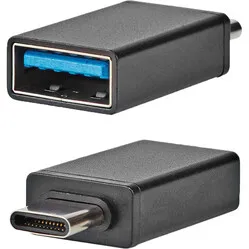
USB-A to USB-C adapter
0 reviews
9,95

Tell us about yourself

We'll get back to you as soon as possible with a proposal.

Stel vraag
Configure your product
9,95
Incl. VAT
8,22
Excl. VAT
Article number: ERGO-CTA2
The product is in stock and, if ordered before 17:00 on business days, will be shipped the same day.
Hierboven staat de verwachte levertijd. Zodra het pakket verstuurd is, ontvang je een berichtje.
  • Order 2 for 9,45 each (incl. VAT) and save 5%
  • Order 4 for 8,96 each (incl. VAT) and save 10%
  • Order 10 for 8,46 each (incl. VAT) and save 15%
  • Order 20 for 7,96 each (incl. VAT) and save 20%

Product description of USB-A to USB-C adapter

An ode to the USB adapter

A Mac is nice

That eternal struggle between Windows and Mac users. Comparable to the chips-fries debate. Will it ever end?

Apple fans do have to admit one thing; those USB-C ports in a MacBook aren't always that convenient. Fortunately, this small adapter offers the solution. (And it really is fries, by the way).

Why the USB adapter?

A piece of cake

With the help of this USB-C to USB-A adapter, you can easily connect your wireless mouse, keyboard, external hard drive, or mobile phone to your MacBook, Chromebook, or Notebook. Not just these devices, by the way, but all devices with a USB-C input.

Small but mighty

Users of devices with (only) a USB-C input often already have a multiport with a USB-A input. However, these are often large and not always convenient to carry. This model, however, is very suitable due to its weight and size. You can simply slip it into your pocket!

What makes the USB adapter so good?

USB 3.2

The USB adapter features USB 3.2, which indicates the speed of data transfer. In theory, USB 3.2 is up to 10 times faster than USB 2.0, meaning, for example, that it takes less time to copy data from one location to another.

OTG function

A large number of today's laptops and phones feature an On The Go function, meaning that various peripherals such as mice and keyboards can be connected. This is useful, for example, when you want to work on your report on the train.


Pros and cons

  •  Easy to carry
  •  Works quickly
  •  Easy data transfer or charging
  •  Prone to looseness

Brief specifications

MaterialMetal plug, nickel-plated finish
Ergonomic design 
TypeUSB-C (m) to USB-A (f)
FunctionCharging and data transfer
ColourBlack
View specifications >

Product features

  •  USB-C (m) to USB-A (f)
  •  Ideal for MacBook, Chromebook, or Notebook
  •  Easy to carry
  •  USB 3.2 Gen1 Type-C to Type-A converter
  •  Suitable for syncing and charging
  •  Features OTG function
  •  Black in colour
  •  Weight: 4 grams
  •  Dimensions: 32 x 15 x 7 mm
  •  For connecting a mouse, keyboard, external hard drive, USB stick, or mobile phone

What's in the box?

  • 1 x USB-C (m) to USB-A (f) adapter

Frequently asked questions

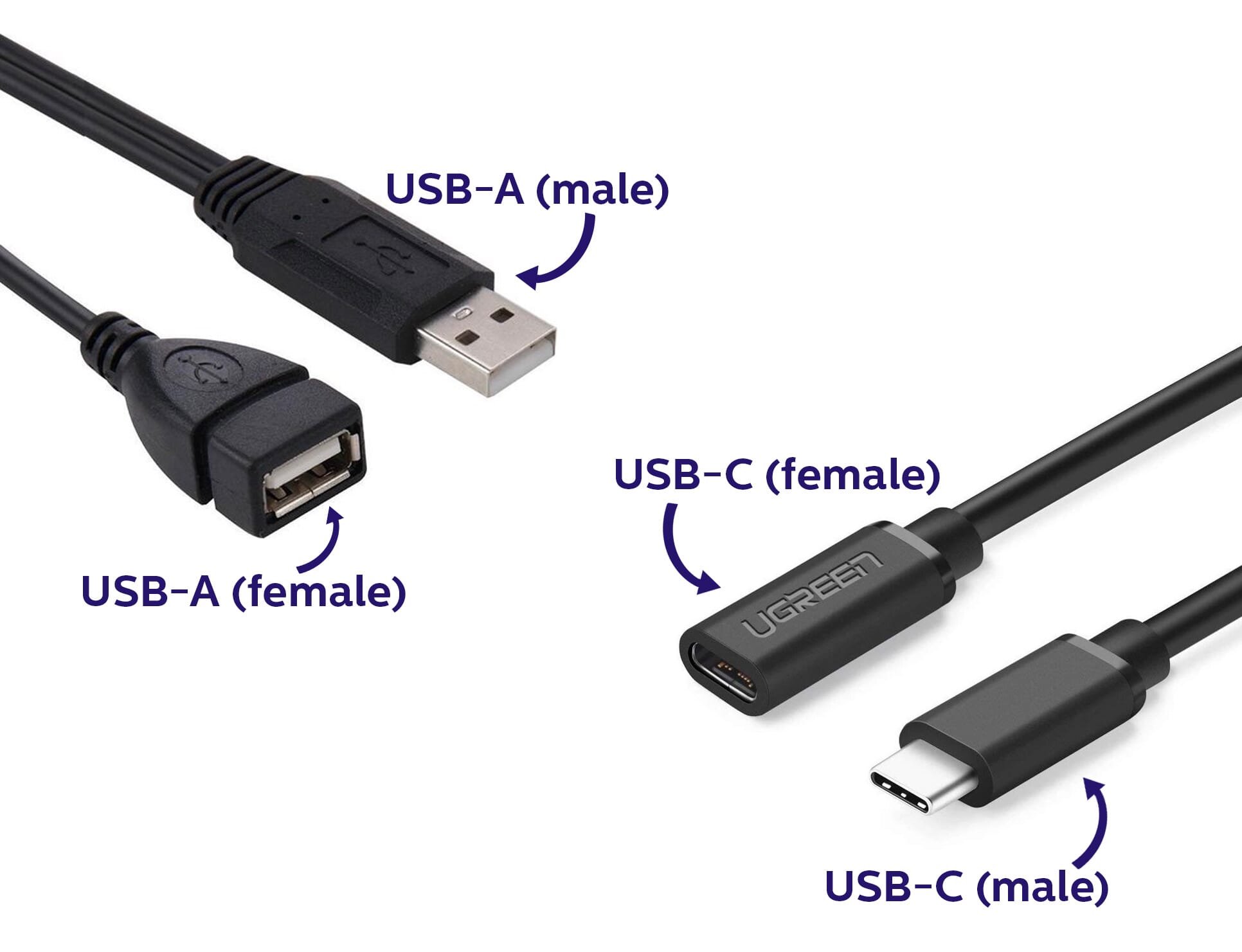
 "What do USB-C (m) and USB-A (f) stand for? "
This indicates the type of USB. C and A in this case stand for the shape of the USB. M stands for male and f stands for female, which indicates whether it is an input or output.

USB-C (m) naar USB-A (f) uitleg

 "Can I use the adapter for charging?"
Yes, that is possible.
Item number ERGO-CTA2
Warranty 2 years
Type of guarantee The Ergowerken free return guarantee service
Colour Black
Assembly materials included not applicable
Required tools not applicable
Product weight 4 grams