





Mechanische toetsenbord
"Uitermate robust toetsenbord! Fijne bluetooth verbinding en top USB aansluiting. Heel fijn voor mijn polsen die nu aanzienlijk minder last hebben."



| Width | 442 mm |
| Depth | 138 mm |
| Height | 42 mm rear |
| Compatibility | Windows and Mac |
| Key layout | QWERTY (ANSI US int.) |
| Switch type | Cherry MX or Gateron mechanical keys |
| Connection | USB-C or Bluetooth |
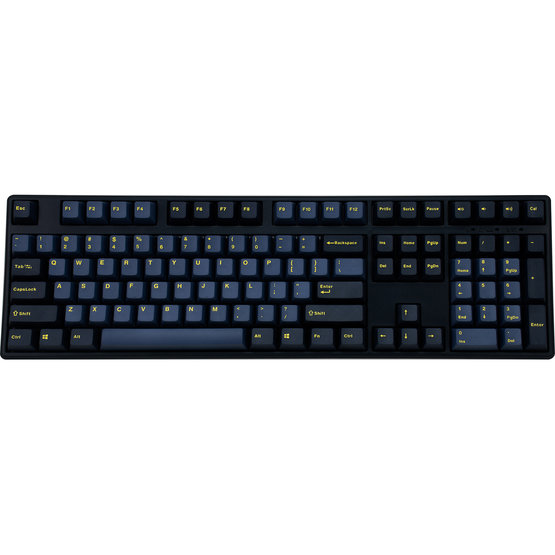
Gaming, typing, programming… It's all possible on Mistel's X-VIII keyboard! And with three customisable layers, you can create the optimal layout for yourself for every task. The Glaze Blue's sibling is not called BumbleBee for nothing; these boards transform into whatever is needed at the moment.
Mistel's X-VIII keyboard features all the keys you need, including a numeric keypad. The keys are equipped with high-quality Cherry MX mechanical switches. The board also has four slider switches on the underside that allow for minor changes to the keys. For example, you can turn the CapsLock key into the left Shift key or Fn key.
The third slider switch mentioned above activates Macro mode. In this mode, you can create up to three different layers, giving each key a different function. We explain exactly how to do this under “frequently asked questions” at the bottom of this page. The keycaps are double-shot, which gives the keycap extra strength and stability. This also keeps the lettering from wearing off or fading.
The X-VIII BTv2 is an upgrade of the older X-VIII. The main innovation lies in its connectivity. The X-VIII can only be used with the included USB-C cable. The X-VIII BTv2, on the other hand, features Bluetooth 5.0, allowing you to use your keyboard wirelessly. But it gets even better; you can connect your keyboard to up to 3 devices simultaneously. Switching between active devices is easy with the Fn+6, Fn+7 or Fn+8 keys.
Not only the connectivity but also the switches have received an update. For example, the switches of the new BTv2 are hot swappable. This means you can swap the switches relatively easily. No soldering is required. The packaging of the new model also includes a so-called switch puller. Would you like to read more about mechanical switches? You can do so here.
| X-VIII | X-VIII BTv2 | |
| Connectivity | Wired via USB-C cable, optional Bluetooth | Wired via USB cable and wireless via Bluetooth 5.0 |
| Hot Swappable | No | Yes |
| Weight | 1100 grams | 1300 grams |
| Switches | Cherry MX switches | Cherry MX or Gateron switches |
| Programmable keys | Yes | Yes |
| Backlight illumination | No | No |
Keychron's wrist rest, made from American walnut wood, perfectly complements Mistel's X-VIII keyboard. The wrist rest features 4 anti-slip points to ensure it stays in place. Thanks to the support, your wrists and hands are at the correct height for using the keyboard. This optimises relaxation and helps prevent injuries. You can add the wrist rest to your order at the top right of the page. You can read more about the wrist rest here.
PLEASE NOTE: Keychron wrist rests are natural products and therefore never identical. The product received may therefore differ from the photo.
Anyone who spends a lot of time at the computer knows that this can be strenuous for your wrists, shoulders, back and neck. A good keyboard can help you with this. Mistel's Glaze Blue keyboard, for example, allows you to add macros. The keys are easy to press and respond quickly. All of this is to minimise muscle tension, which can help prevent or reduce injuries.
Mistel's X-VIII keyboard is wide. From an ergonomic perspective, it's too wide for right-handed mouse users. That's why, for ergonomic reasons, we recommend using a central mouse with this keyboard. These are positioned directly in front of you, between yourself and your keyboard, and also serve as a wrist rest while typing. You can find them here.
This keyboard can also be updated to fix any production and/or design flaws. To do this, you just need to download the firmware. You can find the firmware on this Mistel page.
The keyboard comes with several fun and useful gimmicks. The keycap puller makes it very easy to remove and replace keycaps. Also included are three extra keycaps, a switch tester and a dust cover.
The keyboard is equipped with Cherry MX switches, giving you the choice between MX Silent Red and MX Brown switches. The Silent Red switches are very light and quiet switches with a shorter actuation point, making them ideal for gamers. The Brown switches provide better feedback because they are slightly heavier. These switches are all-rounders and suitable for both office work and gaming.
| Warranty | 2 years |
| Colour | Blue/black |
| Layout | 108-keys |
| Ergonomic design | |
| Plug & Play |
| Hand | |
| Wrist | |
| Arm | |
| Shoulder |
| Item number | ERGO-X8SR/ERGO-X8BR | ERGO-X8SRBT/ERGO-X8BRBT |
| Manufacturer's item number | X8-PUSPDBNA1/X8-BUSPDBNA1 | X8-PUSPDBNBT/X8-BUSPDBNBT |
| Brand | Mistletoe Keyboards |
| Warranty | 2 years |
| Type of guarantee | The Ergowerken free return guarantee service |
| Colour | Glaze Blue/black |
| Keyboard type | Gaming, typing, programming |
| Ergonomic design | |
| Keyboard layout | QWERTY (ANSI US int.) |
| Connection | USB-C wired | Bluetooth |
| Bluetooth | Optional |
| Type of keys | Mechanical |
| Numeric keypad | |
| Shortcut keys | |
| Programmable buttons | |
| Trackball/touchpad | |
| Type of power supply | Wired | Battery |
| Rechargeable | |
| Minimum system requirements | Windows and Mac |
| Plug and play | |
| Dimensions length x width x height | 442 x 138 x 42 millimetres |
| Product weight | 1250 grams |
Customers who write a review enter a prize draw for a voucher. We pick one winner and publish all reviews, including critical ones.