






The benefits of an ergonomic workplace – part 2/3
A healthier workplace: what you need to know
Part 2/3
The key requirements for a healthy and productive workplace
Having presented hard facts, figures, case studies and legislation regarding a healthy workplace in Part 1, in Part 2 I want to focus on the key requirements for a good workplace. Here you’ll find a brief overview of what you can (and must) do yourself, which tools are virtually indispensable, and which factors also have a significant, albeit often overlooked, impact on comfort and productivity.
1. Self-assessment
First, take a critical look at the things you can change yourself
There are plenty of ways to improve your working posture and workplace layout that cost you absolutely nothing. Just time and perseverance. I’ve listed a few of them for you below.
Sitting and standing
Let me start with what we do far too much of all day long: sitting. I wrote earlier that sitting, affectionately known by many as ‘the little killer’, can be very bad for you. The idea still prevails that a sedentary job is risk-free and far less taxing than a physical job such as a removal man, window cleaner or mechanic. WRONG. Prolonged sitting causes muscle atrophy, stiff muscles, weight gain and even an increased risk of cardiovascular disease.
Quite some time ago, back in 1953, a study was conducted among London bus drivers and conductors. Even then, the conclusion was drawn that drivers, who sat for significantly longer periods, were twice as likely to die from cardiovascular disease. A good sixty years later, most people still do not realise that sitting for more than four hours a day is very bad for them.
Unfortunately, a good and lasting solution (I’ll come back to this) to the problem of sitting requires more than just time and effort. Fortunately, there are a number of things you can do to counteract hours of sitting. This requires a slightly more active approach to your day. Fetch a drink for colleagues, eat your lunch whilst out for a walk, discuss matters on the work floor whilst standing, and for once, don’t send an email, but walk over to the colleague in question.
Sitting posture
Sitting is and remains an important part of our daily work. And you might say, “Hey, we do so much sitting. So we must be really good at it.” Nice try. We’re not at all. It’s a shame, because a good, active sitting posture combined with the correct adjustment of your chair can prevent a lot of complaints. You’ll have better blood circulation and work more comfortably.
When adjusting your office chair, pay particular attention to the following:
- Make sure your feet can rest flat on the floor
- The angle in the back of your knees should be at least 90 degrees
- If possible, fill the hollow in your lower back with the adjustable lumbar support
- Adjust the armrests so that your elbows are at an angle of at least 90 degrees
While sitting, be mindful of the following:
- Let your shoulders hang relaxed and do not hunch them up
- Change your sitting position regularly (every 10–15 minutes)
- Adopt a confident posture. Shoulders back, chest out
- Keep your arms as close to your body as possible
Adjusting your desk
The desk is where you spend a large part of your day. It is important that it is adjustable, but even more important that you make use of this adjustability. An adjustable chair alone is not enough. No matter how well you adjust your chair, if your desk is poorly adjusted, you will soon find yourself unable to meet the previously mentioned points, such as flat feet on the floor and your elbows at an angle of at least 90 degrees.
When adjusting your desk, pay attention to the following:
- Set the height of the desk top to match the height of the armrest. You have just adjusted your chair. You can now adjust the height of your desk to match this.
- Ensure there is sufficient legroom. Don’t restrict yourself with drawers, CPU stands and wastepaper bins. Sitting at an angle is a no-no!
- Let your shoulders hang relaxed at your sides and rest your arms on the desk. With an angle of at least 90 degrees, you can be sure your desk is correctly adjusted.
Organising your desk
It is difficult to describe a single correct way to organise a desk. With the wide variety of professions and associated activities carried out at a computer, general advice is no longer sufficient. A wide variety of tools are used on the desk. What we can do is limit ourselves to the tools found on virtually every desk: the mouse, the keyboard and the monitor. Combine these tools with one clear message: ‘centre, centre, centre’. Place all important items as straight as possible in front of you.
The most important tips for a correct layout:
- Avoid having to move your head sideways and/or up and down too much
- Do you work with more than one monitor? Then place the main monitor directly in front of you. Don’t position one slightly to the left and one slightly to the right
- Do you have a variety of tasks? Take this into account. For example: if you have some typing work to do, the keyboard should be easy to slide aside so that you have plenty of space
- Place the keyboard centrally in front of you, no more than 5–10 centimetres from the edge. Position the mouse as close to it as possible
- Keep your elbows close to your body
- Position the monitor about an arm’s length away
2. The right tools
Do you have the right tools?
With the right tools, you can not only be more productive, but you can also prevent all sorts of aches and pains. As we spend hours a day sitting at our desks, it is important that we have the means to sustain this for long periods without developing any issues. Not everyone who spends a lot of time at the computer will start feeling aches and pains straight away. However, do bear in mind that prevention is better than cure. Once you have a strained wrist, it’s not so easy to get rid of it.
Below, I’ll discuss the 5 most important tools for anyone who works extensively on a computer. By incorporating these into your workspace, you’ll be able to work more productively, more relaxed and for longer without developing any issues.
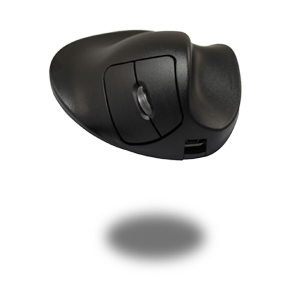
An ergonomic mouse ensures a better and healthier arm posture and provides more support. You may also know the ergonomic mouse as a ‘vertical mouse’ or ‘RSI mouse’. The terminology refers to the same product.
Whereas the traditional mouse is designed purely for function, an ergonomic mouse also takes into account ease of use and the user’s posture. This results in a more user-friendly product. The hand, wrist and arm are therefore in a more natural position, which relieves the necessary tension from the arm. Common aches and pains in the hand, wrist, arm, shoulder and even neck can therefore be significantly reduced. The benefits of the ergonomic mouse are summarised briefly:
- Natural posture
- Less pressure on the wrist
- Better support for the hand
- Greater relaxation from hand to neck
- Reduced risk of developing RSI symptoms
You can find all our ergonomic mice on our 'ergonomic mouse' category page.
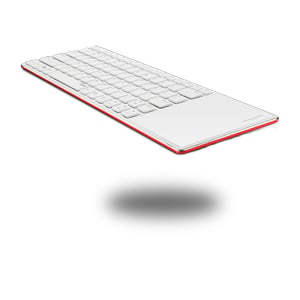
Thanks to a compact (or ergonomic) keyboard, you can create a more centred workspace, which is good for your posture.
You can recognise an ergonomic keyboard by its flat and narrow design. The casing and keys are nice and flat, and in most cases the keyboard does not have a numeric keypad on the right-hand side. All this is designed to ensure a compact and healthy working posture. Your hands do not need to be bent, as is the case with the usual ‘thicker’ keyboards. The mouse can also be placed closer to the keyboard, allowing your arm and shoulder to be more relaxed. The advantages of an ergonomic keyboard are therefore:
- Flat design
- Wrists in line with the arm
- Less muscle tension
- Mouse and arm close to the body
You can find all compact keyboards on our ‘ergonomic keyboard’ category page.
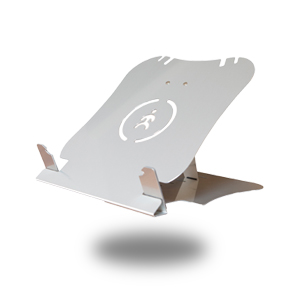
A laptop stand tackles one of the least ergonomic products head-on. It’s a no-brainer: the laptop, of course. Thanks to the laptop stand, the screen is at the correct height and you naturally adopt a better working posture.
The top of a screen should ideally be at eye level. This also applies to a laptop. Without a stand, this is impossible. Furthermore, the distance between the screen and the keyboard is far too small, forcing you, as it were, into a cramped position. With a laptop stand, the screen is at the correct height, you can adopt a good posture and you’re less likely to suffer from back, shoulder and neck pain. Here’s a quick rundown of the benefits:
- Screen at eye level
- Better posture
- Less strain on back, shoulders and neck
- Creates a mobile and healthy workspace
You can find all our laptop stands on our ‘laptop stand’ category page.
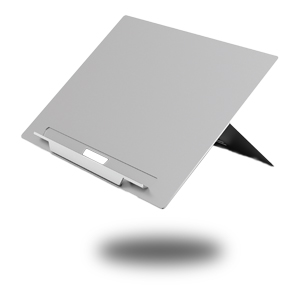
Just like with a monitor, documents are also easier to read when they are positioned closer to eye level. You don’t have to lean towards the paper as much to read everything properly.
Documents usually still lie flat on the desk. To read them properly, you have to turn and tilt your head, and you’re more likely to hunch over your desk, which is bad for your back. Essentially, you’re simply forced out of your most comfortable posture. So, to recap the benefits:
- Documents in a more comfortable reading position
- Better posture
- Less strain on the neck and back
- Documents are positioned centrally
You can find all document holders on our ‘document holders’ category page.
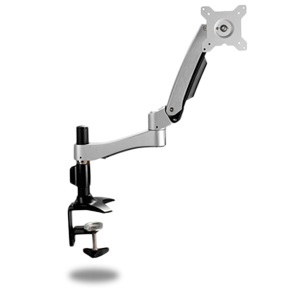
With a monitor arm, not only is your monitor at the ideal height, but you also have much greater flexibility. This makes it easy to shift position or share something with a colleague sitting next to or opposite you.
By positioning the monitor at your ideal height, you can adopt a healthy working posture. Back straight, shoulders back, chest out – you know the drill. You look straight at your screen and don’t have to hunch over or slouch. Unlike the standard monitor stand supplied with your computer, a monitor arm allows you to adjust the monitor to your specific height. To summarise:
- Better sitting posture
- Flexible workspace
- Relaxed back and neck muscles
- Comfortable working for long periods
You can find all monitor arms on our ‘monitor arm’ category page.
3. Other factors
Do you ever think about lighting, air, temperature and noise?
Without perhaps realising it yourself, you are highly susceptible to factors such as light, the right humidity, a comfortable temperature and a noise level that allows you to work productively. Research shows that in a ‘healthy’ building, you can be 10% to 15% more productive and there is 1.5% to 2.5% less absenteeism.
Light
With the right lighting, you won’t have annoying glare on your screen, you’ll be able to read documents clearly, and you won’t suffer from eye strain caused by too much or too little light and contrast. Headaches, blurred vision, and irritated or dry eyes are common complaints in workplaces with poor lighting.
A workplace is considered well-lit from 500 lux (a unit of illuminance). That isn’t really that much, when you consider that a cloudy day provides around 1000 lux. Research shows that increasing the number of lux in the workplace to around 1000 lux actually boosts productivity. The range between 500 and 1000 lux is also often referred to as the ‘stress-free zone’.
Fresh air
Colds, headaches, irritation, fatigue, dizziness and difficulty breathing are common complaints in offices with poor air quality. This may be due to inadequate maintenance of heating and ventilation systems, pollution from adhesives, paint and chemicals, and too many people in a single room.
The humidity in a room is at a comfortable level between 30% and 60%. The amount of fresh air supplied can have a significant impact on productivity. Research showed that short-term absenteeism was 35% lower when 80 cubic metres of fresh air per hour, rather than 40, were pumped into an office space. It also increased productivity by around 2%.
Temperature
When it comes to temperature, it appears to be quite difficult to find the perfect balance. Research shows that we are most productive at around 20°C whilst wearing summer clothing, but we will find this an uncomfortably cold working environment. At 27°C, productivity is actually at its lowest, but we do speak of maximum comfort. So, between 21° and 27°, you need to strike a balance between working productively and feeling comfortable.
Finding that balance is a very personal matter, as another study has shown. Suppose every employee has their own control panel on their desk with which they can regulate the temperature, air speed and amount of fresh air for their own workspace; in that case, they are able to increase their own productivity by up to 12.5%.
Noise
It is a legal requirement that the noise level in an office must not exceed 45 decibels. And that is very low. A quiet classroom, for example, already produces 40 decibels.
Fortunately, more and more companies are making a concerted effort to provide their employees with spaces where the noise level is low and they can concentrate fully. This is achieved using special sound-absorbing partitions, or even completely enclosed rooms where you can work in complete silence.
You can also do your bit to reduce the noise somewhat. By placing plants. We’ve written about this before. Plants absorb a few decibels from the room, thereby lowering the noise level at your workplace.
4. Digest everything calmly
Step by step, we’ll get there
There’s been a lot of information thrown your way in this blog. Take it all in at your own pace and pick up on the things you find important and/or easy to adapt. That way, step by step, you’ll get further and further towards creating the ideal workplace.
If you’re keen to get started but aren’t quite sure where to begin to make your workplace more ergonomic, make use of our comprehensive ergonomic services. For example, we can arrange for you to receive advice from independent ergonomists or provide personalised product advice.
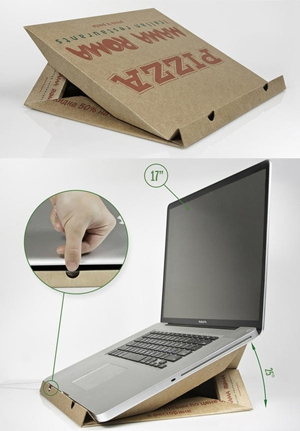
This was part 2 of our three-part series on the benefits of an ergonomic workplace. Next time, we’ll take a more visual approach and I’ll show you how creatively people all over the world are working to make their workplaces healthier and better organised with minimal resources. Here’s a sneak preview.
P.S. Ask for personalised advice via the chat or call us on
+31 (0)76 2600 207
- sources:
- co2indicator.nl
- ccohs.ca
- vgz.nl
- lightingdeluxe.com
- arbo-online.nl
- getbritainstanding.org
- binnenmilieu.nl