10 tips for better mouse use
Use your mouse better - 10 tips to get more out of your mouse
24 September, 2014 | Written by: Tim | View all our tips here | 
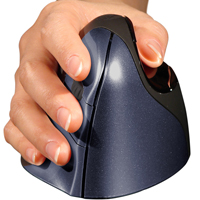 Read our 10 tips for better mouse use now and you'll soon be working more comfortably.
Chances are you've already experienced discomfort from using a computer mouse. This is not only due to the mouse itself, but also to the way you use it.
Our special selection of tips can be easily applied and quickly yields results.
Happy mousing
And you'll be dancing on the table

"Keep the mouse close to your body"
By keeping the arm close to the body, it is more relaxed and the chance of developing complaints is smaller.

"Maintain an elbow angle of at least 90 degrees"
A good relaxed arm is at an angle of slightly more than 90 degrees. Do not make the angle too large, as you will have to 'reach' too much for the mouse, which in turn causes tension.

"Move the mouse from the elbow"
It is important not to move the mouse from the wrist. Most complaints arise from this movement. With movements from the large muscles, i.e. the elbow, the chance of complaints is reduced.

"Hold the mouse loosely"
Don't grip your mouse rigidly. It puts unnecessary tension on your hand and causes discomfort more quickly. Place your hand loosely on the mouse and let it rest there.

"Do not use a wrist rest while mousing"
A wrist rest is ideal for resting your wrist between work sessions. However, while working with the mouse, it hinders your freedom of movement and constricts veins.

"Do not rest your wrists on the edge of your desk"
By placing them on the edge, you constrict blood vessels, which reduces blood flow. In the long run, this can cause irritation or even lead to long-term complaints. So, rest your wrists on the flat part of the desk.

"Give your arm freedom to move"
Lift your arm off the desk, wrist rest, or armrest while mousing. Without the desired freedom, you will operate your mouse with small wrist movements, which can lead to complaints.

"Take your hand off the mouse when at rest"
Often you let your fingers 'hover' above the mouse. This creates unnecessary tension. If you are not using the mouse for a moment, take your hand off it and let it rest, for example, on your lap.

"Play with the mouse sensitivity"
You can always adjust your mouse. Make use of this. Find a setting that works well for you. Ideally, you operate it with small movements and don't have to constantly lift it and reposition it close to you.

"Use keyboard shortcuts"
Many functions that you operate with the mouse can also be done with the keyboard. Think of cutting, pasting, navigating through folders. The keyboard is ergonomically better, so make use of this.

Print our handy tips and always have them at hand