Stel hier je vraag over dit product
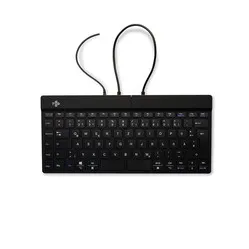
R-Go Split Break split QWERTZ keyboard



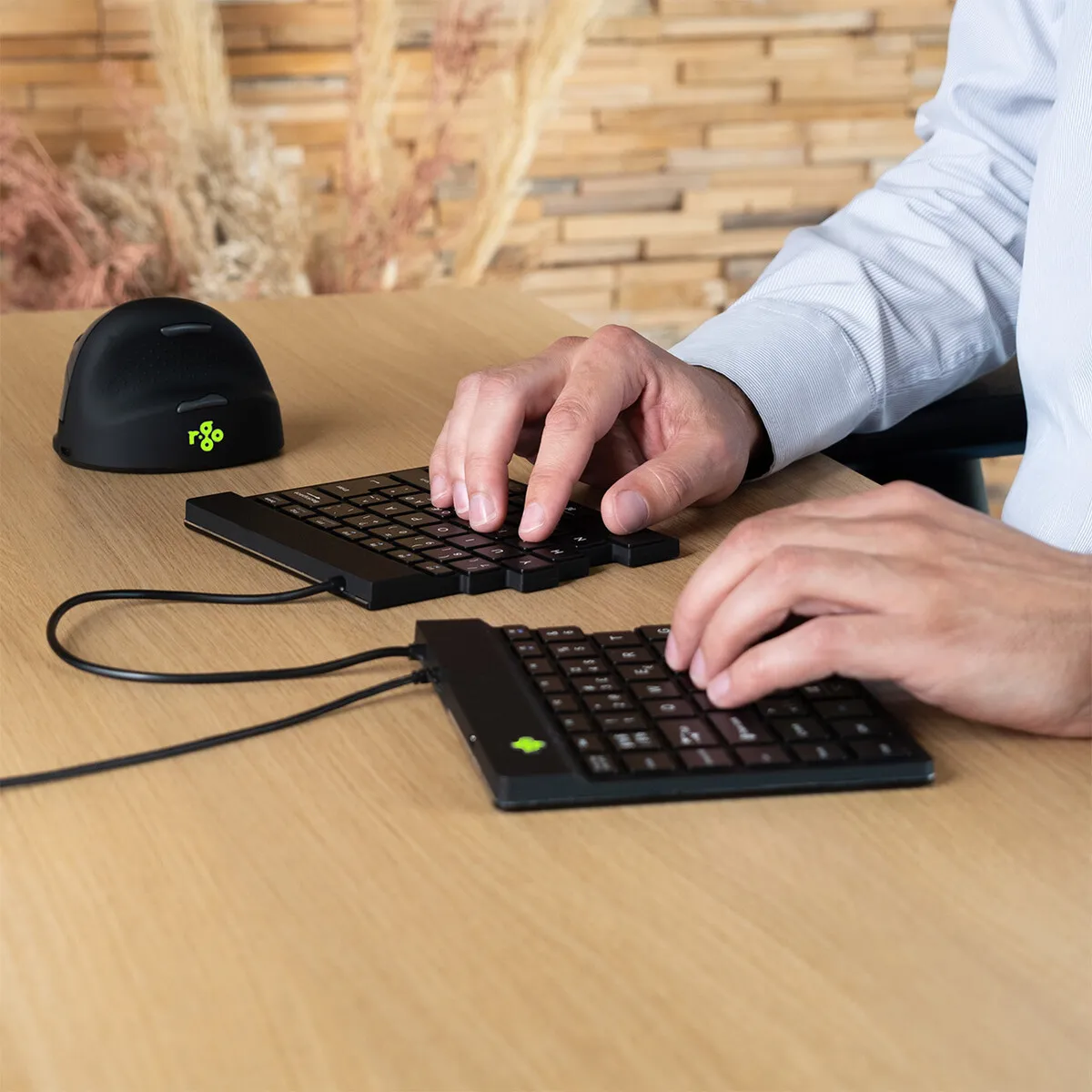





Product description of R-Go Split Break split QWERTZ keyboard
Is this keyboard right for me?

| Width | 288 mm |
| Depth | 137 mm |
| Height | 9 mm |
| Version | Windows |
| Key layout | QWERTZ (ISO) |
| Key type | Scissor mechanism |
| Connection | Wired (USB) 150 cm |
An ode to the R-Go Split keyboard
Two parts, one idea
Some items always stay in the same place. Others you like to take everywhere with you. The R-Go Split keyboard clearly belongs to the latter category.
The keyboard is thin, light, and compact. You can easily put it in your bag and work just as comfortably with it in the office, at home, or on the go. Just put it down, connect it, and you can continue.
Why the R-Go Split keyboard?
The name says it all: this keyboard consists of two separate parts. This allows you to position the left and right halves exactly where it feels comfortable for your posture. Your arms remain more relaxed next to your body, and your shoulders don't have to rotate inwards as much.
Do you prefer working with a compact, one-piece keyboard? Then you simply slide the two parts together. This way, you can use the keyboard just as easily as a normal compact model.
The light key press and thin design ensure smooth typing. This helps to limit tension in hands and wrists during long working days.
What makes an ergonomic keyboard so good?
Those who work extensively at the computer often notice that their wrists, arms, and shoulders are strained. An ergonomic keyboard helps to reduce that strain.
Because the two halves are separate, you can keep your hands in a natural position. This often feels more relaxed in the shoulders and arms.
This version has a QWERTZ key layout. This is the layout commonly used in Germany and parts of Europe, among other places.
Usage explanation
You can place the two parts as close or as far apart as you find comfortable. Some people place them right next to each other, while others place them further apart to give their arms more space.
The maximum distance between the two parts is approximately 50 cm. This allows you to adjust the position well to your workspace and posture.
Get the most out of this product
On top of the keyboard is a small R-Go logo that changes colour while you work. Green means you're doing well. Orange indicates it's time for a short break. Red shows that you've actually been working for a bit too long continuously.
For this, you use the R-Go Break pause software. Please note that this software only works on Windows.
Don't miss this either
The plastic components of the R-Go Split keyboard are made from fully recycled material. In addition, R-Go is affiliated with WEEE, a European organisation that regulates the collection and recycling of electronic devices.
Step-by-step plan for Mac users
Are you using a Mac? Then it may happen that the right half of the keyboard does not work exactly as expected. You can easily solve this with the following steps:
1. Download, install and open this software
2. Select the 'Simple Modifications' tab
3. Click 'Add item'. Select 'left_shift' on the left and 'right_shift' on the right on the top line. Select 'right_shift' on the left and 'left_shift' on the right on the line below
4. Everything should now work as it should. If not, restart your computer
Pros and Cons
- 3-year warranty from a Dutch brand
- 100% recycled plastic components
- Break assist pause indicator
- Split ergonomic design
- Light key press
- Option to connect numpad
- Wired connection
Brief specifications
| Warranty | 3 years |
| Ergonomic design | |
| Colour | Black |
| Material | Aluminium |
| Product weight | 296 grams |
How happy will my body be with this?
| Wrist | |
| Shoulder | |
| Arm | |
| Hand |
Product features
- Compact and split design
- Ultra-thin and light
- Pause indicator via Break assist
- Option to connect numpad
- Keys with scissor mechanism
- Made entirely from recycled material
- Suitable for QWERTZ layout
- Cable length 150 cm
- Aluminium casing
What's in the box?
- R-Go Split keyboard
- USB connection cable
- Brief manual
- Setup guide
- Handy card with tips
Frequently asked questions
Specifications
| Item number | ERGO-RGOSPLIT |
| Manufacturer's item number | RGOSP-DEWIBL |
| Brand | R-Go |
| Warranty | 3 years |
| Type of guarantee | The Ergowerken free returns guarantee service |
| Colour | Black |
| Keyboard type | Compact split keyboard |
| Ergonomic design | |
| Keyboard layout | QWERTZ (ISO DE layout) |
| Connection | USB wired |
| Bluetooth | |
| Type of keys | Flat keys with scissor mechanism |
| Numeric keypad | |
| Shortcut keys | |
| Programmable buttons | |
| Trackball/touchpad | |
| Type of power supply | Wired |
| Battery type | not applicable |
| Rechargeable | not applicable |
| Minimum system requirements | Windows, Linux |
| Plug and play | |
| Dimensions length x width x height | 288 x 137 x 9 millimetres |
| Product weight | 296 grams |
Reviews R-Go Split Break split QWERTZ keyboard
Customers who write a review enter a prize draw for a voucher. We pick one winner and publish all reviews, including critical ones.