Which size fits your hand?
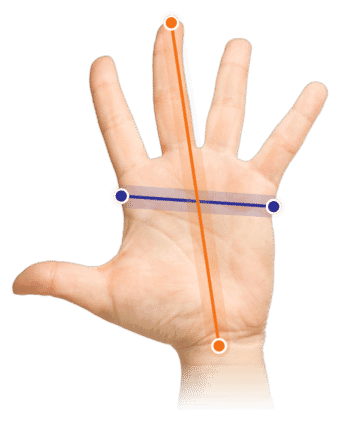
Measure your hand as shown in the image and choose your size using the table below:
| Size | Width | Length |
|---|
| One size | 70 - 95 mm | < 190 mm |
Important: Is your hand wider and/or longer than the measurements above? Then choose the larger Oyster large wired.
Ad-just-a-ble angles
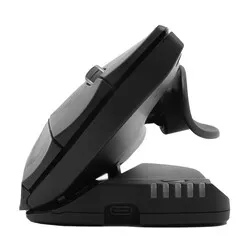
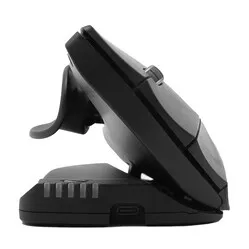
An adjustable mouse, it is hard to imagine. Set the Oyster to 1 of its 5 adjustable angles and find your ideal working posture. Left-handed or right-handed? It makes no difference. This mouse really works for everyone. With the Oyster you are guaranteed to find your ideal working posture.
Why the Oyster mouse?
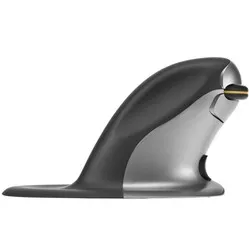
The beauty of the Oyster mouse is its versatility. The mouse can not only be adjusted to 5 different angles of 20-30-40-50-60 degrees, but it can also be used left-handed as well as right-handed.
The Oyster was developed specifically to counter RSI-related complaints. With 5 different angles, everyone can find an ideal working posture. The vertical design of the mouse guides you into a more natural posture and reduces the chance of complaints in your hand, wrist and arm.
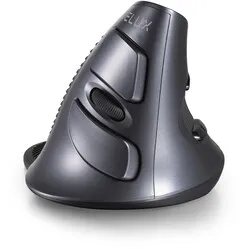
The Oyster has 2 scroll wheels and a symmetrical design. That gives you the option to use it on the left as well as on the right. So even if minor complaints do come up with this mouse, you can switch hands very quickly. The cable can also be moved through a special slot, which means it never gets in the way.
The mouse can be connected to your laptop or PC with a USB cable.
This is what makes an ergonomic mouse so good
A traditional mouse keeps the forearm muscles under constant load. The user has to rotate the wrist to place the hand on the mouse. The design of an ergonomic mouse has an adapted shape and so keeps your wrist off the desk. This reduces stress on the nerves and blood vessels, which also helps prevent RSI complaints.
Get the most out of it
The Oyster mouse has a unique design, which makes it usable by left-handed and right-handed users alike. The wired mouse has 5 positions. That lets you set the mouse in the position that works comfortably for you.
Thanks to the symmetrical design of the mouse, there is the option to use it left-handed as well as right-handed. In total the wired mouse has 8 functional buttons, including two scroll wheels. Two buttons perform a double click and the other buttons have a cut and paste function.
You simply plug the mouse into your PC or laptop and it works straight away.
You should not miss this either
The cut and paste button on the mouse does not work on Mac computers.
"My RSI therapist said it did not glide very smoothly, but that was 6 years ago. Does it slide easily across the desktop?" Anne | 6-11-2017
It glides across the desk just as well as most other mice. There is really no difference there
"Why can this mouse be set at different angles?"
It has to do with the personal preferences of the user. It also makes it possible to adapt the mouse to a specific complaint.
"Is this mouse really both left-handed and right-handed?"
It certainly is. The mouse has a scroll wheel on both sides. So you can turn the mouse around and carry on working with your other hand.
"What if the Oyster turns out not to suit me?"
If the mouse does not suit you, you can return it free of charge within 90 days. Together we will look for a mouse that fits you better.