Stel hier je vraag over dit product
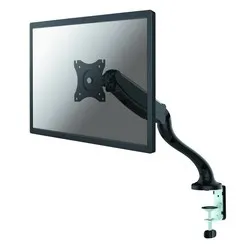
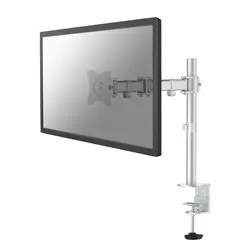
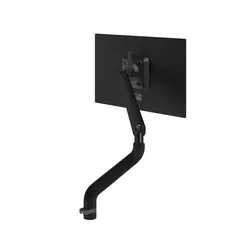
NM-D500BLACK monitor arm 10-30''


Product description of NM-D500BLACK monitor arm 10-30''
The main specifications of the Newstar NM-D500BLACK monitor arm
 1
1 10 - 30 inch
 75/100
 80 - 410 mm
 360 degrees
 180 degrees
 360 degrees
 0 - 510 mm
 6 kg
6 kg Clamp and grommet
 10 - 85 mm
Newstar Neomount NM-D500BLACK monitor arm 10-30"
Description
"Just use a few books, mate"
Can you hear your colleague saying it already? "Yeah, that's just as easy as a monitor arm. And much cheaper too. Always something to read at hand. If you want to tilt it? Just slide a magazine underneath. And if your colleagues want to look along, they can just stand up." Let him vent for a bit. But then tell him he's looking a bit green.
Why the Newstar Neomount monitor arm?
The D500 is your monitor's best friend. With this monitor arm, you can effortlessly position your screen perfectly in front of you. Thanks to the gas spring in the arm, the height can be adjusted without clamps or tools. You only use your hands. The arm is nice and long, which makes finding the perfect setup a simple task. Your body will thank you, as it allows you to work much more comfortably. In addition, collaboration with colleagues is also promoted.
The Neomount D500 can support substantial screens. Up to 30 inches and with a maximum weight of 6 kilograms. The arm is 51 cm long and can be adjusted in height from 8 to 41 cm. It rotates and swivels 360 degrees, and can tilt 180 degrees. You have a choice for mounting. A desk clamp and grommet are supplied as standard.
The D500 can be used in any workplace. It truly comes into its own, especially in workplaces used by different people and with sit/stand desks. The arm can be used by multiple people, as its height can be adjusted with a single hand movement. This is also beneficial for sit/stand workstations. The best setup when sitting is always slightly different from when standing.
In fact, a monitor stand is an asset for everyone. The benefits are noticeable very quickly. Whether it's Uncle Joop spending an hour on the Kawasaki forum every day, or Linda working 8 hours a day as a finance operator.
Physical and productive improvements are mainly cited with a monitor arm. However, there are more benefits to be happy about. For example, the workplace is neatly tidied and has a professional appearance. An arm also saves you a lot of space. This space can then be used for other important matters that are important to you.
What makes a monitor arm so good
A monitor arm gives you control over your monitor. Simply put, it allows you to tailor it to your needs. At the correct height and angle, it improves your working posture, allowing your body to find more relaxation. You can work comfortably for longer and are less likely to develop back, neck, or shoulder complaints. An arm for multiple monitors can also improve overview and thus productivity.
Installation of the NM-D500BLACK
Almost all mounting necessities are supplied with the arm. You only need to provide a Phillips screwdriver yourself. With the help of the manual, it is possible for anyone to assemble the monitor arm. Step by step, you will be explained how to attach the clamp to the desk, which screws go where, and finally how to mount your screen on the arm.
Get the most out of it
Do you share your workplace with colleagues? Or do you have a sit/stand desk? Then adjusting the height of your monitor is very important for optimal viewing. You grab the D500 and move the monitor higher or lower. Simple and super fast.
This product is good for
back - shoulder - neck
A good working posture is important. With your monitor at the correct height, this is easier to achieve. You sit more comfortably, allowing your body to remain relaxed for longer. Especially your shoulders, back, and neck will feel significantly better.
Pros and cons
- Height adjustable in an instant
- Sleek design
- Mounting with desk clamp and grommet possible
- Only available in black
Brief specifications
| Gas-sprung arm | Yes |
| Tilt | Max. 180 degrees |
| Rotate | Max. 360 degrees |
| Swivel | Max. 360 degrees |
| Mounting | Clamp or grommet |
| view all specifications |
Product features
- For mounting 1 monitor
- Equipped with a gas spring
- Widely adjustable
- Black aluminium arm
- Mounting possible with a clamp and grommet
- Only a screwdriver needed for mounting
What's in the box?
- Black aluminium monitor arm
- Mounting material
- Clamp and grommet
Downloads
Frequently asked questions
Specifications
| Item number | ERGO-NSNMD500B |
| Manufacturer's item number | NM-D500BLACK |
| Brand | NewStar |
| Warranty | 5 years |
| Type of guarantee | Ergowerken free warranty return service |
| Colour | Black |
| Number of screens | 1 |
| Gas-sprung arm | |
| Minimum screen size | 10 inches (25.6 cm) |
| Maximum screen size | 30 inches (76.8 cm) |
| Maximum load capacity | 6 kilograms |
| Tilting | Yes, up to 180° |
| Rotate | Yes, up to 360° |
| Swinging | Yes, up to 360° |
| Lowest setting | 80 millimetres |
| Highest position | 410 millimetres |
| Depth | 0 - 510 millimetres |
| VESA minimum | 75 x 75 millimetres |
| VESA maximum | 100 x 100 millimetres |
| Method of installation | By means of a desk clamp and feed-through |
| Suitable for desk thicknesses of | 85 - 405 millimetres |
| Assembly materials included | |
| Required tools | A Phillips screwdriver and, if you wish to use the feed-through mounting, a drill is required. |
| Cable management |
Reviews NM-D500BLACK monitor arm 10-30''
Customers who write a review enter a prize draw for a voucher. We pick one winner and publish all reviews, including critical ones.