Stel hier je vraag over dit product
Dataflex Viewprime plus monitor arm - black




Product description of Dataflex Viewprime plus monitor arm - black
An ode to the Dataflex Viewprime Plus monitor arm
Autobots, roll out! So spoke the leader of the Autobots. Now there's a new leader, of monitor arms, that is. Monitor arms, roll out!
Why the Viewprime Plus monitor arm?
That's quite a statement! Does it live up to it? The answer can be short; Yes! But then you'd still have a lot of questions. So feel free to read on.
Thoughtful design
In 99 out of 100 cases, a monitor arm is attached to the back of the desk. This immediately presents the first challenge. What if your desk is against a wall or there's a partition behind your desk? The design of the Viewprime Plus ensures that you can still adjust the monitor perfectly.
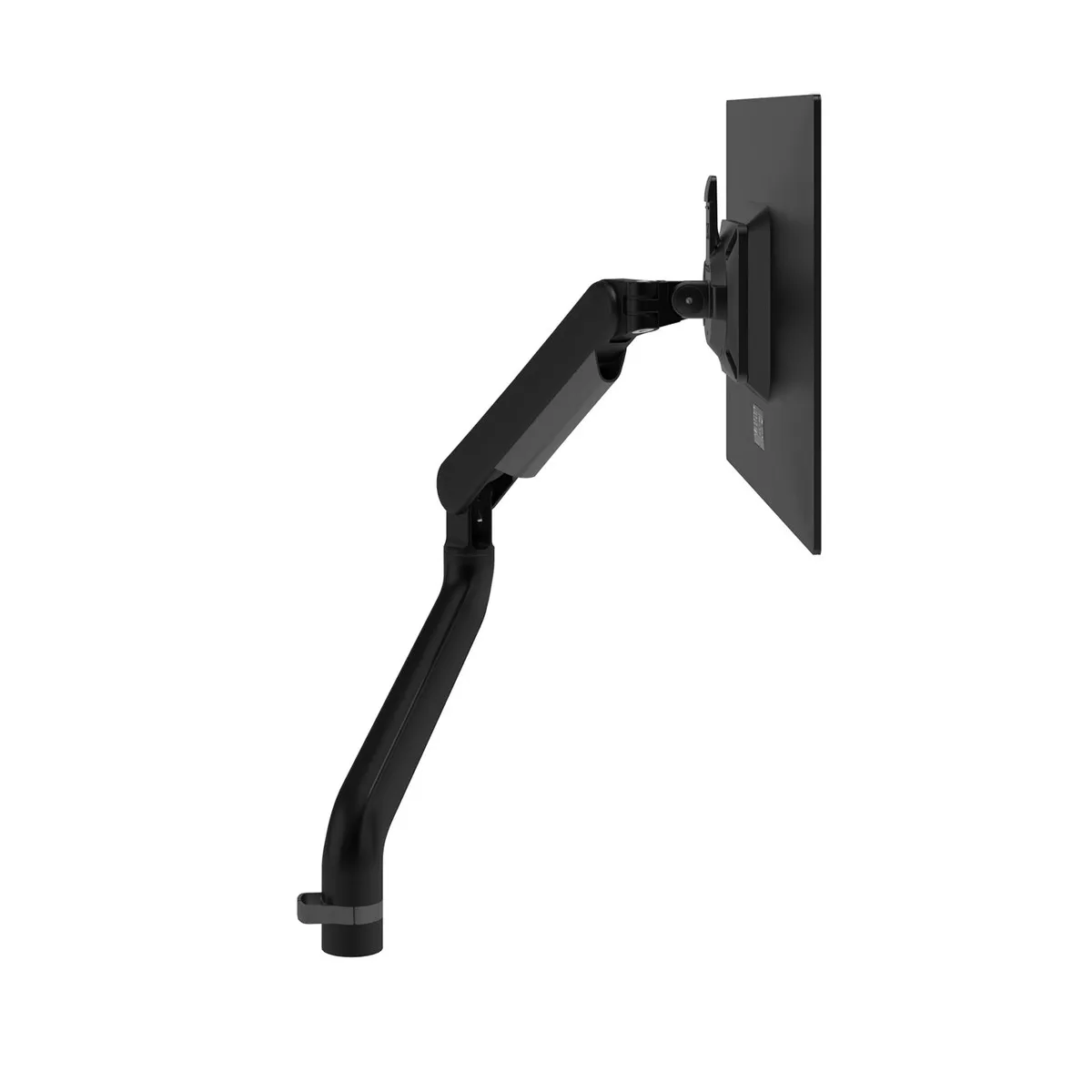
The depth of the screen is easy to adjust over a distance of 516 mm, and you can 'lock' the rotation points at 180 degrees. This way, the arm does not extend beyond the edge of your desktop. This ensures that when adjusting your desk, you won't accidentally redesign the wall, monitor arm, or partition.
Without this lock, you can, of course, rotate the arm fully around its axis. In addition to rotating, you can also easily swivel, tilt, and pivot your monitor. Speaking of the monitor, it can weigh a maximum of 9.5 kilograms and is easily mounted using the quick-release VESA adapter. It is suitable for both 75 x 75 mm and 100 x 100 mm hole patterns.
Smooth and fast
To make the monitor arm easy and smoothly adjustable, a gas spring has been chosen. The only drawback to this is that the monitor must have a minimum weight of 1.5 kilograms. In practice, however, this is not a problem for the majority of monitors.
You adjust a gas spring once, and then you can adjust the monitor's height with one finger. With most monitor arms, that's a guess, but the Viewprime simply has an indicator that allows you to adjust it perfectly.
For everyone
Thanks to its extensive adjustment options, it is the ideal flexible working partner. With a height range of 355 mm, it is also suitable if you are a bit taller. This is, by the way, the height of the VESA adapter. The top edge of the monitor will therefore be a bit higher.
What makes a monitor arm so good?
A computer screen usually comes with a stand. This often takes up some space on your desk and makes the workspace look cluttered quickly. In addition, the height range of such a stand is often insufficient to adjust the screen correctly.
With a monitor arm, you can easily place the monitor at the correct working height. That is approximately at eye level when you type blind (just slightly below, actually). If you can't type blind yet or wear glasses with a reading section, it's advisable to place the screen a bit lower.
By placing your screen at the correct working height, you relieve the strain on your neck, shoulder, and back muscles. You can imagine that this makes your workday more comfortable.
Get the most out of the Viewprime Plus monitor arm
Tidy workspace
The Viewprime is equipped with integrated cable guides that allow you to neatly route the cables along the monitor arm. Besides looking tidy, this also ensures that you don't pull cables out of the monitor when adjusting the arm.
To clamp, or not to clamp
With many monitor arms, you often receive a variety of mounting brackets. Often you only use one and throw the rest away or store it in one of your drawers for the next 10 years. Very environmentally conscious. Ahem! Dataflex thought it could be done differently. For the Viewprime, they have developed 3 clamps, one of which you can order. There are 3 choices;
- Desk clamp suitable for desktops up to 50 mm thick.
- Low-profile desk clamp suitable for (sliding) desktops up to 25 mm thick. Handy if you have little space under the desktop or if there's a cable tray under the desk.
- Grommet clamp suitable for desktops up to 49 mm thick.
Don't miss this either
Are you now completely enthusiastic about the Viewprime Plus monitor arm? Then you're in good company. This monitor arm won the RED Dot design award in 2020.
Frequently Asked Questions
Pros and Cons
- Suitable for many screens
- Adjustable with one finger
- Integrated cable management
- Gas spring with indicator
- Adjustable lock
- Not available in silver-grey
Brief specifications
| Warranty | 15 years |
| Ergonomic design | |
| Colour | Black |
| Number of screens | 1 |
| Load capacity | 1.5 to 9.5 kg |
How happy will my body be with this?
| Neck | |
| Back | |
| Eyes | |
| Shoulders |
Product features
- Dynamic height adjustment of 355 mm
- Depth adjustment of 516 mm
- Portrait and landscape mode (±90º VESA rotation)
- Tension indicator for quick installation
- Integrated cable management
- Includes quick-release attachment
- Compatible with VESA MIS-D 75 x 75/100 x 100 mm
- Tilt +90°/-50°, swivel ±90º, rotate ±90º
- 360° swivel arm with adjustable lock at 180°
- RED Dot winner 2020
- Optional desk clamp or grommet mount
What's in the box?
- 1 x Viewprime monitor arm
- 1 x Manual
- 1 x Mounting hardware
- 1 x Desk clamp or grommet mount
Specifications
| Item number | ERGO-DF65113-813/913/933 |
| Manufacturer's item number | 65.113 (monitor arm)/65.813 (feed-through clamp)/65.913 (sheet clamp)/65.933 (low-profile sheet clamp) |
| Brand | Dataflex |
| Warranty | 15 years after product registration |
| Type of guarantee | The Ergowerken free return guarantee service |
| Colour | Black |
| Number of screens | 1 |
| Gas-sprung arm | |
| Minimum screen size | All monitors with a VESA mounting option and weighing no less than 1.5 kilograms |
| Maximum screen size | All monitors with a VESA mounting option and weighing no more than 9.5 kilograms |
| Minimum load capacity | 1.5 kg |
| Maximum load capacity | 9.5 kg |
| Tiltable | +90°/-50° |
| Rotate | 360° and lockable at 180° |
| Swinging | 90 |
| Lowest setting | 159 millimetres |
| Highest position | 355 millimetres |
| Depth | 0 to 556 millimetres |
| VESA minimum | 75 x 75 millimetres |
| VESA maximum | 100 x 100 millimetres |
| Method of installation | Optional via desk or feed-through clamp |
| Suitable for desk thicknesses of | Desk clamp: 12 - 50 mm | Low-profile desk clamp: 18-25 mm | Feed-through clamp: 10 - 49 mm |
| Assembly materials included | |
| Required tools | Screwdriver |
| Cable management | Integrated into monitor arm |
| Product weight | 4.7 kg |
Reviews Dataflex Viewprime plus monitor arm - black
Customers who write a review enter a prize draw for a voucher. We pick one winner and publish all reviews, including critical ones.