Offerte aanvragen
Jouw offerte op maat, binnen 24 uur in je mailbox. Voor als je interesse hebt in aantallen. Of goedkeuring nodig hebt voor je bestelling.

Je vraagt een offerte aan voor:
Stel hier je vraag over dit product
Optapad extended wired touchpad


Beschrijving Optapad extended wired touchpad
Does this mouse fit my hand?
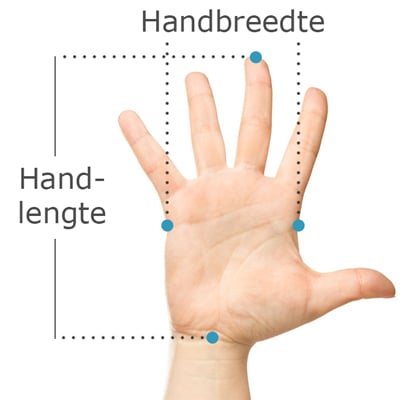
Do you want to find the ideal mouse? Then be sure to measure your hand. The following image clarifies how to measure your hand. This mouse is suitable for hands with the following dimensions:
Suitable for any hand size
Description
The bigger brother
The standard Optapad has a new sibling. Healthy round shapes and a slightly higher fat percentage clearly characterise it. It may indeed look a bit slower, but man, look what a cuddly bear. I'd love to rest my wrists on that.
Why the Optapad?
The term trackpad is almost ordinary for the Optapad Extended. You simply cannot compare it to what you typically find on a laptop. This Swedish-developed masterpiece sits between you and your keyboard. Thanks to its central position, your arms remain within shoulder width. Your shoulders will relax as a result and will thank you for it.
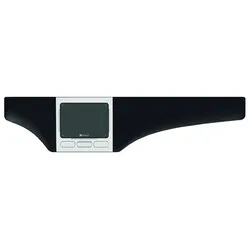
Thinnest & most versatile touchpadWith a thickness of a minimum of 9.7 mm and a maximum of 17.2 mm, this touchpad is the thinnest on the market. It weighs only 625 grams. These numbers are nice, but you also see it immediately when you look at the ergonomic Optapad. It has a sleek design and makes a solid impression. Its soft palm and wrist rest provide comfort while mousing and typing.
The Optapad can be used broadly. It is not only ideal for administrative tasks. Graphic designers will also appreciate its precision and extensive possibilities. 4 programmable buttons and 4 programmable corners on the touchpad give you endless possibilities. Key combinations can even be entered under the programmable corners.
There are more reasons why the Optapad gladly places itself above a conventional touchpad. For example, the touch part is entirely made of glass. This feels comfortable, allows your fingers to glide more easily over the surface, and increases your precision.
Using the OptapadThe generously sized palm/wrist rests on the left and right provide extra support while typing and mousing. They also reduce the height difference between your keyboard and the desk, which benefits your wrists. The rests are interchangeable and replaceable, which makes the product much more durable.
The Optapad works with 'zForce optical multisensing' technology. It means that it detects shadows and reflections you make with your hands. This makes the Optapad Extended very accurate. Styluses and other objects at least 7 mm thick can also be used thanks to this technique.
LEDs are located in the edges of the touchpad that light up when you touch it. A nice gimmick that does little more than provide extra confirmation that it registers something. It can even be turned off. The LEDs near the touch keys in the corners are more useful.
The programmable touch keys indicate with those LEDs that you have successfully touched the key. Because the key is not physical, it can sometimes be pleasant to see the confirmation of your stroke. Do you notice, for example, that you often mis-type? Then the surface of the touch key can even be enlarged.
Scrolling can be done with the buttons, but also with the touchpad. Even vertically. This function is integrated into the bottom and sides of the touchpad. It's up to you whether you activate the horizontal scroll function on the left or right side. It can even be turned off. The physical programmable buttons have a standard left-click, right-click, scroll up, and scroll down function.
The touchpad can be operated with 1 and 2 fingers. With 2 fingers, you have access to a scroll function, zooming, swiping, and calling up the right-click function.
What makes an ergonomic mouse so good
A big advantage of a central mouse like the Optapad Extended is its ease of use. Your hands will find it quickly. In addition, it can be operated with both hands simultaneously, allowing you to distribute the workload nicely. Click with the left, drag with the right. Or vice versa. You are completely free to choose. Thus, a trackpad is not only good for relaxing your shoulders but also for your arms and hands.
Get the most out of it
Optapad has designed a very clear program for their driver. Here you can make all adjustments very quickly. You can find the program on this page under the 'downloads' heading. It is suitable for Windows and Mac OS. You can even share the Optapad with colleagues or family, as it can save multiple profiles with preferences.
Using the driver is simply a must, whether you are an intensive user or not. You can do so incredibly much, and there is something for everyone to adjust to get more out of the Optapad.
This product is good for
arm - shoulder
The Optapad Extended touchpad provides relaxation in the arm and shoulder muscles. Because the touchpad is centrally located in front of you, you no longer have to reach for the mouse.
Pros and Cons
- Centrally placed
- Touchpad supports multitouch
- Can be used with both hands
- Programmable buttons
- Less easy to carry
Brief specifications
| Warranty | 2 years |
| Ergonomic design | |
| Usage | Left and right-handed |
| Number of buttons | 8 programmable buttons |
| Plug & Play | |
| view all specifications |
Product features
- Large palm/wrist rests
- Prevents RSI complaints
- Can be used with both hands
- Touchpad with multitouch technology
- Can be placed centrally in front of the body
- 8 programmable buttons
- Thin and modern design
- Environmentally friendly, made from recycled materials
- Wrist rest made of soft coated textile
- Easy to keep clean
- Promotes natural posture
- Plug & Play, works with Windows and Mac
- Free software to program buttons
- Cable length 150 cm
What's in the box?
- 1 x Optapad Extended wired touchpad
- 1 x manual
Standard functions
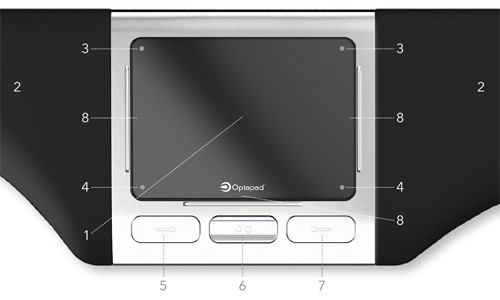
- Touchpad
- Wrist rest
- Left: Slow mode, Right: double-click
- Left: Copy, Right: Paste
- Left mouse button
- Scroll button
- Right mouse button
- Horizontal/vertical scrolling
Frequently asked questions
Specificaties
| Item number | ERGO-OPTAEX |
| Manufacturer's item number | 171202 |
| Brand | Optapad |
| Warranty | 2 years |
| Type of guarantee | Ergowerken free warranty return service |
| Colour | Silver grey with black wrist rests |
| Ergonomic design | Yes |
| Management | Touchpad |
| Left- or right-handed | Can be used with either the left or right hand, or both at the same time |
| Hand length | Suitable for all hand sizes |
| Hand width | Suitable for all hand sizes |
| Operation | Buttons and touchpad |
| Included receiver | not applicable |
| Bluetooth | not applicable |
| USB port | Yes |
| USB version | 2.0/3.0 |
| Number of buttons | 8 buttons |
| On/off button | not applicable |
| Adjustable buttons | Yes, using the free software provided |
| Scroll wheel | Scroll button instead of scroll wheel |
| Trackball | No |
| Adjustable sensitivity | No |
| Sensitivity | The speed at which you can move your finger |
| Type of power supply | Wire |
| Battery type | not applicable |
| Rechargeable | not applicable |
| Minimum system requirements | Mac OS X and Windows XP or higher |
| Plug and play | Yes |
| Dimensions length x width x height | 486 x 110 x 17 millimetres |
| Product weight | 625 grams |
Reviews Optapad extended wired touchpad