Notify me when is back in stock.
Enter your email address and we’ll notify you when it’s back in stock.
Once you submit your email address, we’ll send you a confirmation email for your sign-up.
This notification does not guarantee that you’ll be able to claim the product when new stock arrives. Want a better chance of getting it once it’s back in stock? Order and pay for it now, and you’ll be first in line when new stock becomes available.
Privacy Your email address is stored in a secure, closed database that we cannot access. After the stock update, your email address will be automatically deleted.
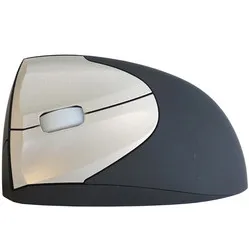
Contour Design Unimouse wired left-handed ergonomic mouse
0 reviews
94,00

Your custom quote, within 24 hours in your inbox. For when you're interested in larger quantities or need approval for your order.

Contour Design Unimouse wired left-handed ergonomic mouse

You are requesting a quote for:

Contour Design Unimouse wired left-handed ergonomic mouse
Just follow along, requesting a quote is this easy.
1
Complete the quick form and get your quote fast.
2
Tap the orange button and we’ll get right on it.
3
You’ll receive a custom quote within 24 hours. Need a little more time? We’ll let you know. Simple and clear.
Contour Design Unimouse wired left-handed ergonomic mouse
Request quote
Stel vraag

Contour Design Unimouse wired left-handed ergonomic mouse

Sale
Configure your product
106,95
94,00
Incl. tax
77,69
Excl. tax
Article number: ERGO-CUNI-L
The product is in stock and, if ordered before 17:00 on business days, will be delivered the next day.
Hierboven staat de verwachte levertijd. Zodra het pakket verstuurd is, ontvang je een berichtje.
Is this the right product for you?
Use our handy selection check
  • Order 2 for 89,30 each (incl. VAT) and save 5%
  • Order 4 for 86,95 each (incl. VAT) and save 7,5%
  • Order 8 for 84,60 each (incl. VAT) and save 10%

Product description of Contour Design Unimouse wired left-handed ergonomic mouse

Does this mouse fit my hand?

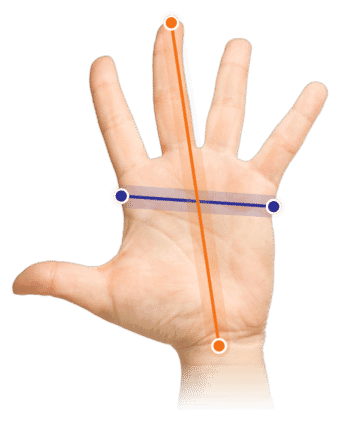
Do you want to find the ideal mouse? Then be sure to measure your hand. The following image clarifies how to measure your hand. This mouse is suitable for hands with the following dimensions: Suitable for all hand sizes

explanation-measuring-hand

An ode to the Unimouse

ATS!...?

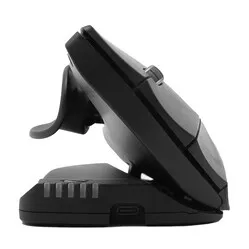
"Arm Tension Soreness?" No, it's not an abbreviation for an arm or wrist condition. It's the name Contour has given to the ultra-adjustable thumb rest of the Unimouse. It stands for: Articulating Thumb Support. That's the advantage when you create something unique, you get to invent the name.

Why the left-handed wired Unimouse?

What does it mean for you as a user? A lot of comfort and possibilities. You can move the thumb rest in all conceivable directions, both horizontally and vertically. And you can also adjust the angle of the mouse as desired.

Uni(que) mouse

Few mice can do it, adapt to the user. The Unimouse is a particularly unique case in this regard. We've seen mice tilt before, but the Unimouse takes it to a higher level. You can set it to the most comfortable angle for you, between 35 and 70 degrees.

If you get tired of it, you can just as easily adjust it again. Are you going to do precise (drawing) work? Then set it to the position where you have the most control, adjust the sensitivity to one of the 10 DPI settings (between 800 and 2800 DPI), a small adjustment of the thumb rest, and off you go!

Suitable for every task

Its adaptable grip makes the Unimouse suitable for every profession. Below is a small selection:

  • • Graphic designer
  • • Administrative assistant
  • • Industrial designer
  • • Accountant

Control over the Unimouse

The mouse buttons provide pleasant feedback, with consistent resistance regardless of where you press the button. Only at the very beginning of the button does it offer slightly more resistance, but in practice, you'll barely notice this.

The scroll wheel rolls smoothly and provides pleasant click feedback. Thanks to the rubber finish, you'll never lose control.

Dynamic working with the wired Unimouse

One of the most important aspects of ergonomic working is dynamism. Contour's developers emphasised this when conceiving the Unimouse.

For example, you can continuously adjust the tilt angle of the Unimouse, and the thumb support can also be easily adjusted 35 degrees in any direction. The Unimouse allows you to change your posture while mousing, which reduces fatiguing static load.

Do you suffer from wrist pain? Then set it more vertically to give your wrist muscles more rest. Do you have some complaints in your hand? Then set it flatter to give your hand maximum support. Also, raise the thumb rest so you don't have to squeeze.

Get the most out of it

The Contour mouse features a Pixart PMW3330 sensor. Thanks to this sensor, the mouse works excellently on almost any surface. Furthermore, you have 10 different mouse sensitivities to play with. For reflective surfaces, based on our own tests, we advise using a mouse mat.

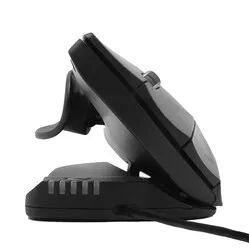
The 5 LEDs at the front of the mouse show the DPI setting. The green LEDs indicate DPI from 800 to 1600. The red lights are for serious high-speed work and show 2000 to 4000 DPI. It has 6 buttons, including 2 buttons for forwards/backwards. The Unimouse cable is 200 cm long and has a USB-A connection. It weighs 150 grams without the cable (180 grams including the cable).

Practical example: administrative assistant

Clicking, dragging, and scrolling – you're busy with it. From window to window, field to field. A mouse that feels solid in your hand and offers sufficient support is important for you. Find the right angle for maximum relaxation and raise the thumb rest slightly so your thumb can rest comfortably. That way, you'll get through those long days.

Don't miss this either

The angle adjustment is done using 4 friction hinges. This allows you to continuously adjust it between 35 and 70 degrees, without compromising on sturdiness. This offers countless possible postures for comfortable working. Do make sure you don't accidentally press one of the buttons while adjusting the mouse.

With the Contour driver for your Unimouse, you can assign other functions to the buttons. You can even change several buttons per programme, allowing you to tick off your tasks even faster.

2024 update

In spring 2024, Contour gave a fresh update to a large part of their product range, including Unimouse. Several well-known advantages, such as the adjustable thumb rest, have naturally remained. The update concerns a number of changes within production and design;

 Old modelModel from spring 2024
Adjustable tilt angle  
Unique thumb support  
Programmable buttons  
Left/right version  
Relaxed grip and variation  
4000 DPI in 10 steps  
New matte black colour  
Lower ecological footprint*  
* Made from recycled aluminium (GRS-certified) and a reduction of CO2-eq per product by more than 50% compared to previous versions.

 

Pros and cons

  •  Adjustable angle
  •  Adjustable thumb rest
  •  Long mouse buttons
  •  Programmable buttons
  •  Short adjustment period (1-3 days)
  •  No pinky rest

Brief specifications

Warranty2 years
Ergonomic design 
UsageLeft-handed
Number of buttons6
Plug & playYes
View specifications >

How happy will my body be with this?

Wrist     
Arm     
Hand     
Shoulder     

Product features

  •  Prevents RSI complaints
  •  Button functions can be changed using driver
  •  Vertically adjustable between 35 and 70˚
  •  Adjustable Thumb Rest
  •  Adjustable DPI
  •  200 cm long cable

Downloads

Product Sheet
Manual
Product guide
Drivers (Please note: you will be redirected to the Contour website)

What's in the box?

  • 1 x Left-handed wired mouse
  • 1 x Manual
  • 1 x Quick guide

Adjustment options of the Unimouse

Frequently asked questions

 "How long is the cable?"
The Unimouse cable is 200 cm long.
 "Does it take long to get used to the Contour Unimouse?"
A tilted mouse works a little differently from a standard flat model. Because of this, you'll need some time to get used to it. But because the Unimouse is easy to adjust, you'll get used to it quickly.
 "What if I don't like the mouse?"
You can always return your purchase within 90 days. So you have 90 days to carefully examine and try out the mouse.
 "What is the advantage of an adjustable mouse?"
By adjusting the mouse, you can set it up to work comfortably for you. Additionally, you can easily switch postures, which reduces static load.
Item number ERGO-CUNI-L
Manufacturer's item number UNIMOUSE-L
Brand Contour
Warranty 2 years
Type of guarantee Ergowerken free warranty return service
Colour Matte black
Ergonomic design Yes
Management Pixart PMW3330 sensor
Left- or right-handed Left-handed
Hand length Suitable for any arm length
Hand width Suitable for any hand size
Operation Buttons and scroll wheel
Connection Wired via USB
Included receiver not applicable
Bluetooth not applicable
USB port Yes
USB version 2.0
Number of buttons 6 programmable buttons
On/off button No
Adjustable buttons The driver for the left-handed model is currently under development.
Scroll wheel Yes
Trackball not applicable
Adjustable sensitivity Yes
Sensitivity 800/1000/1200/1400/1600/2000/2400/2800/3400/4000 dpi
Type of power supply Wire
Battery type not applicable
Rechargeable No
Minimum system requirements Mac OS / Windows
Plug and play Yes
Dimensions length x width x height 127 x 76 x 50 millimetres
Product weight ± 150 grams (180 grams with cable)