







Stel hier je vraag over dit product
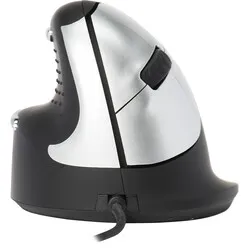
Oyster Large wired left/right ergonomic mouse


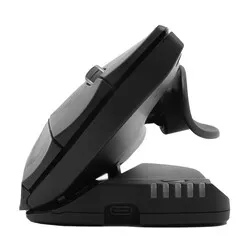

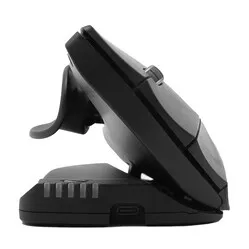
Product description of Oyster Large wired left/right ergonomic mouse
Oyster Large wired ergonomic mouse
Which size fits your hand?
Measure your hand as shown in the image and choose your size using the table below:
| Size | Width | Length |
|---|---|---|
| One size | > 95 mm | > 190 mm |
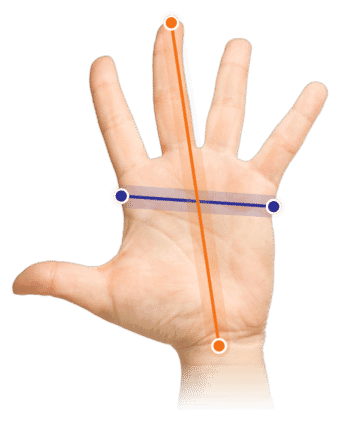
Important: Is your hand narrower and/or shorter than the measurements above? Then choose the smaller Oyster wired.
Description
Adjustable angles
An adjustable mouse, it's incredible. Set the Oyster to one of its 5 adjustable angles and find your ideal working posture. Left- or right-handed? It makes no difference. This mouse truly serves everyone. With the Oyster, you are guaranteed to find your ideal working posture.
Why the Oyster mouse?
The beauty of the Oyster mouse is its versatility. The mouse can not only be adjusted to 5 different angles of 20-30-40-50-60 degrees, but can also be used by both left and right-handed users.
The Oyster has been specially developed to combat RSI-related complaints. With 5 different angles, everyone can find an ideal working posture. The vertical design of the mouse forces you into a more natural posture and reduces the chance of complaints in the hand, wrist, and arm.
The Oyster has 2 scroll wheels and is symmetrically designed. This gives you the option to use it with both your left and right hand. Even if minor complaints should arise with this mouse, you can quickly switch hands. The cable can also be swapped via a special slot, meaning it never gets in the way.
The mouse can be connected to your laptop or PC via a USB cable.
This is what makes an ergonomic mouse so good
A traditional mouse causes the forearm muscles to be continuously strained. The user has to rotate the wrist to place the hand on the mouse. The design of an ergonomic mouse has an adapted shape and thus keeps your wrist off the desk. This reduces stress on the nerves and blood vessels, thus preventing RSI complaints.
Get the most out of it
The Oyster mouse has a unique design, allowing it to be used by both left and right-handed users. The wired mouse has 5 positions. This allows you to set the mouse to the position that works comfortably for you.
Due to the symmetrical design of the mouse, it can be used by both left and right-handed users. In total, the wired mouse has 8 functional buttons, including two scroll wheels. Two buttons perform a double click, and the other buttons have a cut and paste function.
You simply plug the mouse into your PC or laptop and it works immediately.
Also, don't miss this
The cut and paste button on the mouse does not work on Mac computers.
This product is good for
hand - wrist - arm - shoulder
The original design of this mouse makes it possible to distribute the load across two hands. This ensures more muscle relaxation.
Pros and Cons
- Can be used by left and right-handed users
- Adjustable to 5 angles
- Plug & Play
- Cut and paste button does not work on Mac
Brief specifications
| Warranty | 2 years |
| Ergonomic design | |
| Usage | Left and right-handed |
| Sensitivity | 1200 DPI |
| Controls | Buttons and scroll wheel |
| view all specifications |
Product features
- Adjustable angle with 5 positions
- Left and right-handed wireless mouse
- 8 different buttons
- Prevents RSI complaints
What's in the box?
- Wired mouse
- Manual
Frequently asked questions
Specifications
| Item number | ERGO-MI060L |
| Brand | Oyster |
| Warranty | 2 years |
| Type of guarantee | Ergowerken free warranty return service |
| Colour | Black with silver accents |
| Ergonomic design | Yes, adjustable to different angles |
| Management | Optical |
| Left- or right-handed | Suitable for both left- and right-handed use thanks to its unique design |
| Hand length | Greater than 190 mm, measured from the top of the middle finger to the edge of the wrist |
| Hand width | Wider than 95 mm, measured on the palm, 1 cm below the four fingers |
| Operation | Buttons and scroll wheel |
| Included receiver | not applicable |
| Bluetooth | not applicable |
| USB port | |
| USB version | 2.0/3.0 |
| Number of buttons | 8 |
| On/off button | not applicable |
| Adjustable buttons | |
| Scroll wheel | |
| Trackball | |
| Adjustable sensitivity | |
| Sensitivity | 1200 dots per inch |
| Type of power supply | Wire |
| Battery type | not applicable |
| Rechargeable | not applicable |
| Minimum system requirements | Mac OS X v10.5, Mac OS X v10.6, Mac OS X v10.7, Mac OS X v10.8, Mac OS X v10.9, Mac OS X v10.10, Mac OS X v10.11, Windows XP, Windows Vista, Windows 7, Windows 8, Windows 10 |
| Plug and play | |
| Dimensions length x width x height | 95 x 88 x 55 millimetres |
| Product weight | 150 grams |