
Muis bevalt goed
"Fijne muis, ligt goed in de hand. Bluetooth werkt perfect."



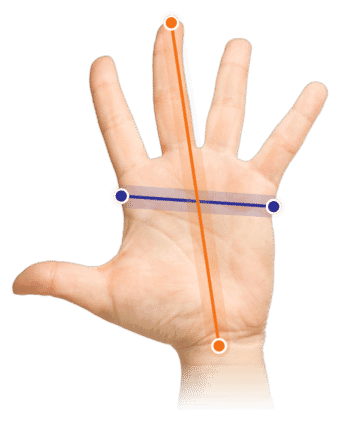
Measure your hand as shown in the image and choose your size using the table below:
| Size | Width | Length |
|---|---|---|
| One size | < 85 mm | < 185 mm |
"What a nice little thing. Bought a new mouse? Is it any good? Oh, with extra buttons, you say? Oh, wireless USB and Bluetooth, you say? Oh, available in all sorts of fancy colours, you say?" Say hello to our new wolf in sheep's clothing, because it tackles RSI like a seasoned ninja. In style, of course.
The Delux Mini subtly reveals its strongest point. It's a nice compact mouse that is ideal for smaller hands. Of course, we've tested it ourselves, and the mouse is perfectly usable up to a hand length of 185 mm and a hand width of 85 mm.
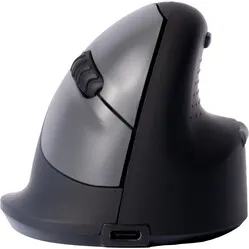
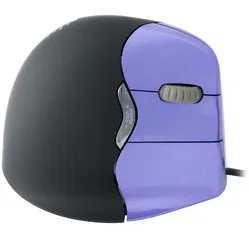
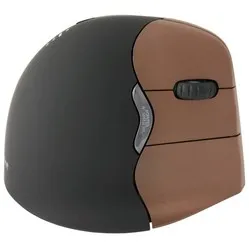
It's vertical and gentle on the wrist, but also supportive enough to make your hand fall in love with it. The mouse is so finely shaped that the thumb is relatively close to the fingers, which promotes hand relaxation. You can decide where to place your thumb in this rather spacious indentation.
You can comfortably rest your hand on the mouse. Thanks to the small lip under the little finger, you won't easily rub the side of your hand across the desk. The scroll wheel is pleasantly positioned, usually sitting nicely under the middle finger. This may vary slightly per user. The long buttons ensure that even the smallest hands can operate it.
The Mini features 5 buttons and a scroll wheel. In addition to the familiar right and left mouse buttons, there's a forward and backward button near the thumb. The button just above it is for adjusting the mouse's sensitivity. Very handy when switching between precise tasks and more general work.
All buttons feature a silent click. From now on, you can click yourself tired with the stealth of a ninja. Great for colleagues!
The mouse comes with a 140 cm long charging cable. This cable allows the mouse's integrated battery to be charged rapidly. You plug the cable with a USB C connector into the mouse. A blue light will then illuminate next to the connector. The battery is full when the light stops glowing. When you're finished with the mouse, you can switch it off using the switch on the bottom. This will make the batteries last longer.
The Delux Mini can be connected wirelessly in 2 ways, which is quite unique. It can connect via Bluetooth (4.0), but can also work wirelessly via USB (2.4Ghz) thanks to the included USB dongle. You can find this on the underside of the mouse, where it's securely held in the recess by a small magnet. So you won't easily lose it.
On the bottom of the mouse, you can find the USB and Bluetooth modes. Mode 1 is the wireless USB connection, mode 2 is Bluetooth.
The RGB strip on the mouse near the forward and backward buttons has no function. However, it looks good and gives the mouse a cheerful appearance. If you're not keen on that happy rainbow fuss, you don't necessarily have to ignore the mouse. By simultaneously pressing the left and right mouse buttons and the scroll wheel, you can switch off the strip and be rid of the colourful torment.
You can choose from 5 different colours with us. These include Mint Green, Pink, Pearl-like blue, Jet Black, and Iron Gray. Names that could have rolled straight out of a car brand's catalogue. View all colours and choose your favourite.
The big advantage of a vertical model like the Delux Mini is what it does for your arm. It takes your arm out of the twisted posture that a flat mouse causes. Thanks to the improved posture, there is less tension on your arm, and you should be able to use your mouse for longer without discomfort.
What the Mini does brilliantly is its versatile applicability. Windows, Mac OS, and Android – it works everywhere. With the disappearance of USB ports on MacBooks, the Mini also poses no problem. Where you might connect it via the dongle at work, you can easily use it at home on your MacBook via Bluetooth. You can get by everywhere with the same mouse, and that makes it such a suitable partner.
You won't hear the Mini complain about the surface either. We've tested it ourselves on white printer paper and a white desktop, among other things, and it performed brilliantly there too. Not every mouse has that reliability.
Not that we want to encourage it (as it's prone to RSI, not funny), but this Delux can withstand quite a few clicks. The Omron switch under the buttons is designed to last up to 10 million clicks.
On Windows computers, you can use all the mouse's functions. On Mac OS, the backward and forward buttons do not work.
If you're a Mac user and want to use all the buttons, consider purchasing the USB Overdrive programme. With this, you can not only get all the buttons working, but you can also assign them any function you have in mind. You can use the programme for free with adverts.
| Warranty | 2 years |
| Ergonomic design | |
| Usage | Left-handed |
| Number of buttons | 5 |
| Colour | White |
| Wrist | |
| Arm | |
| Hand | |
| Shoulder |
| Item number | ERGO-DEVMLWH |
| Manufacturer's item number | M618ZD |
| Brand | Deluxe |
| Warranty | 2 years |
| Type of guarantee | Ergowerken free guarantee return service |
| Colour | White |
| Ergonomic design | |
| Management | Optical |
| Left- or right-handed | Left-handed |
| Hand length | Less than 185 mm, measured from the tip of the middle finger to the edge of the wrist |
| Hand width | Smaller than 85 mm, measured on the palm, 1 cm below the four fingers |
| Operation | Buttons and scroll wheel |
| Connection | Wireless USB and Bluetooth |
| Included receiver | Yes, 2.4 GHz nano receiver |
| Bluetooth | |
| USB port | |
| Number of buttons | 5 + a scroll wheel |
| On/off button | |
| Adjustable buttons | |
| Scroll wheel | |
| Trackball | |
| Adjustable sensitivity | |
| Sensitivity | 800/1200/1600/2400 DPI (dots per inch) |
| Type of power supply | Integrated rechargeable battery |
| Battery type | Integrated 1000mA polymer Li-ion |
| Rechargeable | Yes (with 140 cm long cable included) |
| Minimum system requirements | Windows 2000 and above - Mac OS |
| Plug and play | |
| Dimensions length x width x height | 103 x 89 x 69 millimetres |
| Product weight | 120 grams (with USB receiver in mouse 122 grams) |
Customers who write a review enter a prize draw for a voucher. We pick one winner and publish all reviews, including critical ones.