Stel hier je vraag over dit product
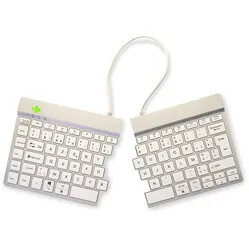
R-Go Split Break split white AZERTY BE - Bluetooth


Product description of R-Go Split Break split white AZERTY BE - Bluetooth
Does this keyboard suit me?
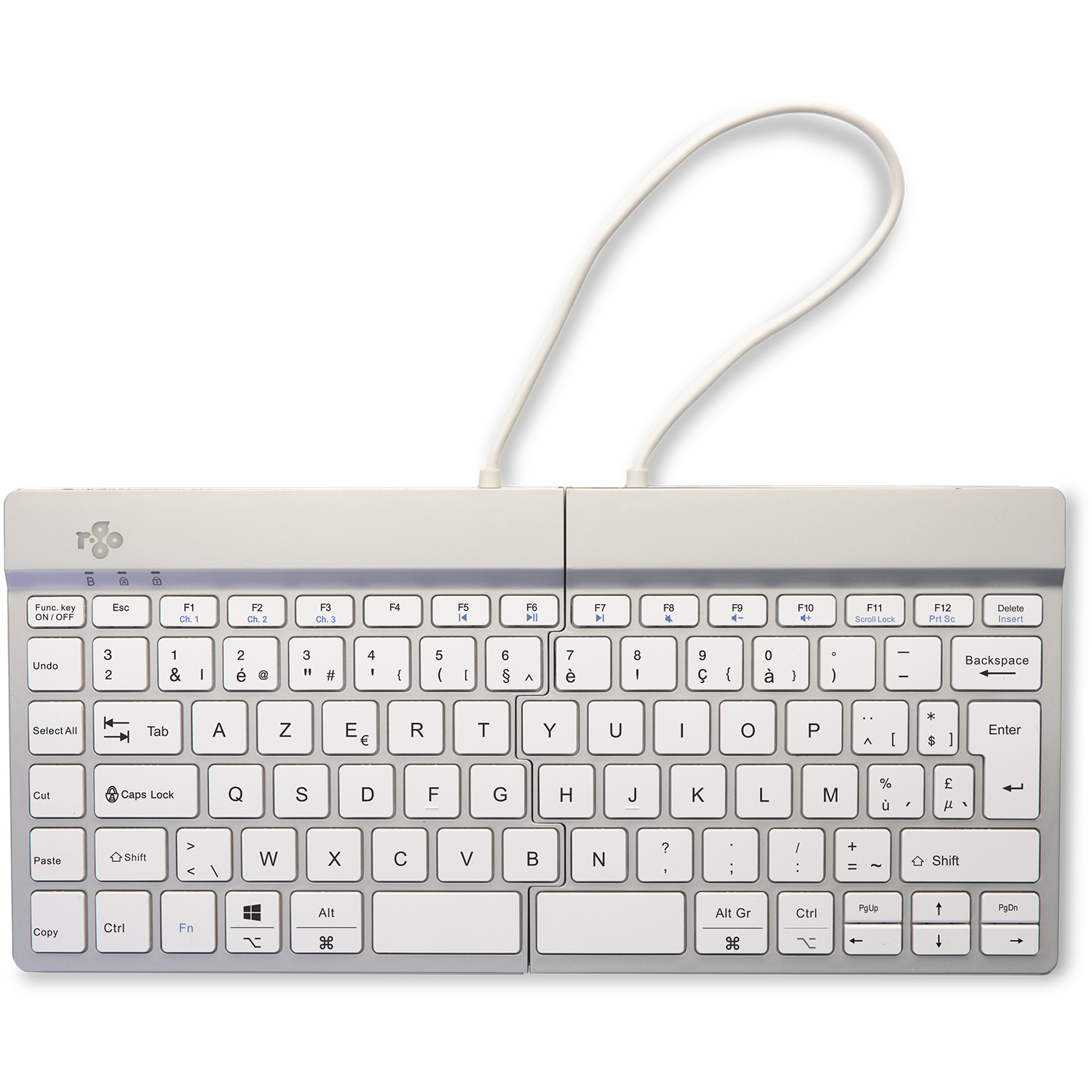
| Width | 307.5 mm |
| Depth | 138 mm |
| Height | 12 mm |
| Compatibility | Windows/Mac |
| Key layout | AZERTY BE (ISO) |
| Key type | Scissor mechanism |
| Connection | Bluetooth 5.0 |
An ode to the R-Go Split split keyboard
Not made to stand still
Do you also have that different feeling about certain things you own? You might find one thing perfectly in its place and never want to move it. And you might find another so fantastic because it's perfect for quickly packing up, taking with you, and using anywhere. The R-Go Split belongs to the second group!
Why the R-Go Split split keyboard?
To put it simply, the split keyboard from R-go is a compact keyboard neatly divided into two pieces, allowing you to position them in the most optimal and comfortable way. The two pieces fit together perfectly, which means you can also use the R-Go Split as a normal compact keyboard.
The key press is wonderfully light, and the keyboard is very thin. These factors also play an important role in optimising relaxation, which can help prevent and alleviate complaints. The keyboard is also lightweight, making it the ideal partner for on the go.
Bluetooth connection
Thanks to Bluetooth 5.0, you get a good and stable connection with your devices. You can connect up to 3 devices wirelessly to your Split break at the same time and switch between them.
The integrated rechargeable battery lasts up to 140 hours (3.5 months of work). You can fully charge it with the included cable in about 2.5 hours. You don't have to worry about the battery running out when you're not working. The keyboard goes into sleep mode after about 10 minutes.
What makes an ergonomic keyboard so good?
Anyone who spends a lot of time working on a computer knows that it can be strenuous for your wrists, shoulders, back, and neck. A good keyboard can help with this. The R-Go Split, for example, has a compact design. The keys are also extra easy to press. You can also position the left and right halves in the optimal position for you. All of this is to minimise muscle tension, which can help prevent or reduce injuries.
Get the most out of this product
The Split keyboard features an R-Go logo at the top of the keyboard that lights up green when you are working “well”, orange when you need to take a break, and red when you have worked too long. In this way, the keyboard helps you work in a healthy way, on top of its ergonomic benefits. For this, you need the R-Go Break pause software. Please note; this is only suitable for Windows.
Don't miss this either
The plastic components of the R-Go Split are made entirely from recycled material. R-Go is also a member of the WEEEE, a European body that regulates the collection and recycling of electronic devices.
Step-by-step guide for Mac users
On devices using the OS operating system, the right half of the keyboard does not work entirely as desired. This is easy to resolve by following these steps:
1. Download, install and open this software
2. Select the 'Simple Modifications' tab at the top of your screen
3. Click 'Add item'. Select 'left_shift' in the left column and 'right_shift' in the right column on the top row. Select 'right_shift' in the left column and 'left_shift' in the right column on the row below
4. Everything works as it should! If it still doesn't work as desired, restart your computer
5. Still not working? Call us!
Pros and Cons
- 3-year warranty from a Dutch brand

- 100% recycled plastic components

- With Break assist
- Split design
- Light key press
- Split parts are fixed together
Brief specifications
| Warranty | 3 years |
| Ergonomic design | |
| Colour | White |
| Material | Aluminium |
| Product weight | 350 grams |
How happy will my body be with this?
| Wrist | |
| Shoulder | |
| Hand | |
| Arm |
Product features
- Compact and split design
- Ultra-thin and light
- With pause assist
- Scissor mechanism keys
- Made entirely from recycled material
- Perfect for taking with you
- Integrated Numpad
- Bluetooth 5.0 connection
- Connect up to 3 devices
- Aluminium casing
- Belgian AZERTY layout
- Battery lasts approximately 140 hours
What's in the box?
- R-Go split keyboard
- USB-C to USB-A charging cable
- Manual
- Setup guide
Frequently Asked Questions
1. Download, install and open this software
2. Select the 'Simple Modifications' tab at the top of your screen
3. Click 'Add item'. Select 'left_shift' in the left column and 'right_shift' in the right column on the top row. Select 'right_shift' in the left column and 'left_shift' in the right column on the row below
4. Everything works as it should! If it still doesn't work as desired, restart your computer
5. Still not working? Call us!
Specifications
| Item number | ERGO-RGOSPLITBTWH-BE |
| Manufacturer's item number | RGOSBBEWLWH |
| Brand | R-Go |
| Warranty | 3 years |
| Type of guarantee | The Ergowerken free return guarantee service |
| Colour | White |
| Keyboard type | Compact split keyboard |
| Ergonomic design | |
| Keyboard layout | AZERTY (ISO BE) |
| Connection | Bluetooth |
| Bluetooth | 5.0 |
| USB version | USB-C |
| Type of keys | Scissor mechanism |
| Numeric keypad | No, but can be connected |
| Shortcut keys | |
| Programmable buttons | |
| Trackball/touchpad | |
| Type of power supply | Integrated battery |
| Battery type | Integrated |
| Rechargeable | |
| Minimum system requirements | Windows, Linux, Mac |
| Plug and play | |
| Dimensions length x width x height | 307.5 x 138 x 12 millimetres |
| Product weight | 350 grams |
Reviews R-Go Split Break split white AZERTY BE - Bluetooth
Customers who write a review enter a prize draw for a voucher. We pick one winner and publish all reviews, including critical ones.