Stel hier je vraag over dit product
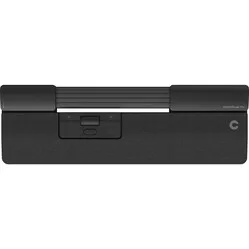
Contour Design SliderMouse Pro wired trackpad - Vegan leather


Product description of Contour Design SliderMouse Pro wired trackpad - Vegan leather
Ode to the SliderMouse Pro vegan leather
Conveyor belt
Many of us may not even notice it anymore with the advent of self-checkout in supermarkets. But Contour Design is standing firm. They are simply incorporating the track into their latest central mouse.
Why the SliderMouse Pro?
Centred mouse
The SliderMouse Pro is what they call a central mouse or a trackpad mouse. This is a mouse that is placed between the user and the keyboard. This allows you to maintain a compact posture, enabling you to work comfortably in an ergonomic position. Because the SliderMouse Pro is relatively flat and the controls are close together, you can use your fingers and hands without excessive stretching, twisting, or overstraining.
Slider bar
At the top of the SliderMouse Pro, you'll find the slider bar which you can use to control the cursor on your computer. You can use both your left and right hand for this. Additionally, you can operate the clickable slider bar with a light touch. This slider bar means you don't have to move your hands and wrists unnecessarily across your desk. You'll need to get used to this at first, but we promise you it's worth it.
Buttons
The central panel has 6 buttons and a scroll wheel, making it even easier to navigate on your screen. The buttons are also programmable with the help of a driver (see downloads section). Programming buttons can be useful when you frequently use the same key combinations, such as cut and paste or navigating forwards and backwards.
Anti-bacterial vegan leather
Contour has given its SliderMouse Pro a new look and feel with the introduction of vegan leather. It feels soft and pleasant on the skin and, compared to its fabric alternative, has an anti-bacterial layer and can be cleaned with alcohol. 30% recycled material has been used.
What makes the SliderMouse Pro so good?
Integrated wrist rest
The SliderMouse Pro includes an integrated wrist rest. This ensures your wrists are supported while using the trackpad, as well as when using your keyboard. A wrist rest prevents kinking of the wrists, and thus also complaints. This way, you can comfortably use both your mouse and keyboard.
The wrist rests compatible with the SliderMouse Pro are available in different sizes and materials.
Keyboard risers
With the help of the keyboard risers, you literally elevate your workspace to a higher level. These separate risers allow you to ergonomically adjust your keyboard in combination with the SliderMouse Pro. Because the keyboard risers are adjustable on two sides, you have 4 mounting options: a negative tilt, a positive tilt, neutral flat, and raised flat. Try out all the possibilities to discover what suits you best.
Get the most out of your SliderMouse Pro
To make your new SliderMouse Pro truly your own, the trackpad offers you several options. For example, you can choose from 5 different click resistances and click sounds. The cursor speed can also be adjusted, with a choice of 10 different settings (600-2800 DPI). We recommend trying everything out to feel what suits you best.
Don't miss this either
Sister of
The SliderMouse Pro was launched together with the RollerMouse Pro. This is almost the same trackpad, with only a small difference in cursor control. The RollerMouse Pro has a cylindrical pointer that controls the cursor. We recommend looking at both models before making your final choice.
All functions explained
You'll quickly get the hang of the SliderMouse Pro. Below you can find the functions and buttons it has.
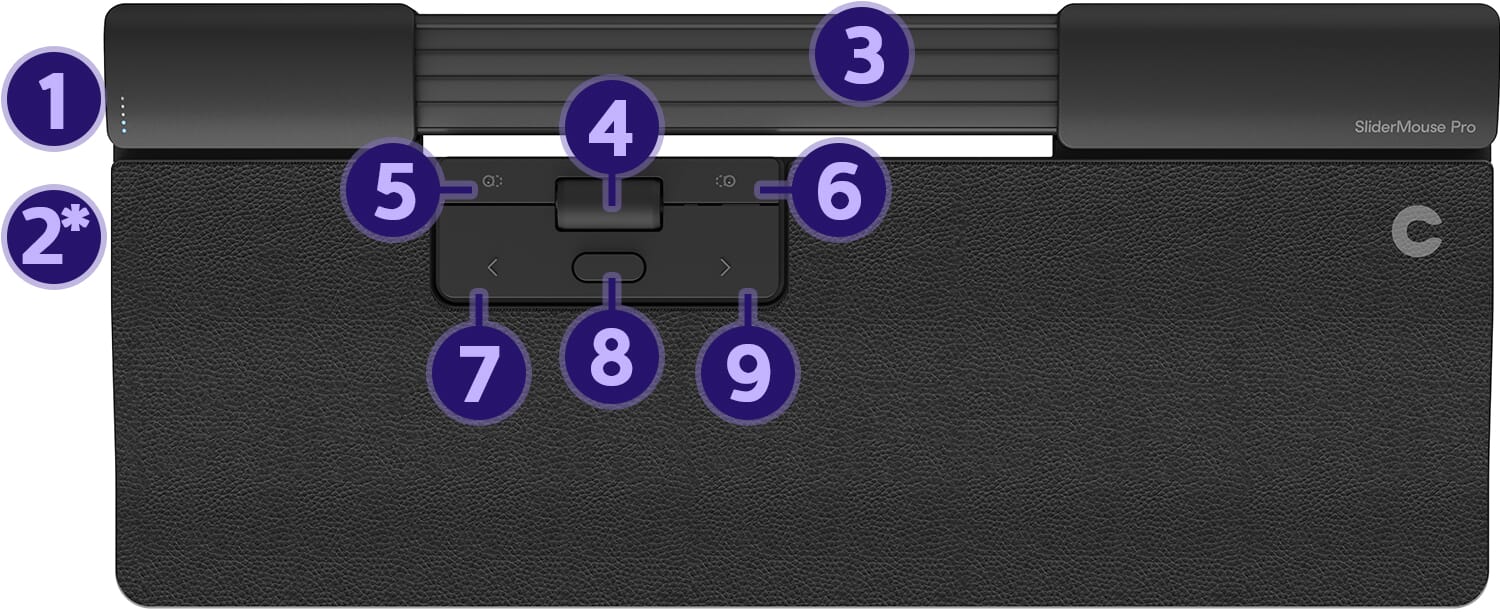
- Cursor speed
- On/off button*
- Slider bar (cursor control)
- Scroll wheel
- Cut
- Paste
- Left mouse button
- Double click
- Right mouse button
*Wireless model only
Pros and cons
- Programmable buttons
- With wrist rest
- For both Windows and Mac
- Not convenient to carry
Brief specifications
| Brand | Contour Design |
| Ergonomic design | |
| Buttons | 6 programmable buttons |
| DPI | 10 settings (600-2800 DPI) |
| Adjustable buttons |
How happy will my body be with this?
| Shoulder | |
| Arm | |
| Hand | |
| Wrist |
Product features
- Mechanical slider bar
- Magnetic wrist rest
- With built-in quick buttons
- For both Windows and Mac
- Wrist rest made of anti-bacterial vegan leather
- Work without stretching, twisting, and overstraining
- Comfortably do your desk work
- Placed between the keyboard and the user
SliderMouse Pro
Downloads
What's in the box?
- 1 x SliderMouse Pro
- 1 x Wrist rest
- 2 x Keyboard risers
- 1 x Manual
Frequently asked questions
Specifications
| Item number | ERGO-SMPBS-VE | ERGO-SMPBR-VE | ERGO-SMPBE-VE |
| Manufacturer's item number | CDSMPRO20110 | CDSMPRO20210 | CDSMPRO20310 |
| Brand | Contour Design |
| Warranty | 2 years |
| Type of guarantee | The Ergowerken free return guarantee service |
| Colour | Black |
| Ergonomic design | |
| Management | Trackpad |
| Left- or right-handed | Left- and right-handed |
| Hand length | Suitable for any hand size |
| Hand width | Suitable for any hand size |
| Operation | Buttons and trackpad |
| Connection | Wired |
| Included receiver | not applicable |
| Bluetooth | not applicable |
| Number of buttons | 6 |
| On/off button | not applicable |
| Adjustable buttons | |
| Scroll wheel | |
| Trackball | |
| Adjustable sensitivity | |
| Sensitivity | 10 settings (600-2800 DPI) |
| Type of power supply | Cable |
| Battery type | not applicable |
| Rechargeable | not applicable |
| Minimum system requirements | Mac OS X v10.5, Mac OS X v10.6, Mac OS X v10.7, Mac OS X v10.8, Mac OS X v10.9, Mac OS X v10.10, Mac OS X v10.11, Windows XP, Windows Vista, Windows 7, Windows 8, Windows 10 |
| Plug and play | |
| Dimensions length x width x height | Slim: (38.3 cm x 12.3 cm x 2.3 cm) | Regular: (38.3 cm x 16.5 cm x 2.3 cm) | Extended: (42.4 cm x 16.5 cm x 2.3 cm) |
Reviews Contour Design SliderMouse Pro wired trackpad - Vegan leather
Customers who write a review enter a prize draw for a voucher. We pick one winner and publish all reviews, including critical ones.