Stel hier je vraag over dit product
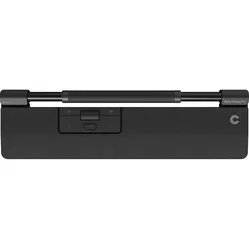
Contour Design RollerMouse Pro trackpad wireless - Vegan Leather


Product description of Contour Design RollerMouse Pro trackpad wireless - Vegan Leather
Why the RollerMouse Pro vegan leather?
Centrally positioned
The RollerMouse Pro is a trackpad mouse that sits centrally: between you and the keyboard. The advantage is that you can keep your hands and wrists in a natural position. You work far more compactly; you make fewer movements across the desk, which can help reduce ergonomic complaints in the hands, wrists, arms and shoulders. With the RollerMouse Pro there is no more need to stretch, twist or overload these parts of the body.
The mouse rolls
At the top of the RollerMouse Pro you will find the so-called rollerbar. This is a cylindrical control that moves along a horizontal bar. By turning and sliding this cylinder you steer the cursor on your screen.
The 6 buttons on the RollerMouse Pro let you carry out your office work quickly and easily. For example, you can cut and paste at the touch of a button, and also navigate forward and back in your internet browser. Are there other shortcut functions you use often? Then you simply assign them to the button of your choice. All the keys are programmable using the driver (see downloads). Finally, a scroll wheel has been added to the RollerMouse Pro as well.
All the buttons and the scroll wheel are located close to the cursor navigation. This lets you work very compactly and with the fewest movements. The RollerMouse Pro can be used with both wide and compact keyboards.
What makes the RollerMouse Pro so good?
Magnetic wrist rest
The RollerMouse Pro comes with an integrated wrist rest. This ensures that both wrists are properly supported when you use your keyboard or trackpad, and prevents an unnatural bend in the wrists. With the wrist rest you can keep working in a relaxed way.
The wrist rest is magnetic and attaches to the RollerMouse Pro in that way. The wrist rest is also available in different materials and sizes, so you can make this trackpad entirely your own.
Anti-bacterial vegan leather
Contour has given its RollerMouse Pro a new look and feel with the arrival of vegan leather. It feels soft and pleasant against the skin and, compared with its fabric alternative, has an anti-bacterial layer and can be cleaned with alcohol. It uses 30% recycled material.
Size and wire(less)
The RollerMouse Pro comes in three different sizes: slim wrist, regular wrist and extended wrist. The difference between them is the width of the wrist rest.
In addition, you can choose between a wired model and a wireless (USB/Bluetooth) model. Both options have their advantages and disadvantages. Think, for example, of the freedom of movement you have with the wireless model. On the other hand, a wired RollerMouse Pro never leaves you with an empty battery.
Keyboard risers
With the keyboard risers you take your workstation, literally, to a higher level. These separate risers let you set up your keyboard together with the RollerMouse Pro in an ergonomic way. Because the keyboard risers are adjustable on both sides, you have 4 mounting options: a negative slope, a positive slope, neutral flat, and raised flat. Try out all the options to discover what suits you.
Get the most out of your RollerMouse Pro
Even more personalisation
As mentioned, you can fully programme the 6 buttons of the RollerMouse Pro, but that is not all. You can also adjust the click resistance and click sounds to your liking. The cursor speed is easy to adjust to your preferences too, as you can choose from 10 different settings (600-2800 DPI).
You should not miss this either
Sister model of
The RollerMouse Pro came onto the market together with the SliderMouse Pro. This is almost the same trackpad, with one small difference in the cursor control. The SliderMouse Pro has a slidebar with which the cursor is steered. We recommend you look at both models before you make your final choice.
All functions explained
You will get the hang of the RollerMouse Pro fairly quickly. Below you can find the functions and buttons it has.
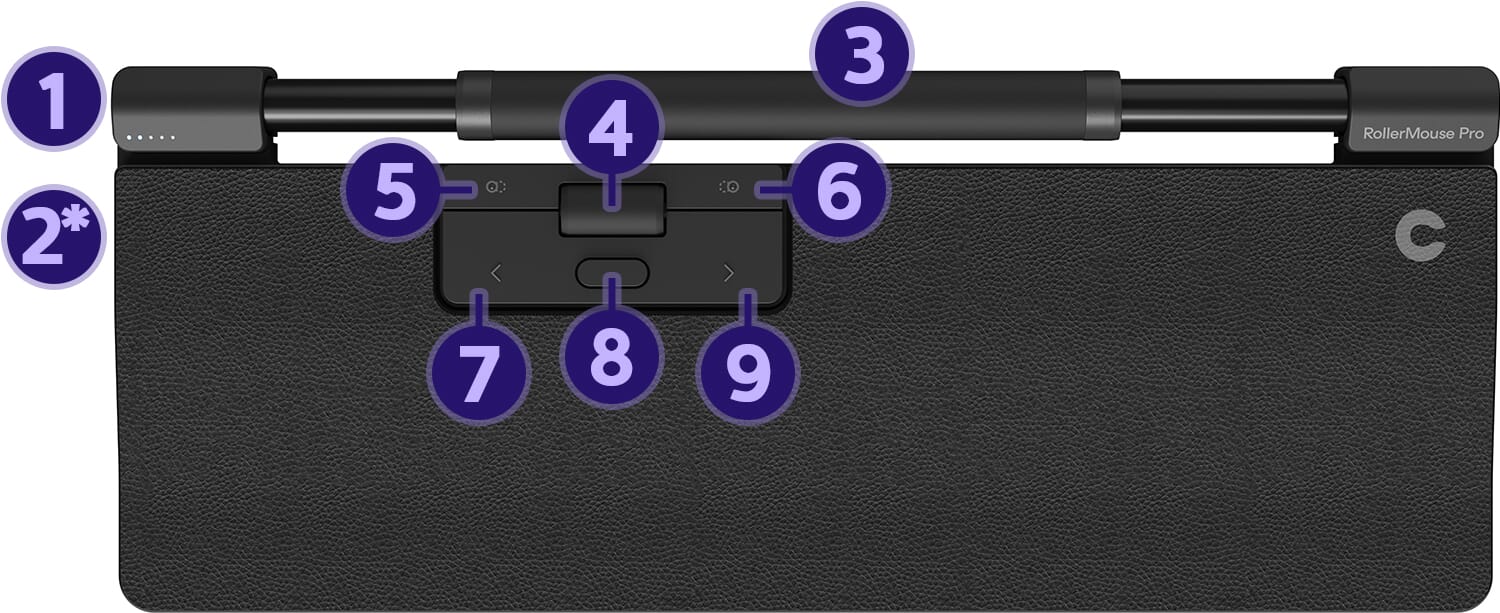
- Cursor speed
- On/off button*
- Rollerbar (cursor control)
- Scroll wheel
- Cut
- Paste
- Left mouse button
- Double click
- Right mouse button
*Wireless model only
Pros and cons
- Working in a natural posture
- Customisable buttons
- Integrated wrist rest
- Control with both hands
- Not convenient to take with you
Brief specifications
| Brand | Contour Design |
| Ergonomic design | |
| Number of buttons | 6 |
| Sensitivity | 10 settings (600-2800 DPI) |
| Adjustable buttons |
How happy will my body be with this?
| Shoulder | |
| Arm | |
| Wrist | |
| Hand |
Product features
- Centred mouse
- Wired, connects via USB receiver and Bluetooth
- Placed between the user and the keyboard
- Adjustable buttons
- Two-handed control
- for PC and Mac
- Wrist rest made of vegan leather
- With magnetic wrist rest
- Keeps the wrists and hands in a natural position
- Work in a compact posture
RollerMouse Pro
Downloads
What is in the box?
- 1 x RollerMouse Pro
- 1 x Wrist rest
- 2 x Keyboard risers
- 1 x USB receiver
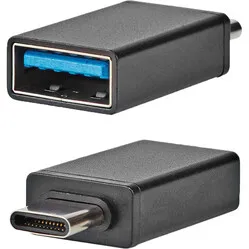
- 1 x USB extender
- 1 x USB charging cable
- 1 x Manual
Frequently asked questions
Specifications
| Item number | ERGO-RMPDS-VE | ERGO-RMPDR-VE | ERGO-RMPDE-VE |
| Manufacturer's item number | CDRMPRO10110 | CDRMPRO10210 | CDRMPRO10310 |
| Brand | Contour Design |
| Warranty | 2 years |
| Type of guarantee | The Ergowerken free return guarantee service |
| Colour | Black |
| Ergonomic design | |
| Management | Trackpad |
| Left- or right-handed | Left- and right-handed |
| Hand length | Suitable for any hand size |
| Hand width | Suitable for any hand size |
| Operation | Buttons and trackpad |
| Connection | USB receiver & Bluetooth |
| Included receiver | |
| Bluetooth | |
| USB port | USB-C to USB-A charging cable |
| Number of buttons | 6 |
| On/off button | |
| Adjustable buttons | Yes - with contour driver |
| Scroll wheel | |
| Trackball | |
| Adjustable sensitivity | Yes - 10 settings |
| Sensitivity | 10 settings (600-2800 DPI) |
| Type of power supply | Battery |
| Battery type | Lithium 2000 mAh battery |
| Rechargeable | |
| Minimum system requirements | Mac OS X v10.5, Mac OS X v10.6, Mac OS X v10.7, Mac OS X v10.8, Mac OS X v10.9, Mac OS X v10.10, Mac OS X v10.11, Windows XP, Windows Vista, Windows 7, Windows 8, Windows 10 |
| Plug and play | |
| Dimensions length x width x height |
Slim: 38.2 cm x 10.8 cm x 2.3 cm Regular: 38.2 cm x 14.9 cm x 2.3 cm Extended: 42.4 cm x 14.9 cm x 2.3 cm |
Reviews Contour Design RollerMouse Pro trackpad wireless - Vegan Leather
Customers who write a review enter a prize draw for a voucher. We pick one winner and publish all reviews, including critical ones.