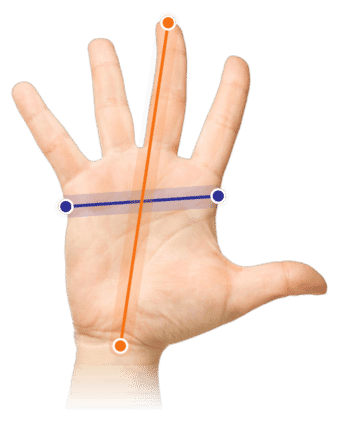
Which size fits your hand?
Measure your hand as shown in the image and choose your size using the table below:
| Size | Width | Length |
|---|
| Any hand size | suitable | suitable |
Old and familiar
You learn to write at an early age. The shape and use of a pen are therefore self-evident for everyone. Penclic has incorporated precisely that advantage into its mouse. You don't have to get used to it, you know how it works. Put it down, connect it, and you can get started.
Why the Penclic 2 mouse?
During the development of the Penclic mouse, one of humanity's most used and trusted tools was taken as a starting point: the pen. Precisely because of its familiar design, it works intuitively, easily, and comfortably. You have a good grip, and the hand and arm are in their natural posture. This prevents complaints.
The reasoning behind choosing the pen shape is as simple as it is brilliant. A large part of the human brain controls fine motor movements. This makes working with a pen so easy and comfortable for us. The pen shape for a mouse is a logical consequence of this.
An advantage of the Penclic mouse is its fine grip, which makes it pleasant to work with. Just like with a traditional mouse, you control the cursor by dragging it across the desk. The mouse requires a light grip, which reduces muscle tension in the arm.
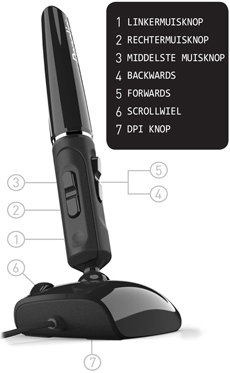
The wireless Penclic has all the buttons you would expect: left and right mouse buttons, the forward/backward button, and a middle mouse button. Furthermore, it is equipped with a scroll wheel, and there is a button under the mouse to turn it on and off. The mouse sensitivity can be set to 800, 1200, 1600, or 2400 DPI. You can do this by pressing the left and right mouse buttons simultaneously for 3 seconds.
The Penclic works Plug&Play, meaning you only need to insert its wireless USB receiver into your laptop or computer to get started. It has a range of more than 5 metres. The mouse works on almost all operating systems. Windows XP and newer, Mac OSX 10.1 and newer, and Linux. The wireless Penclic comes with 1 rechargeable AAA battery. This can be charged in the Penclic via a USB cable.
This is what makes an ergonomic mouse so good
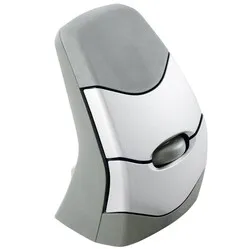
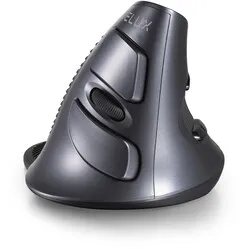
The ergonomic mouse was brought to life when it became clear that the traditional mouse caused complaints for many people. The design is tilted, forcing your wrist into a natural posture. This relaxes the muscles in the wrist, arm, and shoulder, preventing and counteracting complaints such as RSI.
Get the most out of it
The Penclic mouse feels the same as a traditional pen. This makes switching to this mouse as easy as using a new pen. The difference is that you now follow your movements on the screen instead of on paper.
The pen shape of the mouse works wonderfully accurately. Thanks to this mouse, being creative digitally is almost as smooth as on paper. Working in Photoshop, Illustrator, and CAD programmes is perfectly suited for the Penclic.
Don't miss this either