Stel hier je vraag over dit product
NM-D335D4BLACK monitor arm 10-27''


Product description of NM-D335D4BLACK monitor arm 10-27''
Key specifications of the Newstar NM-D335D4BLACK monitor arm
 4
4 10 - 27 inch
 75/100
 0 - 810 mm
 360 degrees
 90 degrees
 30 degrees
 80 mm
80 mm 32 kg
32 kg 10 - 88 mm
Newstar Neomount NM-D335D4BLACK monitor arm 10-27"
Description
We can only dream of this
4 football matches at once. Or no, 4 series at once. Oh, wait, I'm 4 episodes of GTST behind. Or should I do something productive with it? With 3 screens, I can still do a lot. I'll still have room for that one dart match.
Why the Newstar Neomount monitor arm?
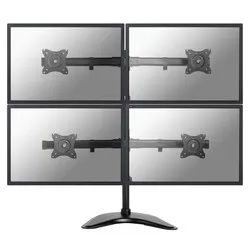
4 screens on 1 bracket. It's possible with the Neomount D335D4. Ideal if you always want to maintain an overview and not miss anything. With its 2x2 setup, you still maintain a compact arrangement, allowing you to work with this monster even in smaller spaces.
Despite being able to support 4 monitors, it doesn't compromise on power. This Neomount can also support screens up to 27 inches. That's a diameter of 69 cm. Up to 8 kilograms of screen can be attached to each arm. The monitors can tilt, swivel, and rotate independently. This allows you to find the ideal viewing angle. The top monitors will need to be tilted down a little more. The D335D4 can be attached to the table with a clamp, base, and grommet.
The D335D4 is compact thanks to its short arm, which is only 8 cm. This allows you to place the arm even in smaller workspaces. You don't lose valuable space, but you do have the convenience of 4 screens right in front of you.
If you want to place 4 monitors, this arm is a real asset. Without an arm, you are forced to place them all next to each other on your desk. Not only does it take up a lot of space, but your overview is also completely gone. Thanks to this Neomount, you have a centred working posture and don't have to move your head too much to see everything. The monitors are also at a height that significantly improves your posture. You can lean back more and still see everything clearly. Your back, neck, and shoulders will benefit greatly from this.
Your workspace will become a real eye-catcher with this monitor mount. It is clean, organised, and ergonomic. In short, very professional. A sea of space is created, allowing other important items to be closer at hand.
This is what makes a monitor arm so good
A monitor arm gives you control over your monitor. Simply put, it allows you to adjust it to your liking. At the right height and at the right angle, it improves your working posture, allowing your body to find more relaxation. You can work comfortably for longer and are less likely to develop back, neck, or shoulder complaints. An arm for multiple monitors can also improve overview and thus productivity.
Installation of the NM-D335D4BLACK
Newstar would ideally like to deliver its products like a foldable tent. You remove the packaging and it's immediately ready to use. While this is not a realistic scenario, Newstar still strives for simplicity. You only need a screwdriver to assemble this product. Everything else is included. Together with the illustrated manual, it should be possible for everyone to assemble the arm.
Get the most out of it
Do you need to analyse or monitor a lot of information? Then the D335D4 can be a serious asset. The setup makes it so good. With your screens in a 2x2 arrangement, everything is within reach. You don't have to tilt and turn your head. Do you already work with 4 screens, but they are next to each other and the space you are in is limited? Then this arm is the solution to your problem.
This product is good for
back - shoulder - neck
Analysing and monitoring a lot of information is tiring, but the D335D4 makes it easier. They are at the right height, nicely centred. The relaxation this provides has a positive effect on your back, neck, and shoulders.
Pros and cons
- For 4 monitors
- Ideal for monitoring information
- Mounting with desk clamp, base, and grommet possible
- No gas spring for height adjustment
Brief specifications
| Number of screens | 4 |
| Tilt | Max. 90 degrees |
| Rotate | Max. 360 degrees |
| Swivel | Max. 30 degrees |
| Mounting | Clamp, base or grommet |
| view all specifications |
Product features
- For attaching 4 monitors
- All screens centrally located for a clear overview
- Widely adjustable
- Black aluminium arm
- Mounting possible with a clamp, base, and grommet
- Only a screwdriver needed for assembly
What's in the box?
- Black aluminium monitor arm
- Mounting material
- Clamp, base, and grommet
Downloads
Frequently asked questions
Specifications
| Item number | ERGO-NSNMD335D4B |
| Manufacturer's item number | NM-D335D4BLACK |
| Brand | NewStar |
| Warranty | 5 years |
| Type of guarantee | Ergowerken free warranty return service |
| Colour | Black |
| Number of screens | 4 |
| Gas-sprung arm | |
| Minimum screen size | 10 inches (25.6 cm) |
| Maximum screen size | 27 inches (69.12 cm) |
| Maximum load capacity | 32 kilograms |
| Tilting | Yes, up to 90° |
| Rotate | Yes, up to 360° |
| Swinging | Yes, up to 30° |
| Lowest setting | 0 millimetres |
| Highest position | 810 millimetres |
| Depth | 80 millimetres |
| VESA minimum | 75 x 75 millimetres |
| VESA maximum | 100 x 100 millimetres |
| Method of installation | By means of a desk clamp, base or feed-through |
| Suitable for desk thicknesses of | 10 - 88 millimetres |
| Assembly materials included | |
| Required tools | A Phillips screwdriver and, if you wish to use the feed-through mounting, a drill is required. |
| Cable management |
Reviews NM-D335D4BLACK monitor arm 10-27''
Customers who write a review enter a prize draw for a voucher. We pick one winner and publish all reviews, including critical ones.