







Stel hier je vraag over dit product
Matias Ergo Pro programmable split keyboard for PC


Product description of Matias Ergo Pro programmable split keyboard for PC
Is this keyboard right for me?
| Width | 368 mm |
| Depth | 230 mm |
| Height | 35 mm |
| Compatibility | Windows |
| Key layout | QWERTY (ANSI US) |
| Key type | Mechanical keys |
| Connection | Wired via USB |
An ode to the Ergo Pro split keyboard
Customisable
Customising something is often a positive thing! This is especially true for you if you become the proud owner of the Ergo Pro. Because if there's one thing it's good at, it's helping you to create that healthy workspace tailored to your needs.
Why the Matias Ergo Pro split keyboard?
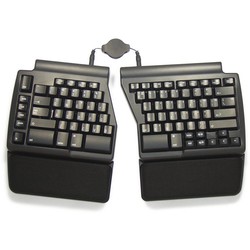
The Ergo Pro is a compact and split keyboard that allows wrists and hands to be kept in a more natural position. Firstly, the Ergo Pro can be slid apart. Both parts can also be raised on the side where they meet. The keyboard can also be raised slightly at the front. To optimise comfort, both parts feature (removable) wrist rests.
The keyboard features Matias Quiet Click mechanical keys. The keys are programmable, meaning you can change their functions yourself. You can also add macros, allowing entire sentences to be conjured up by pressing a combination of keys. The keyboard has internal memory and the necessary software. So, you don't need to download any operating programmes.
What makes an ergonomic keyboard so good?
Anyone who performs a lot of computer work knows that this can be strenuous for your wrists, shoulders, back and neck. A good keyboard can help you with this. The Matias Ergo Pro, for example, has a compact and split design. The keys are also extra easy to press. And you can place your mouse close to the keyboard. All of this is to minimise muscle tension, which can help prevent or reduce injuries.
Get the most out of this product
The left half of the keyboard has an extra row of hotkeys on the outside: Copy, Cut, Paste and Undo. On the right side of the right half, the keyboard has three USB-A ports. Here you can plug in your mouse, or even a camera or phone, for example. The Matias Ergo Pro also features Anti-Ghosting, meaning there is no limit to the number of keystrokes the keyboard can process simultaneously.
The Ergo Pro comes in two variants: one for Windows and one for Mac. So, make sure you order the keyboard that matches your operating system. You can switch between the Mac and Windows versions at the top right of the page.
Don't miss this either
Programmable keys
As mentioned, certain keys are programmable: The Function keys (F1 to F12), the four extra hotkeys on the left side of the keyboard, both spacebars, and the N-key. Programming works as follows: Hold down both the Escape key and the key you want to program simultaneously until the CapsLock key starts flashing. Now you can add a word, sentence or character to this key. Press the programmed key again to save.
To delete a macro, hold down Escape and the programmed key until the CapsLock key starts flashing, then press the programmed key again. All macros can also be deleted by holding down the Escape key and the Backspace key simultaneously.
How happy will my body be with this?
- Shoulders
- Wrist
- Hand
- Arm
Pros and cons
- Adjustable for the ideal posture
- With integrated wrist rests
- (Quiet) Mechanical keys
- Programmable keys
- With integrated USB hub
- Not an ideal travel companion
Brief specifications
| Warranty | 2 years |
| Product weight | 1690 grams |
| Keyboard layout | QWERTY |
| Connection cable length | 2 metres |
| Key type | Mechanical |
| view all specifications |
Product features
- Ergonomic design
- Split keyboard
- Matias Quiet Click mechanical keys
- Improved navigation key layout
- Tiltable
- With extra hotkeys
- Specifically for Windows
- 2-metre cable length
- With 3 USB 2.0 ports
- Laser-etched keys
- Traditionally curved keys
- With special Anti-Ghosting Circuits
- Modern design
- Integrated wrist rest
- Programmable keys
What's in the box?
- 1 x Ergo Pro keyboard
- 1 x 2 m USB/USB-micro cable
- 1 x 1 m USB/USB-micro cable
- 2 x Bridge cable
- 1 x Manual
Frequently asked questions
Specifications
| Item number | ERGO-MAQPC |
| Manufacturer's item number | FK403QPC |
| Brand | Matias |
| Warranty | 2 years |
| Type of guarantee | Ergowerken free warranty return service |
| Colour | Black |
| Keyboard type | Split keyboard |
| Ergonomic design | |
| Keyboard layout | QWERTY (ANSI US) |
| Connection | Wired via USB |
| Bluetooth | not applicable |
| USB version | 2.0 |
| Type of keys | Mechanical keys with Matias Quiet Click technology |
| Numeric keypad | Integrated, accessible via Fn key |
| Shortcut keys | |
| Programmable buttons | |
| Trackball/touchpad | |
| Type of power supply | Wire |
| Battery type | not applicable |
| Rechargeable | not applicable |
| Minimum system requirements | Windows XP and above |
| Plug and play | |
| Dimensions length x width x height | 368 x 230 x 35 mm (with wrist rest) 368 x 165 x 35 mm (without wrist rest) |
| Product weight | 1690 grams |
Reviews Matias Ergo Pro programmable split keyboard for PC
Customers who write a review enter a prize draw for a voucher. We pick one winner and publish all reviews, including critical ones.