Superfijne muis. Aangeschaft vanwege een
"Superfijne muis. Aangeschaft vanwege een beginnende RSI. Merkte meteen een verschil. Komt ook omdat ik er optijd bij was."



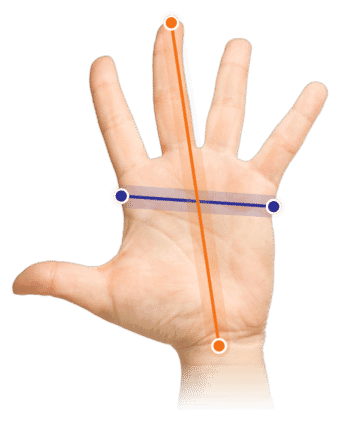
Measure your hand as shown in the image and choose your size using the table below:
| Size | Width | Length |
|---|---|---|
| Any hand size | suitable | suitable |
"Accute TendinitiS?" Oh man, thankfully not. On the contrary, it's a very positive abbreviation that will make your thumb do a little "hallelujah". The Articulating Thumb Support will certainly put the term 'thumb yoga' in the Oxford English Dictionary.
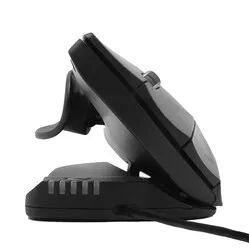
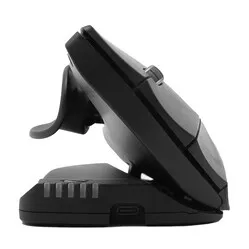
Every user is different, and with that in mind, the Unimouse was created. Not only is the angle of the mouse infinitely adjustable, the thumb rest can also move in every direction. So you can set it up entirely to your own preferences.
There are very few mice that offer so much in terms of adjustment options. The Unimouse is quite unique in this respect. We know tilting from the Oyster mouse, for example, but that one does it in steps. For stepless adjustment between 35 and 70 degrees, you really do need the wireless Unimouse.
Once you start using it, you'll quickly notice that there isn't just one favourite position. You'll find several. A bit flatter for more precision during accurate (drawing) work. Then back to its comfortable higher angle for dragging and clicking. And don't forget to use the thumb rest and the 10 DPI settings to give it your own 'touch'.
The long buttons of the wireless Unimouse have a pleasant click and fairly even resistance, regardless of where you press them.
The rubber scroll wheel gives you control and precision. It rolls smoothly and provides the right feedback with a light click.
Dynamics at your workplace are very important. You've undoubtedly heard that more often, especially where sitting is concerned. Contour has now built this thinking into their Unimouse as well.
A stepless angle of 35 to 70 degrees and a thumb rest that moves 35 degrees in every direction. You can certainly call that dynamic. So you adjust the mouse not only for your tasks, but also for your strain (this has nothing to do with the taxman).
Do you suffer from wrist pain? Open that mouse up. Your arm sits in a better posture and your hand rests relaxed on the mouse. Would you like a bit more support from the mouse? Then set the mouse flatter and let the thumb rest point upwards. Your hand can now rest relaxed on the mouse and you don't have to grip it.
Because it isn't tethered to your PC with a cable, you have complete freedom to move the mouse. Do make sure you operate it within shoulder width, your shoulder and neck muscles will appreciate that.
An ergonomic mouse like the wireless Unimouse is specially designed to take as much tension as possible off your muscles, which can help reduce and prevent complaints. Thanks to its tilted design, your wrist, arm and hand keep a natural posture while you work. This promotes relaxation and helps prevent RSI complaints.
The extensive adjustability lets you reduce static load. That also makes it suitable for most hand sizes straight away. The long buttons mean that even with short fingers, you can still operate the mouse easily.
The Contour mouse features a Pixart PMW3330 sensor. Thanks to this sensor, the mouse works excellently on almost any surface. You also have 10 different mouse sensitivities to play with. On reflective surfaces we advise using a mouse mat anyway, based on our own tests.
The 5 LEDs at the front of the mouse show the DPI setting. The green LEDs show DPI rising from 800 to 1600. The red lights are for the serious high-speed work and show 2000 to 4000 DPI. The Unimouse has 6 buttons, including a forward and backwards button. It can be used wirelessly up to 8 metres from your computer, either via Bluetooth or the included USB receiver. The mouse weighs 140 grams.
The Contour mouse contains a rechargeable Lithium-ion polymer battery with a capacity of 500mAh. With average use you can work for 2-3 months before it needs the charger again. Charging while you work is perfectly possible: 2 hours of charging gets you through another couple of months.
Contour has built a battery indicator into the mouse. When you press the DPI button once, it first shows the DPI setting (the DPI does not change then). After that it shows the battery level. You can read more about this in the manual on this page.
Stepless adjustment of the mouse is possible thanks to 4 friction hinges. A little extra pressure is needed to adjust it, so you don't have to worry about the mouse collapsing while you work. Do take care not to accidentally press a button while adjusting the mouse.
With the Contour driver for your Unimouse you can assign other functions to the buttons. You can even change several buttons per programme, so you tick off your tasks even faster.
| Warranty | 2 years |
| Ergonomic design | |
| Usage | Left-handed |
| Number of buttons | 6 |
| Plug & play | Yes |
| Wrist | |
| Arm | |
| Hand | |
| Shoulder |
| Item number | ERGO-CUNIWL-L |
| Manufacturer's item number | UNIMOUSE-WL-L |
| Brand | Contour |
| Warranty | 2 years |
| Type of guarantee | Ergowerken free warranty return service |
| Colour | Matte black |
| Ergonomic design | |
| Management | Pixart PMW3330 sensor |
| Left- or right-handed | Left-handed |
| Hand length | Suitable for any arm length |
| Hand width | Suitable for any hand size |
| Operation | Buttons and scroll wheel |
| Connection | Wireless USB or Bluetooth |
| Included receiver | Yes, 2.4 GHz USB nano receiver |
| Bluetooth | |
| USB port | |
| USB version | 2.0 |
| Number of buttons | 6 programmable buttons |
| On/off button | |
| Adjustable buttons | The driver for the left-handed model is currently under development. |
| Scroll wheel | |
| Trackball | not applicable |
| Adjustable sensitivity | |
| Sensitivity | 800/1000/1200/1400/1600/2000/2400/2800/3400/4000 dpi |
| Type of power supply | Rechargeable battery |
| Battery type | Rechargeable lithium-ion polymer battery, 500 mAh |
| Rechargeable | |
| Minimum system requirements | Mac OS / Windows |
| Plug and play | |
| Dimensions length x width x height | 127 x 76 x 50 millimetres |
| Product weight | approximately 140 grams |
Customers who write a review enter a prize draw for a voucher. We pick one winner and publish all reviews, including critical ones.