Stel hier je vraag over dit product
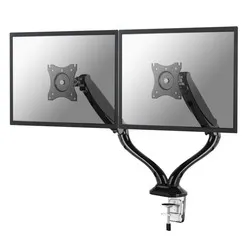
NM-D500DBLACK monitor arm 10-27''


Product description of NM-D500DBLACK monitor arm 10-27''
Key specifications of the Newstar NM-D500DBLACK monitor arm
 2
2 10 - 27 inch
 75/100
 80 - 410 mm
 360 degrees
 180 degrees
 180 degrees
 0 - 510 mm
 12 kg
12 kg Clamp and grommet
 10 - 85 mm
Newstar Neomount NM-D500DBLACK monitor arm 10-27"
Description
"Pick me! No, pick me!"
The identical twins are raring to go. Because they want your attention. Competitive as they are, they want to know which one you will make arm 1 and which one arm 2. Our advice? It makes no difference, they are exactly the same. And if you get tired of one of them, you simply turn it out of the way.
Why the Newstar Neomount monitor arm?
The highly flexible D500D lets you mount 2 monitors. Each monitor sits on its own arm, which leaves you completely free in how you position them. One high and the other low. Or perhaps you regularly need to show something to customers sitting next to you. Then you swing one monitor round their way for a moment.
Both arms are fitted with a gas spring. This lets you set the arm higher or lower without having to loosen or tighten anything. All you need is your arms and a minimum of effort. A setup that is comfortable and productive for you is therefore easily made with the NM-D500D. You can sit up straighter and more relaxed. Your back benefits a great deal from that. Your shoulders and neck will notice it too.
The D500D can take a lot. Whoppers of up to 27 inches and a maximum weight of 6 kilograms are no problem. The long 51 cm arm can reach anywhere on the desk. And the height is widely adjustable as well. A height of 8 to 41 cm can be reached. And that refers to the middle (the centre) of the monitor.
Using 2 monitors is not just for professional applications. Even doing homework becomes easier. Your assignments are on one screen, while on the other you can calmly do research and read documents. It is also excellently suited to commercial purposes. While you have your monitor straight in front of you, you can show important information to your customer on the other one.
Do you really have to put in full days to justify a monitor arm? Absolutely not. It should even be part of the basic equipment on every desk. The benefits apply to everyone. The average hobbyist also gains from a better posture and a tidy desk.
A monitor arm improves your sitting posture and can increase productivity. Those are the main benefits, but not the only ones. The look of your workplace improves considerably as well. Your desk is tidier and easier to clean. You can use the space you save for other important things you like to keep within reach.
What makes a monitor arm so good
A better and healthier posture. A better overview. More control. A monitor arm makes you the boss of your monitor. It enables you to work more productively and to work together better.
You are no longer tied to 1 fixed spot and 1 posture. The dynamism of the arm translates into more dynamism within your workplace. You feel less shut in and pinned down. That little bit of extra freedom will give you more pleasure than you would expect beforehand.
Installing the NM-D500DBLACK
A screwdriver. That is all you need to fit the monitor arm with a desk clamp. All the mounting hardware is in the box. The manual that is included tells you step by step what to do. Would you like to know what it looks like? Then have a quick look under the heading 'downloads' on this page.
Fitting with a grommet is possible too, by the way. Like the desk clamp, it is supplied as standard. Do bear in mind that you need a drill for the grommet.
Get the most out of it
The flexible D500D is particularly suitable for flexible workstations and for roles in which several programmes are used at the same time. At a flexible workstation the monitor arms can easily be adjusted for each user. The gas spring makes tools unnecessary.
Do you regularly work in different programmes at the same time? Because you have to transfer information from one programme to another, for example? Then 2 screens are anything but a luxury. The D500DBLACK reduces clicking, and so saves you a lot of time.
This product is good for
back - shoulder - neck
A good working posture is important. With your monitor at the right height that is easier to achieve. You sit more comfortably, which means your body stays relaxed for longer. Your shoulders, back and neck in particular will feel considerably better.
Pros and cons
- Height adjustable in an instant
- Mount 2 monitors for a better overview
- Can be fitted with a desk clamp or a grommet
- Available in black only
Specifications at a glance
| Gas spring arm | Yes |
| Tilt | Max. 180 degrees |
| Rotate | Max. 360 degrees |
| Swivel | Max. 180 degrees |
| Mounting | Clamp or grommet |
| view all specifications |
Product features
- For mounting 2 monitors
- Fitted with a gas spring
- Widely adjustable
- Black aluminium arm
- Can be fitted with a clamp or a grommet
- Only a screwdriver needed for assembly
What is in the box?
- 2 black aluminium monitor arms
- Mounting hardware
- Clamp and grommet
Downloads
Frequently asked questions
Specifications
| Item number | ERGO-NSNMD500DB |
| Manufacturer's item number | NM-D500DBLACK |
| Brand | NewStar |
| Warranty | 5 years |
| Type of guarantee | Ergowerken free warranty return service |
| Colour | Black |
| Number of screens | 2 |
| Gas-sprung arm | |
| Minimum screen size | 10 inches (25.6 cm) |
| Maximum screen size | 27 inches (69.12 cm) |
| Maximum load capacity | 12 kilograms |
| Tilting | Yes, up to 180° |
| Rotate | Yes, up to 360° |
| Swinging | Yes, up to 180° |
| Lowest setting | 80 millimetres |
| Highest position | 410 millimetres |
| Depth | 0 - 510 millimetres |
| VESA minimum | 75 x 75 millimetres |
| VESA maximum | 100 x 100 millimetres |
| Method of installation | By means of a desk clamp and feed-through |
| Suitable for desk thicknesses of | 85 - 405 millimetres |
| Assembly materials included | |
| Required tools | A Phillips screwdriver and, if you wish to use the feed-through mounting, a drill is required. |
| Cable management |
Reviews NM-D500DBLACK monitor arm 10-27''
Customers who write a review enter a prize draw for a voucher. We pick one winner and publish all reviews, including critical ones.