







Stel hier je vraag over dit product
Delux Ergonomic split pro wireless


Product description of Delux Ergonomic split pro wireless
Is this keyboard right for me?

| Width | 418 mm |
| Depth | 244.1 mm |
| Height | 32.7 mm |
| Compatibility | Windows, Mac and Android |
| Key layout | QWERTY (ANSI US int.) |
| Switches | Scissor |
| Connection | Bluetooth 5.0 and 2.4 GHz (USB receiver) |
Ode to the Split Pro backlit
You'll keep running your hands over it
It's truly wonderfully soft and seems to constantly want to caress your hands. This can indeed be called a full-fledged palm rest. And we haven't even got to the amazing keyboard attached to it yet.
Why the Delux Split Pro backlit keyboard
A very well thought-out board
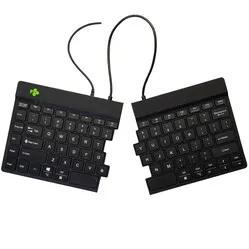
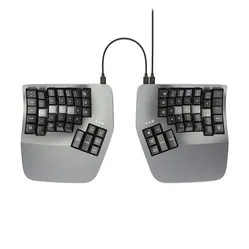
With the Split Pro, you have a fairly compact board in front of you, yet it features a full-sized numeric keypad. Its split design combined with the slight curve in the middle makes for great typing. Furthermore, it is equipped with both one 2.4 GHz (USB receiver) and two Bluetooth connections. We also shouldn't forget the multimedia keys below the function row and the feet under each corner of the board.
Pleasant scissor mechanism
This board types really well for a scissor mechanism. It provides feedback and sufficient counter-pressure. For the avid typist, this is a joy to tap. The board is sturdy and weighs over a kilo, meaning it's not a soundbox either. This ensures it doesn't produce much noise. The scissor mechanism in each key is designed to last up to 3 million keystrokes.
Windows & Mac
The keyboard features a dual layout: both Windows users and Mac enthusiasts can therefore get along with this board.
For Mac users : the keyboard only works 100% when connected in Bluetooth mode. When paired with the USB receiver, some buttons do not function correctly. For example, you cannot create shortcuts with the Command key.
Split with a slight curve
The board's layout immediately catches the eye. And it feels good. There are a few ideas behind it:
- Fingers find the keys on the board more easily
- Hands are better aligned with your wrists
- Your forearms are positioned slightly further outwards, so your wrists don't have to bend
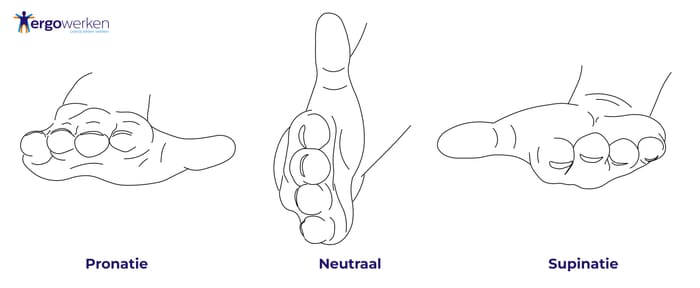
Furthermore, there is a slight curve in the board, causing the thumbs to point slightly upwards. This creates the same effect as with a vertical mouse. The arm adopts a neutral posture and can find more relaxation.
Nice keys with backlighting
The keys on the board are so-called ‘concave keycaps’. Each key has a kind of hollow, where the fingers rest during typing. It gives you just a bit more certainty when striking a key.
The board is equipped with white backlight illumination. You have access to 3 brightness levels, but you can also turn the lighting off. The light does not shine through the keys, but around them. In the dark, you won't be able to read the letters any better because of it.
What makes the Delux Split Pro so good?
Its curve and split layout are ideal for a relaxed forearm posture. The arm is less rotated, the thumbs point upwards. You can compare the posture to your hand on a vertical mouse. The arm is in a more neutral position.
Get the most out of your split keyboard
Multimedia madness
The top function row is equipped with multimedia keys. You can choose to keep the row set to the function keys by default, but it can also be locked to the multimedia keys. The combination ‘FN+Esc’ does this. If the board is in function mode, but you still want to mute the volume? Then press ‘FN+F11’ to activate the multimedia layer once. This combination with FN works for every multimedia key.
The USB receiver of the Split keyboard can be stored in the back of the keyboard. It stays securely in place thanks to the built-in magnet.
Also not to be missed
Nice keys with backlighting
The keys on the board are so-called ‘concave keycaps’. Each key has a kind of hollow, where the fingers rest during typing. It gives you just a bit more certainty when striking a key.
The board is equipped with white backlight illumination. You have access to 3 brightness levels, but you can also turn the lighting off. The light does not shine through the keys, but around them. In the dark, you won't be able to read the letters any better because of it.
Getting used to the layout
A split keyboard always takes some getting used to. The keys are not in a strict straight line. You also have to deal with a ‘gap’ between the middle rows. If you touch-type, you'll need little time to master the board. If you don't, it's not unusual to need 1-2 weeks to fully adjust to the board.
One of the compromises made to keep the board compact are the arrow keys. and immediately stand out as being a bit smaller. Fortunately, they are rounded, so you can always find them quickly (and distinguish them from each other).
Feet all around
The board is equipped with feet under all 4 corners. This also allows for negative tilting, which is comfortable for the wrists.
Pros and Cons
- Split layout offers relaxation
- 2.4 GHz & Bluetooth (dual-mode)
- Connect up to 3 devices
- Pleasant typing scissor mechanism
- Integrated faux leather wrist rest
- Arrow keys have different sizes
Brief specifications
| Keyboard type | Split |
| Ergonomic design | |
| Connection | Wireless |
| Bluetooth | 5.0 |
| Weight | 1026 grams |
Specifications
| Item number | ERGO-GM902PRO |
| Manufacturer's item number | GM902PRO backlight |
| Warranty | 2 years |
| Type of guarantee | The Ergowerken free return guarantee service |
| Colour | Black |
| Keyboard type | Split |
| Ergonomic design | |
| Keyboard layout | US QWERTY (ANSI) |
| Connection | Wireless Bluetooth and USB dongle |
| Bluetooth | 5.0 |
| Type of keys | Scissors |
| Numeric keypad | |
| Shortcut keys | Multimedia |
| Programmable buttons | |
| Trackball/touchpad | |
| Type of power supply | Rechargeable battery |
| Battery type | 860 mAh integrated |
| Rechargeable | |
| Minimum system requirements | Windows 8 | Mac OS |
| Plug and play | |
| Dimensions length x width x height | 418 x 244.1 x 32.7 millimetres |
| Product weight | 1026 grams |
Reviews Delux Ergonomic split pro wireless
Customers who write a review enter a prize draw for a voucher. We pick one winner and publish all reviews, including critical ones.