






The 5 best ergonomic mice of 2026
Table of Contents
Pro tip: use our selection guide
The mice you simply must see
1. Delux Seeker
2. Delux Mini
3. Evoluent D
4. Contour Unimouse
5. Posturite Penguin
An overview: the physical impact of our top 5
Our personal number 1
Use our selection guide
Are you looking for the best mouse for you? With our selection guide, you can find out which mouse suits you best. You can use the selection guide below right away!
The mice you need to see
Is this the most important page of 2026 when it comes to ergonomic mice? That depends. Normally, we advise you to contact us when choosing a new mouse. There are a number of factors at play that determine the right choice.
Veterans and new heroes
This top 5 is more of an extra helping hand to show you which mice, in our view, have the edge over others. It is a tribute to both new heroes and the heroes who have more than earned their spurs and may well have a successor waiting in the wings. Each mouse has been carefully selected by us, taking a number of factors into account.
What do we think?
Take our personal experience, for example. No mouse appears on our website without us having used it ourselves. This allows us to test whether the mouse does what it promises, what the quality is like and how it performs compared to a possible predecessor. This list includes two mice with predecessors (exciting!). Another factor we take into account is the invaluable feedback from customers like you.
What do you think?
In our industry, with over 10,000 (as of 12 January 2026) unique product reviews, we are one of the few with such a wealth of user experiences. All these users have their own perspective on their ergonomic mouse, which provides new insights. For example, we sometimes adjust the recommended hand sizes for mice if we frequently find that a mouse is too small or too large for the user, or we recommend the mouse for slightly different applications than the manufacturer does. All this is possible thanks to users like you.
Developments in the workplace
Not unimportant, of course: the developments in the workplace that influence the type of mouse purchased. Can you give an example, Tim? Certainly, a very interesting one indeed. We’re seeing that companies are increasingly looking towards the preventative side when it comes to healthy working practices. You then move from an ergonomic mouse for specific cases to an ergonomic mouse for everyone. From a budgetary perspective, that can have quite an impact on the mice being considered.
Another example? Another example. Not everyone has an employer who is eager to invest in health. We’re seeing more and more people taking the initiative to invest in their own health and purchase an ergonomic mouse privately. This mouse must, however, meet the requirement of being portable between the office and the home.
1. Delux Seeker
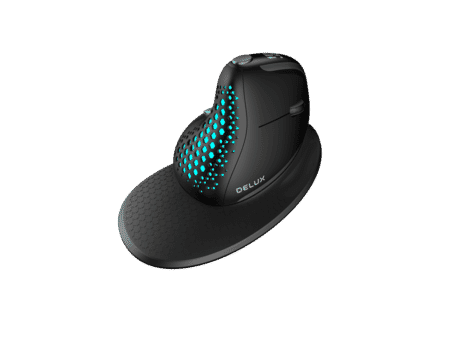
The Delux Seeker made its debut in the world of ergonomic mice in 2021. It stands out from other mice thanks to its two scroll wheels (one for horizontal scrolling, one for vertical scrolling) and a display on the top. This display shows, amongst other things, the battery status and the mouse’s sensitivity. It sits comfortably in the hand and is suitable for all-round tasks. The Seeker comes with a magnetic detachable wrist rest, a rear cover and a storage pouch.
Key benefits of the Delux Seeker
- Display showing battery status, DPI and connection mode
- Scroll wheel near the thumb for horizontal scrolling
- Can be used with up to 4(!) devices simultaneously
- Wired, wireless or Bluetooth connection
- Downloadable driver for customising the buttons
- Lightweight
- Wrist rest with magnetic attachment
Learning curve
2–5 days
Physical benefits
Forearm. The vertical design of the Delux Seeker positions the forearm in a natural posture. It also relieves pressure on the wrist, allowing you to work comfortably for longer.
My humble opinion
When I switched from the Evoluent to the Seeker, it naturally took a bit of getting used to. However, I was sold after just half a day. The horizontal scroll wheel, in particular, is something I use regularly. As soon as I use a different mouse, I miss it straight away.
Personally, I’m not a fan of the wrist rest, as it affects the precision of the movement. If you’re buying the mouse mainly for regular computer work, using the wrist rest isn’t a problem.
My hand (185 mm long) wraps perfectly around the mouse, so it feels secure in my grip. Unfortunately, my thumb is too short to use the ‘forward’ button normally, but that’s not something I miss.
What Microsoft users will love is the driver that allows you to assign different functions to the buttons on your Seeker than the standard ones. For example, you can replace the forward and back buttons with cut and paste, but there are also other handy tricks. Unfortunately, the driver is not available for Mac.
Although the mouse is designed for hands under 190 mm long and 90 mm wide, the model offers the freedom to hold it in a flexible manner. This means you can work comfortably with the Seeker even if you have longer fingers. This makes it a versatile mouse which, with its dimensions of 111x82x75 mm (without wrist rest), is perfect for taking from one workspace to another, in the included pouch of course.
Here’s what you think
The Seeker has been available online for two years now and has already garnered quite a few reviews. Facco quickly got the hang of the mouse and also noted that it works wonderfully. He says: ‘The mouse has arrived and I can already feel the difference in my wrist and arm! I eventually removed the magnetic piece so that I can use the mouse more dynamically.’ Overall experience 10/10 and he’s a fan .
Martijn switched from a well-known brand and wasn’t disappointed. I was looking for a replacement for my Logitech M705 and wanted something ergonomic straight away. After some research, I came across Delux. And within their range, the Seeker appealed to me the most. Suitable for Mac and PC, and the shape and grip are great – much less strain on my wrist. The tilted position feels very natural.
You can read through all the reviews at your leisure on the product page.
2. Delux Mini
The Delux Mini has been around since late 2018 and has caused quite a stir. Its older brother has been doing very well for years and is on display on many a desk in the Netherlands. The Mini (it’s not really that mini) does have a slight edge in terms of quality. The casing is even more robust, the scroll wheel sits comfortably under your finger and the buttons are suitable for the NS quiet carriage.
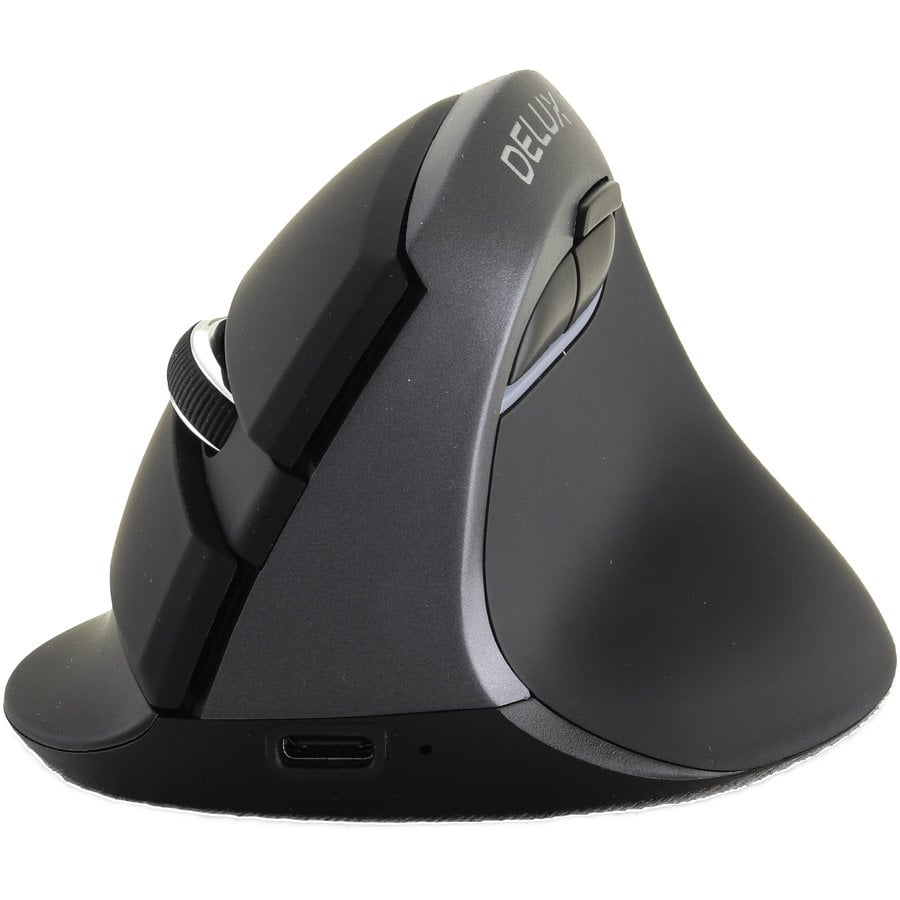
Main advantages of the Delux Mini
- Excellent value for money
- Silent mouse buttons
- Ideal for flexible workspaces
- Can be used wirelessly via both USB and Bluetooth
- Suitable for many hand sizes
- Available in various colours
Adjustment period
2–5 days
Physical benefits
Forearm. Thanks to its vertical design, the Delux Mini positions the arm in a relaxed posture. The forearm in particular benefits greatly from this. Do you suffer from wrist pain? Then you should definitely consider the Delux Mini.
My humble opinion
When the Delux Mini came onto the market, the name ‘mini’ put me off. Surely it wasn’t going to be a tiny little mouse that you’re supposed to take with you everywhere? One of those things that makes your hand ache and offers no support whatsoever. It wasn’t.
I remember finding the quiet click of the mouse buttons a real relief. Many mice produce a rather loud clicking sound, but you could hardly hear this one. The option to connect it via Bluetooth didn’t raise any eyebrows either. Bluetooth mice don’t always work as well or as reliably as one might hope. This unfounded concern also sent the Mini into the realm of myth.
Although the mouse is designed for hands under 185 mm long and 85 mm wide, the model offers the freedom to hold it in a flexible manner. This means you can work comfortably with the Mini even if you have longer fingers. It makes it a versatile mouse which, with its dimensions of 103 x 89 x 69 mm, is perfect for taking from one workspace to another.
The Delux has been designed to provide greater relaxation for the forearm. In my opinion, it does this excellently. Because its body is slightly longer, the fingers are also quite comfortable. It doesn’t force you to grip tightly whilst moving and clicking. For me, this also adds value for the hand.
Here’s what you think
The Delux Mini is most commonly purchased to address wrist complaints. It seems to do its job well, judging by the +267 reviews from previous customers. Daisy says, “It brought immediate relief to my wrist and forearm,” and Marcel gets on well with it because it “fits comfortably in the hand”. The silent click is also appreciated, as evidenced by Bilal’s positive comments : “You can barely hear the click, which is also soothing”.
Gluay, who wrote her review last April, also has a point of criticism in her review. She says, “My hand is small and I was looking for a small ergonomic mouse. This fits well in my hand and the buttons are easy to use, except for the furthest side button because my thumb is too short”. Whereas Delux places the forward and backward buttons above and below the thumb on its other models, on the Mini they are both positioned above. This feels slightly less intuitive, something Gluay also noticed straight away.
You can read through all the product descriptions at your leisure on the product page.
3. Evoluent D
Here’s a new hero, also known as the Evoluent D. It has a few new features that make it better than its predecessors, but it’s mainly the combination of its one predecessor and its other predecessor, the C model, that makes it a joy to work with.
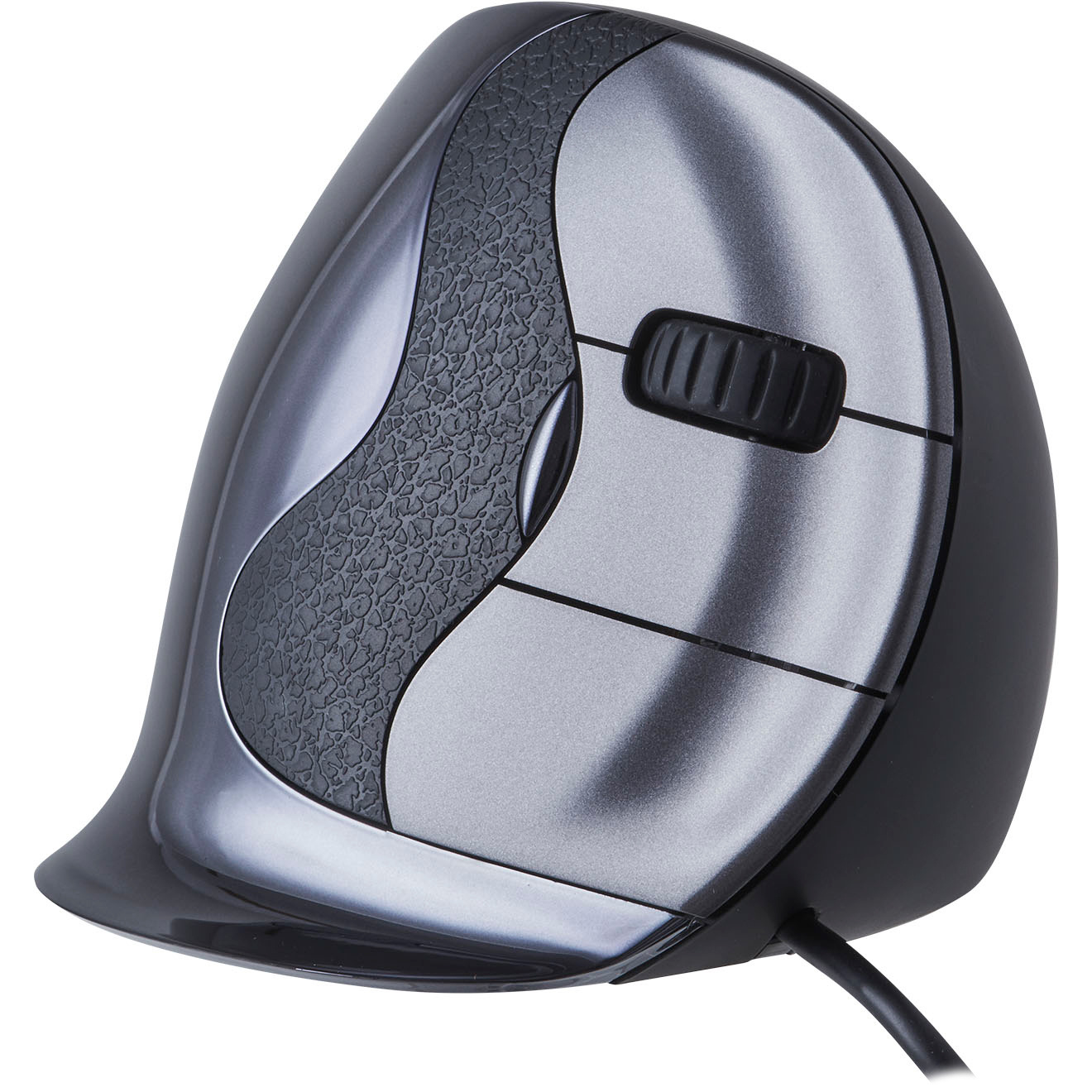
Main advantages of the Evoluent D
- Curved buttons provide a better feel
- Design combining comfortable rounded lines and precise sharp angles
- Available in 2 sizes
- The familiar Evoluent quality
- One of the best models for preventing wrist problems
Adjustment period
2–5 days
Physical benefits
Forearm. Evoluent is known for having one of the most vertical models on the market. We now know that people with wrist problems benefit from the posture enforced by the Evoluent. Compared to other vertical mice, the Evoluent offers the greatest relaxation for the forearm.
My humble opinion
When the Evoluent D was released, I had already spent an incredible number of hours working with its predecessors. With the launch of the Evoluent C, I saw some really significant changes to the model. With the D, I was particularly wary of the ‘strange’ indentations in the front buttons. Is it a design quirk? Has Evoluent run out of inspiring innovations? Should we be enthusiastic about this?
Yes, no and yes/no. At least, I’m still not wildly enthusiastic about the curved buttons. What appealed to me more when I picked up the mouse was the overall design. They’ve managed to tweak a few things again that actually make the mouse better than its predecessors.
The curved buttons feel good, but it is important that your hand size falls within the recommended range. If it doesn’t, your hands won’t reach far enough, or your middle knuckle will press against the indentations, which isn’t exactly the intention either. The anti-slip strip just behind the buttons is also a nice touch, as Evoluent usually makes fairly smooth models. It comes in three sizes, so pay close attention to your hand size when choosing.
What struck me most were the lines of the mouse. You can clearly see that this mouse has the Evoluent 4 and Evoluent C as its predecessors. The design lies somewhere between the rounded, soft lines of the 4 and the hard, clean lines of the C. A bit of the best of both worlds, shall we say.
What do you think?
The Evoluent D has amassed quite a following in just a few years. Marijn, for example, is very happy with it. He was experiencing increasing discomfort in his wrist and forearm, but that has been minimised with the Evoluent D. “It costs a bit, but then you really do have a good mouse.”
You can read more information and the product reviews at your leisure on the product page.
4. Contour Unimouse
Contour has been on the market since the 1990s and is primarily known for its centric mice. When they launched a ‘normal’ vertical mouse, it turned out not to be so normal after all. It wasn’t just a quick add-on; a lot of time and hard work had clearly gone into it. With a continuously adjustable vertical angle and flexible thumb rest, Contour has truly launched a unique mouse.

Main advantages of the Contour Unimouse
- Unique stepless adjustment between 35 and 70 degrees
- Flexible, adjustable thumb rest
- Thanks to the above, suitable for both highly precise and general mouse use
- Long buttons make it suitable for virtually any hand size
- Suitable for wrist and hand complaints
Getting used to it
5–10 days
Physical benefits
Forearm and hand. A flat mouse generally offers more support for the hand, whilst a vertical model is more comfortable for the forearm. Because the Unimouse is vertically adjustable, it offers a wide range of uses in this respect. I often see customers who suffer from discomfort in both their hand and wrist. With the Unimouse, you have the opportunity to effectively address this.
You can opt for a compromise where you position the mouse somewhere between vertical and flat. You can also choose to use it flat for a while and then vertical for a while.
My humble opinion
I can honestly say that this mouse isn’t our most popular model. On the one hand, that’s strange, because you can literally adjust this mouse to suit your hand. The mouse is top quality and feels comfortable in the hand. As described above, that adjustability isn’t just for physical comfort.
With a flatter position and a thumb rest positioned across the mouse, you have maximum grip and control. For Photoshop or CAD users, that’s a real advantage. With a vertical position and an upward-facing thumb rest, you can actually find more relaxation. You lose a bit of precision, but the comfort you gain can mean a pain-free working day.
What Contour has done brilliantly is develop its own driver. The Rollermouse products already came with a driver similar to the one used by Evoluent, for example. The Unimouse has also been equipped with this. And really: use that driver regardless of the work you do on the computer. You can assign frequently used functions to buttons that speed up your work, even specifically per programme. Think of cut and paste in Word or Page Up and Page Down in long Excel lists.
Here’s what you think
Feedback on the Unimouse varies quite a bit. Astrid, for example, is clearly delighted when she says , “It’s great that there are ten speeds to choose from.” Marie has already been testing her model extensively; she clearly realises there’s a lot to be gained from the mouse .“Because you can adjust the tilt of the mouse yourself, you can really tailor it to your own hand.” High five, Marie.
Ellen has also got the hang of her Unimouse, saying, “Being able to adjust the mouse angle and thumb support is really nice and very handy. After a few days of trying out various options, I found a setting that works really well for me and my hand/shoulder complaints have clearly improved.”
Paula is living proof that, however unfortunate it may be, the mouse doesn’t get on with every hand. “The mouse was too big for my hand; you can’t fix that by changing the settings.”
You can read through all the product descriptions at your leisure on the product page.
5. Posturite Penguin
The Penguin mouse, a symmetrical mouse for both left- and right-handed use that, oddly enough, actually bears a resemblance to a penguin. We ourselves (and customers, for that matter) have come up with a name for it that isn’t suitable for all ages, so let’s just call it Penguin. We’ve been selling this model since 2014 and it actually gains in popularity every year.
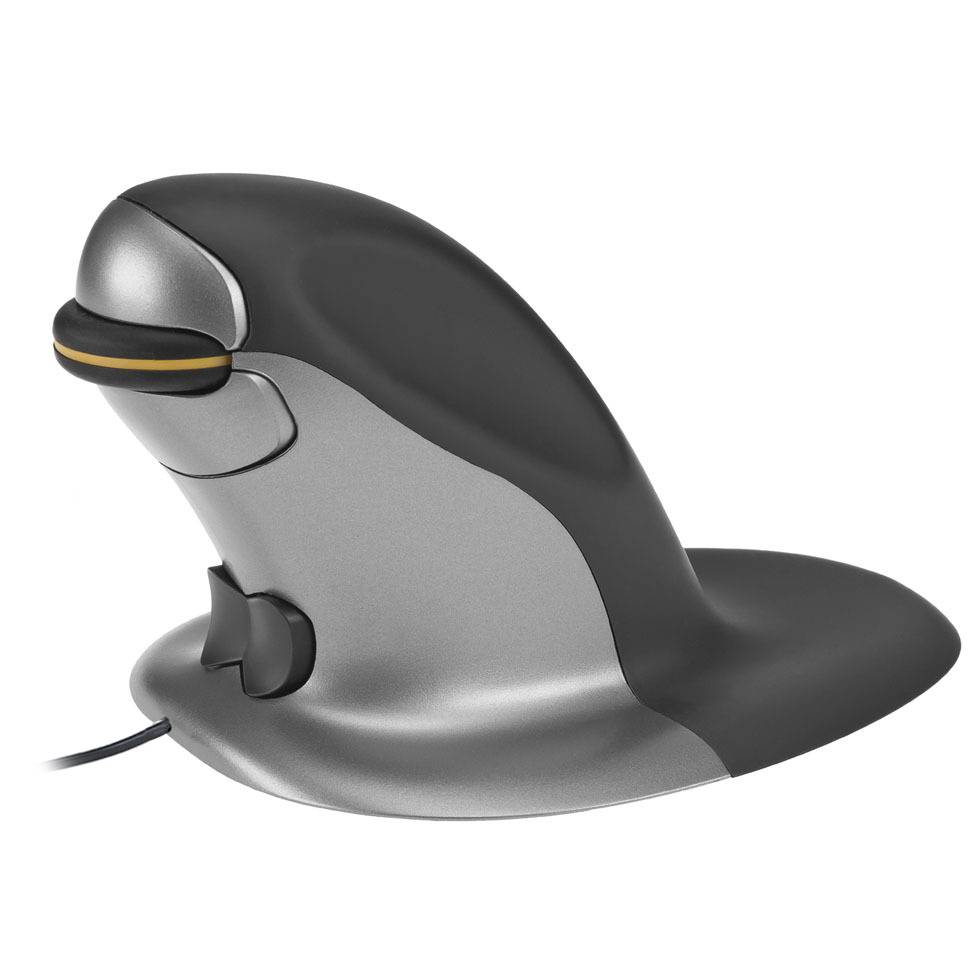
Main advantages of the Penguin mouse
- Suitable for left- and right-handed use
- Available in 3 sizes
- Ideal for shoulder complaints
- Platform provides extra support for the hand
Adjustment period
5–10 days
Physical benefits
Shoulder. The Penguin allows you to alternate between using your left and right hands. This means you can distribute the strain across both shoulders. It is important, however, that you are willing to learn to use the mouse with your weaker hand as well.
Although the vertical position of the mouse also has benefits for the wrist, we believe that the compromises made in the design to keep it symmetrical do not offer the grip that a 100% left-handed or right-handed model does.
My humble opinion
I’ve actually already shared a bit of my humble opinion under ‘physical benefits’. We prefer to position the Penguin as an aid for shoulder complaints. Shoulder problems related to office work usually stem from poor posture.
Just as a vertical mouse works for wrist complaints, only a centred mouse is really effective for the shoulder. The Penguin doesn’t centre your posture, but it can help distribute the load.
It helps that the Penguin is a mouse that, like a traditional model, you simply slide across the desk. That makes the transition from a standard mouse to the Penguin a bit easier than from a standard mouse to a centric mouse. Although I personally feel that the symmetrical shape doesn’t offer the best support for the hand, many customers say they actually like the grip. That’s why I’m such a fan of yours – not everything I say about a mouse is universally agreed upon.
By the way, are you someone who does a lot of precision work with the mouse? Photo editing, video editing or perhaps you create models in CAD: in that case, simply DO NOT buy this mouse. Just like with the Newtral 3, the platform your hand rests on largely disengages the wrist, making it harder to perform small, precise movements. If you really do want a symmetrical mouse, you’re better off switching to the R-Go Twister mouse.
Here’s what you think
You’ve got quite a lot to say about the Penguin mouse, and that’s great. Steven bought one for his hand and found it very beneficial: “When using it, I no longer suffer from the discomfort in my hand that I used to experience with the Apple Magic Mouse”. Mark was pleasantly surprised by the battery in the wireless version: “The rechargeable battery lasts a very long time. I still haven’t had to charge it. There’s a clearly visible full/empty indicator for the battery.” Wenche makes the most of the Penguin, because “It can be used with either hand without any major adjustments”.
“Although it’s still taking me a while to get used to this mouse, I’ve already noticed a reduction in the pain in my arm within a month.” Wies found it a bit harder to get used to, but fortunately she took her time.
You can read through all the product descriptions at your leisure on the product page.
An overview: the physical impact of our top 5
We’ve put together a handy overview of our top 5 mice for you, so you can see at a glance what they excel at. This includes some underlying comparisons, so the star ratings here may differ from what you see on the product page. This overview will likely make it much easier for you to make a choice.
| Hand | Wrist | Elbow | Shoulder | Precision | |
| Deluxe Seeker | |||||
| Delux Mini | |||||
| Evoluent D | |||||
| Contour Unimouse | |||||
| Posturite Penguin |
Our number 1
Curious about our personal favourite from this list? Below you can find our personal favourite and we’ll also briefly explain why.
Jesse’s favourite
As well as providing perfect support for my hand, it’s the light clicks and high-quality feel that have made this my favourite. The fact that it’s also available in five different colours only makes it better for me; we all use and test the mice ourselves for an extended period before they’re added to our webshop. Even after its testing period, the Delux Mini in Pearl Like Blue remained on my desk for quite some time.
Mark’s favourite
My hands are quite large (21 cm) and you know what they say. You need a large mouse. Where 90% of mice fall short, the Unimouse can be perfectly adjusted. The only thing that could be improved is the placement of the scroll wheel. But that’s just a matter of getting used to it.
Tim’s favourite
During my work placement, a long time ago, I had the chance to work with an Evoluent. Model 2 or 3, I can’t quite remember. The concept is still the same; it’s just got a bit better. The grip, the precision, the materials used – the whole package makes the Evoluent D my absolute favourite.
Chiara’s favourite
As I spend a lot of time working in programmes like Photoshop and Excel, I absolutely love the horizontal scroll wheel, which lets me breeze through documents with ease. On top of that, it sits comfortably in my hand and, thanks to the vertical position, my wrist is pain-free. I work on a Mac, so unfortunately the driver doesn’t work for me, but I haven’t missed it so far.