









The 5 best ergonomic keyboards of 2026
Table of Contents
Pro tip: use our selection guide
The keyboards you need to see
1. Kinesis mWave
2. Mistel MD770 RGB
3. R-Go Compact Break
4. BakkerElkhuizen S-board 840 (no hub)
5. Goldtouch Go!2
An overview: the physical impact of our top 5
Our personal number 1
Use our selection guide
Are you looking for the best keyboard for you? With our selection guide, you can find out which keyboard suits you best. You can use the selection guide below right away!
The keyboards you need to see
Is this the most important page of 2026 when it comes to ergonomic keyboards? It’s certainly one that’s worth a look.
It’s not just our experience and market trends that play a part; our more than 10,000 product reviews written by our own customers are perhaps the most important factor of all.
Split keyboards are hot, mechanical keyboards are making a comeback
It’s quite possible that the ideal keyboard for you isn’t on this list. We always recommend getting in touch with us if you’re unsure. Do bear in mind that the list below contains keyboards we stand behind 100%. For instance, there are split keyboards that have proved a godsend for many wrists.
The flat models are also good for the wrist, whilst the compact versions are kind to the shoulders. Oh, and there’s a real resurgence of mechanical keyboards on the way for anyone who types intensively or at least wants to give their hands a bit of a rest.
Incidentally, the line-up consists of a great mix of old and new. ‘New’ doesn’t always mean new, though. In some cases, they are further developments of products that have been on the market for years.
What do we think?
We literally write every keyboard review entirely from scratch. Texts that stem from testing. Checks become facts. We learn what a product can do, but certainly also what it cannot do. It gives us more certainty about what we want to offer you, and it gives you more certainty about what you are being offered. Would you like to see proof of this? Get in touch with us, and we’ll show you a few products that didn’t pass our tests.
What do you think?
Is it strange that we’re proud of thousands of returns? Perhaps. Let me put it this way: it has taught us a great deal about our range. On top of that, there are over 10,000 (as of 9 January 2026) unfiltered product reviews, not all of which are positive. We’re happy about that too! It’s feedback that helps us tailor our advice to your keyboard preferences and allows you to narrow down your product selection.
Developments in the workplace
There have been plenty of developments in recent years. Covid-19 has forced them down our throats. We had to – and are now allowed to – work from home more, and we have become less dependent on our office environment. What working from home will look like in the long term is still somewhat uncertain. Although working from home has become the norm, there are plenty of companies that expect their employees to return to the workplace full-time.
Working from home (at least part-time) does mean that some products are gaining relevance, whilst others are losing it. A keyboard that is easy to carry is one such example of a product gaining popularity.
Furthermore, we are seeing keyboard manufacturers increasingly adopting an ergonomic approach to their designs. This is particularly evident in the technology (mechanical keyboards are on the rise) and features such as split models and programmable keys.
1. Kinesis mWave
Do you know that vibe of the Microsoft Sculpt? That keyboard people secretly still miss? The Kinesis mWave is clearly part of the family, but with more robust build quality and mechanical keys. You get a split design with fixed tilt (10°), negative tilt with magnetic feet and low-profile mechanical switches. And yes, it works both wirelessly (Bluetooth 5.1) and wired (USB-C).
Handy detail: the numeric section is integrated into an Fn layer. So you keep your hands ‘at home’ on the keyboard more often, without having to park a full numpad on the right.
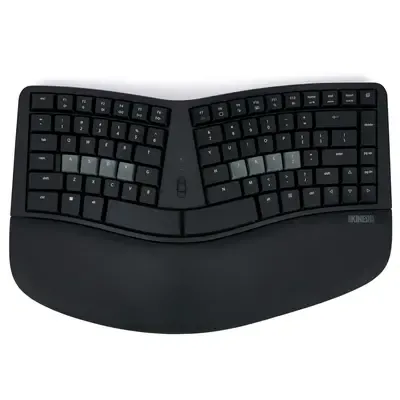
Main advantages of the Kinesis mWave
- Split design with 10° tilt
- Negative tilt with magnetic feet
- Bluetooth 5.1 & USB-C
- Low-profile mechanical (55g)
- Programmable via web interface
- Numeric via Fn layer
Learning curve
2–5 days
Physical benefits
The main benefit here is in posture. The split design makes it easier to align your hands with your forearms, and the tenting and negative rake often keep your wrists more relaxed. That’s exactly the sort of ‘small’ benefit that you’ll suddenly start to appreciate after a few weeks.
My humble opinion
The Microsoft Sculpt not only has a fully-fledged replacement in the Kinesis, but in my view it is superior simply because of its mechanical switches. Mechanical switches haven’t been embraced by everyone yet, but they should be the standard for keyboards. With the Mwave, you also get the familiar Kinesis extras, such as a high degree of programmability, a solid manual and, in addition to our own support, professional support from Kinesis should you need it
Here’s what you think
Jacob T. is nice and clear: “Ideal keyboard, comfortable and perfect size”. He also writes that he does a lot of programming and typing, and that he previously tried a Logitech Ergo K860 but wasn’t satisfied with the keys and the size.
Jill C. calls it “The perfect replacement for my Microsoft Sculpt!” and says: “Thanks to the familiar shape, this keyboard is the perfect replacement for my Microsoft Sculpt.”
Bernd G. thinks the keyboard is great, but writes honestly: “Perfect keyboard, but mechanical switches aren’t really my thing.” He notes that he personally prefers laptop scissor switches.
And Maarten B.? He sums it up with “Great on paper, still need to get used to it in practice”.
2. Mistel MD770 RGB
The split MD770 RGB is a high-quality mechanical keyboard from manufacturer Mistel Keyboards. It’s on our list because the technology in these keyboards makes for a delightful typing experience. Mechanical keyboards and gamers have gone hand in hand for a number of years, but these types of keyboards are also increasingly finding their way into the office. Users who type intensively, programmers, administrative staff – there are plenty of professional groups who already have a mechanical keyboard on their desk. Are you new to mechanical keyboards? Then read more about how they work here.
This top 5 model also has an older sibling. The MD770 has a predecessor, namely the MD600. This popular model is no longer sold; there was strong market demand for a version with arrow keys. On the M600, these could only be accessed via a combination of ‘FN’ and I/J/K/L. With these arrow keys, the MD770 is much more user-friendly and can be used in a wider range of applications.

Key advantages of the MD770
- Mechanical keys are light to type
- Split design
- Gentle on wrists, hands and shoulders
- 75% compact keyboard
- 3 programmable layers
Getting used to it
2–5 days
Physical benefits
Your wrists, hands and shoulders will thank you for using the MD770. You can position the split sections neatly in line with your arms, eliminating that common, irritating wrist bend. You’ll grow to appreciate the mechanical switches in the keyboard more with every minute you type. They are characterised by registering a keystroke before the key fully hits the bottom of the board. This is something that is necessary with keyboards featuring, for example, membrane or scissor mechanisms, and which causes tension in the hand.
Incidentally, like most of our keyboards, the MD770 RGB lacks a numeric keypad on the right-hand side, allowing you to position the mouse close to your body. You’re welcome, shoulder.
My humble opinion
When we asked in 2019 whether the MD600 would also be available with arrow keys, the answer was “coming soon”. In the weeks that followed, Mistel went completely mad with those lads from the Netherlands who kept asking “is it here yet, is it here yet, IS IT HERE YET?!” I was already a huge fan of the MD600 and knew that for most of you it would be more complete with those coveted arrow keys. How happy can you be with arrow keys?
This entire blog has been written using this keyboard (including the 2026 update), and I can honestly tell you that it’s a real joy to type on. I make far fewer mistakes with the mechanical MD770 than with, say, a scissor mechanism. Every corner you tap is spot on, and you don’t have to press the key all the way down with force to be sure it’s registered.
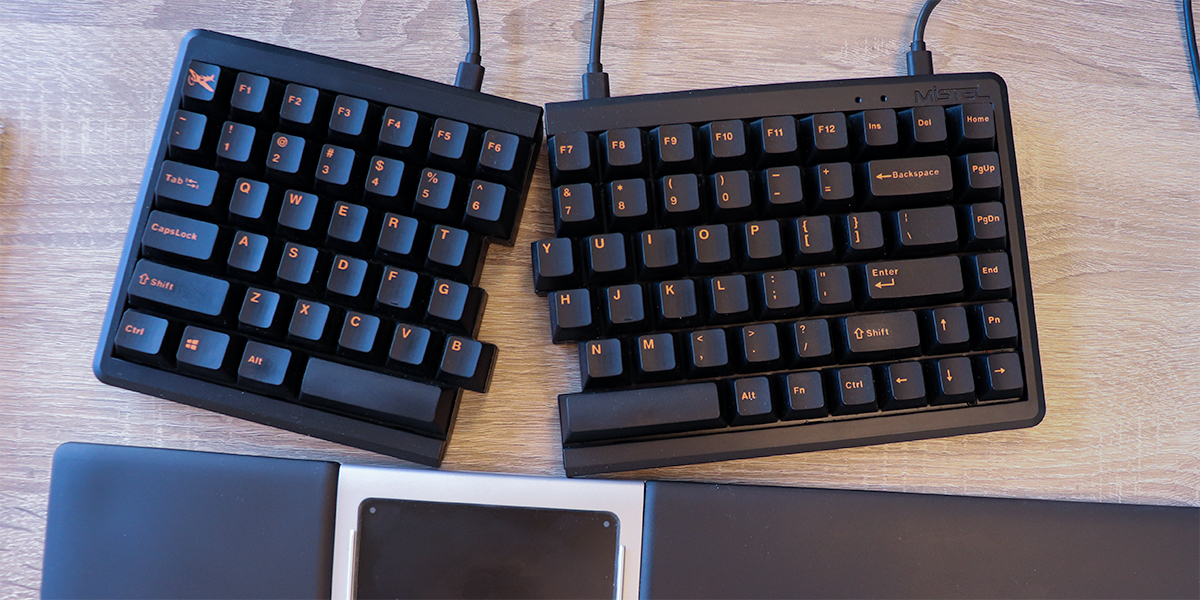 My little companion paired with an Opatapad Extended
One feature I certainly haven’t got the most out of yet is the three programmable layers, which allow you to assign different functions or even macros to all the keys. I did work for a while with a customised layer, where the right space bar acted as a backspace. I realised that I never actually press the space bar with my right hand. Once I’d assigned a backspace to it, I could access the backspace key more easily and quickly.
It took a while, but the Bluetooth version of the MD770 is now on the market too!
Here’s what you think
Shuai is happy with his MD770, as it has helped alleviate his back pain. He bought the keyboard with Red Silent switches and, in his own words, it gave him a ‘pleasant typing experience whilst limiting noise levels’.
Tommy also mentions a plus point that I didn’t include, namely ‘a slight amount of tenting with the included feet’. The feet that you attach to the inside of the split keyboard give it a bit of vertical lift, which is a comfortable position for the wrists. He also praises the ‘Mac compatibility mode’ and thinks it’s a ‘great keyboard for people who type all day’.
You can take a closer look at the keyboard on the product page.
3. R-Go Compact Break Bluetooth keyboard
The R-Go Compact Break is a flat and compact keyboard that lets you type quickly and easily. It features a Bluetooth connection, so you’ll never lose your dongle again. You can charge it using the included cable, and the battery lasts around 140 hours on a single full charge. Well, get typing.
Are you more of a wired type, or would you prefer a white version? Then I have good news, because all that is possible with the R-Go Compact Break. You can optionally purchase and install the Break 'break' software. This gives you more control over your breaks and also provides all sorts of useful exercises to help you get through the day healthily

Key benefits of the R-Go Compact Break
- Light keystroke
- Only 9 mm high
- Bluetooth wireless
- 3-year warranty
- Battery lasts 140 hours
Getting used to it
1–2 days
Physical benefits of the R-Go Break
It is ultra-flat, ultra-light and ultra-comfortable for your wrists and shoulders. Its flat design means you can easily rest your wrists on your desk or armrests without having to bend them awkwardly to reach the keys. The compact design (28.5 cm long) makes it perfect for your shoulder. The mouse can stay nice and close to your body, which puts less strain on your shoulder muscles.
My humble opinion
Do you need a sturdy and compact keyboard that will last? Then go for the Compact Break. Especially if you’re going to make use of its handy traffic light LED, which helps you take a break at the right time.
Here’s what you think
The Compact Break is a treat for both the hands and the eyes, says Roger. He says: ‘The R-Go keyboard is nice and compact and light. The keys give a nice response when pressed. The keyboard also looks great on the desk.’ And you can’t really argue with that. Ellen wanted a compact wireless keyboard, and the Break ticks all her boxes . She ordered this keyboard specifically because it’s wireless and doesn’t have a numeric keypad, and it works well.
You can read through all the product reviews at your leisure on the product page.
4. BakkerElkhuizen S-board 840 (no hub)
The S-board 840 is the sort of keyboard that does its job without any fuss. Compact, light and, above all, nice and flat. Because it’s a fair bit narrower than a full-size keyboard, your right arm doesn’t have to travel as far to reach your mouse. That saves your shoulder a lot of strain, especially if you’re switching between typing and using the mouse all day.
It features a scissor-switch mechanism (so: similar to a laptop, but with greater stability) and has 12 multimedia keys. The numeric keypad isn’t ‘next to’ the main keyboard, but is cleverly hidden within an Fn layer.
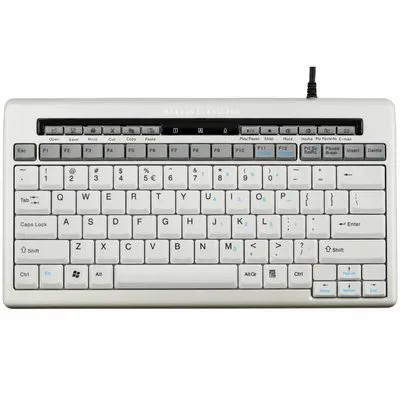
Main advantages of the S-board 840
- Compact size (30.5 cm)
- Flat keys with scissor mechanism
- 12 multimedia keys
- Numeric keypad via Fn layer
- Wired and plug & play
- Comes with a carrying case
Learning curve
1 day
Physical benefits
This is particularly kind to your shoulders. Because it’s compact, your mouse stays closer to your body. And because the keys are flat, you don’t have to bend your wrists as much to reach the keys. A small difference per keystroke, but a big difference over a whole working week.
My humble opinion
For many, the Bakkerelkhuizen 840 remains unrivalled. Compact, pleasant feedback, black letters on white keys that are easy to read, excellent quality and a competitive price. If you prefer a flat keyboard with excellent key feedback and clearly legible letters (you don’t touch-type), then this is indeed a good choice.
Here’s what you think
One reviewer sums it up nicely: “It’s certainly a nice keyboard, nice and compact so your mouse is at the right distance and minimal overreach is required.”
It does take a bit of getting used to, writes the same reviewer: “the keys are a bit closer together, but you get used to it easily after a short while.”
And if wrist comfort is your main priority: “After years of struggling with wrist problems, I’m hugely relieved with this keyboard.” He then goes on to confirm this further: “It’s extremely flat, types extremely comfortably and, in short, is extremely nice!”
The critical note is also included: “The only minor downside: the ‘home’, ‘end’, ‘page up’ and ‘page down’ buttons are a bit awkward when combined with an extra Fn key.”
Finally, there’s also feedback on our advice: “I’m very satisfied with Ergowerken’s customer focus.” And to round it off: “Hats off to Ergowerken!”
5. Goldtouch Go!2
The split Go!2 is a top-of-the-range model that has been around for a number of years but hasn’t lost any of its popularity. Goldtouch’s compact keyboard has a unique feature: you can fold it in half. This makes it the ideal companion for working comfortably anywhere. Because the keyboard folds inwards, you don’t have to worry about the keys getting damaged, as they are so well protected.
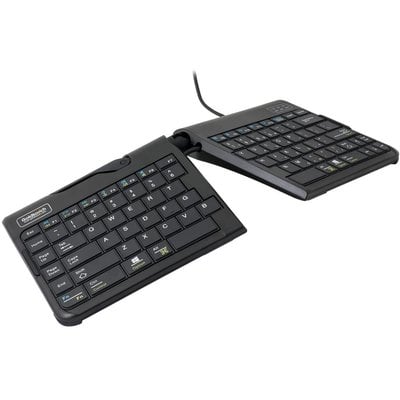
Key benefits of the Goldtouch Go!2
- Split compact design
- Can be locked in a vertical angle
- Flat keys with scissor mechanism
- Foldable and therefore easy to carry
- Good for shoulders and wrists
Getting used to it
2–5 days
Physical benefits
Wrists and shoulders. The great thing about this board is that it’s not only split, but it can also be fixed at a specific angle. So you can position the two parts opposite each other at a vertical angle, in a sort of tent shape. Just as we say with our vertical mice, this is also good for a neutral posture and relaxation of the wrists.
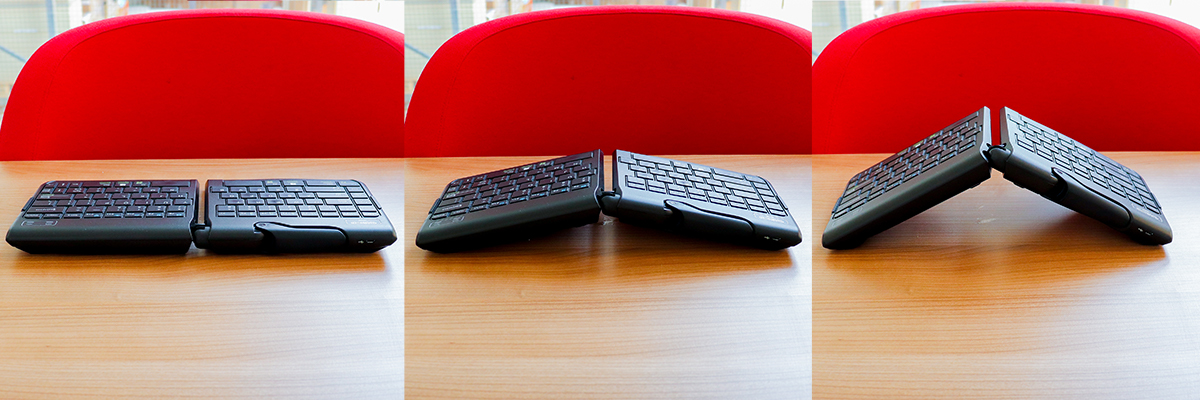 A selection of the different positions of the Goldtouch Go!2
Your shoulder will also appreciate the compact Goldtouch. Both the absence of the number pad and the relocation of the row containing ‘Home’ and ‘Page Up’ to the left give you plenty of space on the right-hand side for your mouse.
My humble opinion
The Go!2 has more than earned its place in this list. When it comes to ergonomics, it does many things very well. It is tiltable, split, flat, made from good materials and does not disappoint. Bear in mind, however, that you need to be able to touch-type fairly well to make successful use of its vertical position. Such an angle means you can barely, if at all, read the letters. No problem for a touch-typer, but if you haven’t mastered that, it becomes a tricky business.
The keyboard is compatible with both Mac and Windows. You can switch it to the correct operating system using a slider on the back, and the crucial keys have dual labelling, such as Alt/Command. In case you were wondering: this is a fully-fledged keyboard, not a mini keyboard with smaller keys.
What do you think?
It’s always nice to see professionals recommending products. For instance, Felice’s physiotherapist referred her to the Go!2 after she developed ‘RSI symptoms in my hands and wrists (from working from home)’.
Karlijn is both positive and critical. She says , ‘The keyboard is very nice and can be adjusted to different positions’, but finds the right-hand shift key ‘very small’. For a key like the right-hand shift, a compromise was indeed made to keep the keyboard compact; Marian got to grips with it straight away and finds it ‘practical to take with you!’. Bregje agrees, because ‘the keyboard is very handy to use as it can be folded away. It therefore takes up very little space in a bag and is easy to carry and use anywhere’.
It doesn’t matter if not everyone gets used to the keyboard straight away, as long as you give yourself time. That’s what Anton did, who says quite honestly , ‘It does take some getting used to the split layout, but it does feel natural in terms of wrist position’.
You can read through all the product reviews at your leisure on the product page.
An overview: the physical impact of our top 5
We’ve put together a handy overview of our top 5 keyboards for you, so you can see at a glance what they excel at. This includes some underlying comparisons, so the star ratings here may differ from what you see on the product page. This overview should make it much easier for you to make a choice.
| Hand | Wrist | Shoulder | |
| Kinesis mWave | |||
| Mistel MD770 RGB | |||
| R-Go Compact Break | |||
| BakkerElkhuizen S-board 840 | |||
| Goldtouch Go!2 |
Our number 1
Curious about our personal favourite from this list? Below you can find our personal favourite and we’ll briefly explain why.
Jesse’s favourite
Ever since the keyboard was developed, I’ve been working with the prototype of this keyboard. It took some getting used to, as the keys are arranged in an ortholinear layout – that is, in straight rows rather than the usual brick-like pattern. But now that I’ve got used to it, I wouldn’t want anything else; I type faster than before, there’s less strain on my fingers, and it looks cool too. What more could you want?
Tim’s favourite
Since I started using mechanical keyboards, I really don’t want anything else. I type a lot during the day and my MD770 RGB makes it wonderfully comfortable. I don’t mind that the keyboard is a bit higher; I let my forearms float slightly above the desk, which means I don’t have to bend my wrists awkwardly. Every year I come across quite a few new keyboards to test or write about, but my MD770 always finds its way back to my desk.
Mark’s favourite
Mistel MD770 RGB Red Silent switch
I’ve had several keyboards under my fingers. First, a simple, compact, flat keyboard. This caused me some discomfort in my left wrist. As a result, I switched to a Goldtouch V2. This gave my wrists much more relief and the membrane keys also felt more comfortable. After experimenting with the angle, a slight elevation in the middle of the keyboard provided the most typing comfort.
Then the Keychron brand came along, specifically the K2 model with brown switches. In terms of typing comfort, this was clearly an improvement over the Goldtouch V2’s membrane keys. However, I soon started experiencing wrist discomfort again. I also found the sound the keys produced a bit less pleasant. Due to the wrist pain, I eventually switched to the Mistel MD770 RGB with Silent Red switches. Everything is just right for me. You can use it in split mode, the keystroke is light, and each keystroke produces minimal noise. A winner as far as I’m concerned.
Chiara’s favourite
Keychron K8 aluminium RGB with red switches
I’ve now been using the Keychron K8 intensively every day for several months. It’s my first mechanical keyboard and I had to get used to it quite a bit at first. I kept pressing the wrong keys or several keys at once. Now I wouldn’t want anything else and I find the keys on my own MacBook at home almost irritating, because I don’t get the feedback that an ergonomic keyboard provides. On the K8, I can type away all day without any problems. Yes, I need a wrist rest because otherwise the keyboard is too high to work comfortably. But with a wrist rest in place, it’s a joy to work with. The key feedback is lovely, the keyboard has a whole host of shortcut keys, and the backlighting of the keys instantly gives my desk a cosy look. Perhaps the K2 would beat the K8 – as it’s a bit more compact and otherwise the same – but as I’ve never worked on it, I don’t feel I can make that call. The Keychron K8 is my favourite.